
Resetting your Whirlpool Duet Dryer is a straightforward process that can resolve various issues. This guide will provide you with a beginner-friendly tutorial to perform a manual reset effectively.
Whirlpool Duet Dryer Manual Reset Importance
A manual reset is often necessary when your Whirlpool Duet Dryer experiences operational issues like unresponsive controls or error codes. This process can help restore functionality without the need for professional assistance. Knowing when to reset your dryer can save you time and money.
Common reasons for a reset include:
Power surges
Faulty error codes
Control panel glitches
Whirlpool Duet Dryer Reset Preparation Steps
Before attempting to reset your Whirlpool Duet Dryer, it’s essential to prepare properly to ensure a smooth process. This section outlines the necessary steps to take, including gathering tools and understanding your dryer’s settings, so you can effectively troubleshoot and reset your appliance with confidence.
Before you begin the reset process, ensure you have the following items ready:
| Tool | Purpose |
|---|---|
| Flathead screwdriver | To access the control panel |
| Soft cloth | To clean any surfaces |
| User manual | For reference on error codes |
Preparation is key for a smooth reset. Make sure the dryer is unplugged to avoid any electrical hazards. Clear the area around the dryer for easy access.
Whirlpool Duet Dryer Manual Reset Steps
If your Whirlpool Duet dryer is experiencing issues, a manual reset can often resolve the problem. This section provides clear, step-by-step instructions to guide you through the reset process, ensuring you can quickly get your appliance back in working order without needing professional assistance. Follow these simple steps to troubleshoot effectively.
Follow these steps to reset your Whirlpool Duet Dryer effectively:
Unplug the dryer from the electrical outlet. This action will cut off power and allow the system to reset.
Wait for five minutes. This time allows the dryer’s internal systems to discharge completely.
Plug the dryer back in. Reconnect the power to restore functionality.
Press the power button to turn on the dryer. If the control panel lights up, the reset was successful.
Run a test cycle. Select a drying cycle and observe if the dryer operates normally.
If the dryer still does not function properly, further troubleshooting may be necessary.
Whirlpool Duet Dryer Error Code Explanations
Understanding the error codes on your Whirlpool Duet dryer is essential for effective troubleshooting. Each code provides insight into specific issues that may arise during operation, helping you identify the problem quickly. This section will clarify the meanings behind common error codes, enabling you to address them with confidence.
Understanding error codes can help diagnose issues more effectively. Here are some common codes and their meanings:
| Error Code | Meaning |
|---|---|
| F01 | Control board failure |
| F02 | Door switch issue |
| F03 | Temperature sensor fault |
| F04 | Heating element problem |
Refer to your user manual for specific troubleshooting steps related to each error code. Addressing these issues promptly can prevent further complications.
Whirlpool Duet Dryer Post-Reset Troubleshooting
After performing a manual reset on your Whirlpool Duet dryer, it’s essential to ensure everything is functioning correctly. This section will guide you through common troubleshooting steps to address potential issues that may arise post-reset, helping you maintain optimal performance and avoid further disruptions.
If your Whirlpool Duet Dryer continues to show problems after a reset, consider these troubleshooting tips:
Inspect the door switch. Ensure it is functioning correctly and not obstructed.
Check the lint filter. A clogged filter can cause overheating and operational issues.
Examine the power supply. Ensure the outlet is working and providing adequate voltage.
Performing these checks can help identify underlying problems that a simple reset cannot resolve.
Whirlpool Duet Dryer Professional Help Indicators
Understanding the professional help indicators for your Whirlpool Duet dryer is essential for effective troubleshooting. These indicators can signal when it’s time to seek expert assistance, ensuring your appliance operates efficiently. Familiarizing yourself with these signs can help prevent further issues and extend the lifespan of your dryer.
If you have followed the reset process and troubleshooting steps without success, it may be time to contact a professional. Signs that indicate a need for expert assistance include:
Persistent error codes
Unusual noises during operation
Failure to start despite proper resets
Ignoring these signs can lead to more significant issues and higher repair costs.
Recommended Products
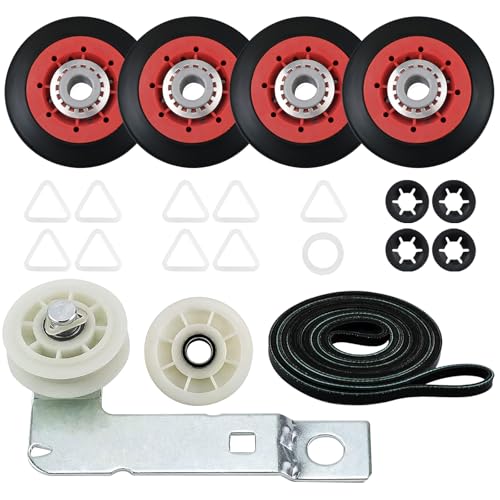
[FIX YOUR DRYER PROBLEMS]: The 4392067 dryer repair kit and W10837240 Dryer Idler Pulley are essential maytag dryer parts designed to address common issues such as noisy operation, non-starting cycles, lack of heat, and drum rotation failures

GENUINE OEM QUALITY: Whirlpool Genuine OEM dryer maintenance kit is engineered for compatible dryers to help support proper fit, reliable operation, and the performance standards your appliance was designed to deliver
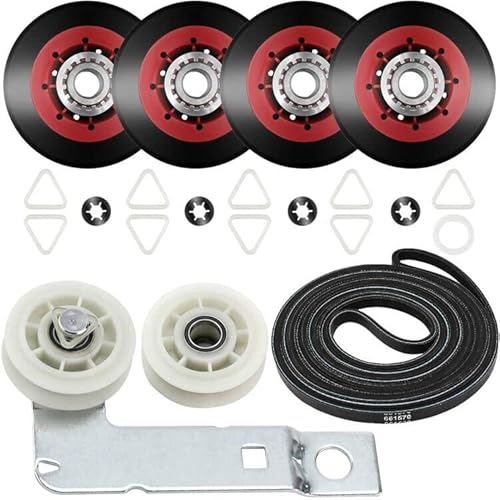
4392067 MAINTENANCE KIT & W10837240 DRYER IDLER PULLEY INCLUDES DRUM ROLLER, BELT & PULLEY: ❶ 4 * WPW10314173 dryer drum support roller wheel repair kit ( 4 pcs older red color wheels, 8 pcs tri-rings and 4 pcs retaining washer ); ❷ 1 * 661570V dryer drum belt ( 93 1/2" long); ❸1 * 279640 dryer idler pulley ( This pulley wheel keeps tension on the dryer belt. Includes 1 pcs idler pulley, 1 pcs tri ring, and 1 pcs washer )➍1 * W10837240 Dryer Idler Pulley with bracket
Whirlpool Duet Dryer Maintenance Tips
Maintaining your Whirlpool Duet dryer is essential for optimal performance and longevity. Regular upkeep can prevent common issues and ensure efficient drying cycles. This section provides practical tips to help you care for your dryer effectively, making it easier for beginners to follow along and keep their appliance in top shape.
Regular maintenance can help prevent the need for frequent resets. Consider these practices:
Clean the lint filter after every use to ensure proper airflow.
Inspect the venting system for blockages at least once a year.
Wipe down the control panel to remove dust and debris.
Implementing these maintenance tips can prolong the life of your dryer and enhance its performance.
Whirlpool Duet Dryer Manual Reset Benefits
Performing a manual reset on your Whirlpool Duet Dryer is a simple yet effective way to troubleshoot common issues. Following the outlined steps can help restore functionality without professional help. Regular maintenance will further enhance your dryer’s performance and reliability.

Hey, I’m Jake. I focus on cooling systems at Appliance Mastery, like fridges, freezers, and air conditioners.
I’ve worked in appliance repair for more than ten years and I’m certified through NASTeC. I’ve seen just about every fridge issue you can imagine.
My goal is to help you fix problems without stress. Whether it’s a freezer that won’t cool or an AC that keeps beeping, I’m here to walk you through it.