
Resetting the water filter in a Whirlpool refrigerator is essential for maintaining clean drinking water and optimal performance. This process can usually be completed in a few simple steps, ensuring your refrigerator continues to function effectively.
Understanding Whirlpool Refrigerator Water Filters
Whirlpool refrigerator water filters play a crucial role in ensuring the quality of your drinking water by removing contaminants and impurities. Understanding how these filters work and their specific features can help you maintain your appliance effectively. This section delves into the various types of filters available and their importance in your household.
Whirlpool refrigerators typically use water filters to remove impurities from tap water. These filters need to be replaced regularly to ensure water quality and taste.
The reset process is crucial after replacing the filter to inform the refrigerator’s system of the new filter’s status. Not resetting the filter can lead to incorrect filter life indicators and potentially affect water quality.
Recommended Products
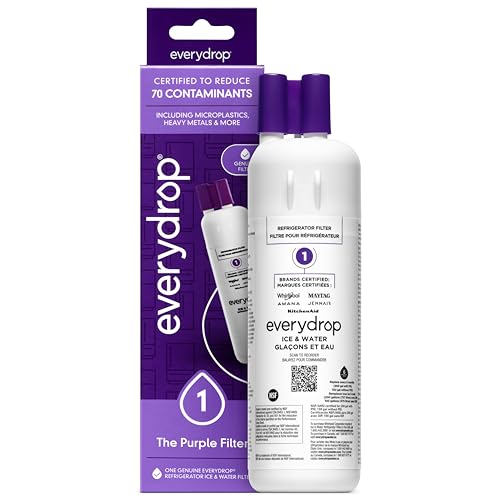
"Certified* to reduce 70 potentially harmful contaminants such as microplastics, heavy metals, pesticides, and pharmaceuticals, everydrop water filters raise the standards for crisp, clean, and refreshing water and ice. *Filters certified by NSF International under NSF/ANSI Standards 42, 53, and 401 to reduce specific contaminants. See everydropwater.com for details."

Certified* to reduce 75 potentially harmful contaminants such as microplastics, heavy metals, pesticides, and pharmaceuticals, everydrop water filters raise the standards for crisp, clean, and refreshing water and ice. *Filters certified by NSF International under NSF/ANSI Standards 42, 53, and 401 to reduce specific contaminants. See everydropwater.com for details.

"Certified* to reduce 70 potentially harmful contaminants such as microplastics, heavy metals, pesticides, and pharmaceuticals, everydrop water filters raise the standards for crisp, clean, and refreshing water and ice. *Filters certified by NSF International under NSF/ANSI Standards 42, 53, and 401 to reduce specific contaminants. See everydropwater.com for details."
Whirlpool Refrigerator Filter Model Identification
Before resetting the filter, confirm you have the correct replacement filter for your specific Whirlpool refrigerator model. Using the wrong filter can lead to poor filtration and water quality issues. Check the user manual or the manufacturer’s website for the correct part number.
| Model Number | Filter Part Number | Filter Type |
|---|---|---|
| WRX735SDH | 4396841 | EveryDrop |
| WRS588FIH | 4396710 | EveryDrop |
| WRF555SDF | 4396841 | EveryDrop |
| WRS321SDH | 4396841 | EveryDrop |
Whirlpool Refrigerator Water Filter Reset Steps
Resetting the water filter in your Whirlpool refrigerator is a straightforward process that ensures your water and ice remain fresh and clean. Following the correct steps will help you maintain optimal performance and extend the life of your appliance. Here’s a detailed guide to effectively reset your Whirlpool refrigerator water filter.
Follow these steps to reset your Whirlpool refrigerator water filter. This ensures the system recognizes the new filter and maintains accurate tracking of filter life.
Open the Refrigerator Door
Ensure the refrigerator door is fully open to access the control panel.Locate the Filter Reset Button
This is usually found on the control panel. It may be labeled as “Filter Reset” or “Reset.”Press and Hold the Reset Button
Hold the button for approximately three seconds until the indicator light changes. This confirms the reset.Close the Door
Once the reset is complete, close the refrigerator door to finalize the process.
Whirlpool Refrigerator Filter Reset Problems
Resetting the water filter in a Whirlpool refrigerator can sometimes lead to unexpected challenges. Users may encounter issues such as persistent error messages or difficulty in completing the reset process. Understanding these common problems can help streamline the troubleshooting experience and ensure your refrigerator operates efficiently.
Sometimes, users encounter issues when attempting to reset the filter. Understanding these problems can help resolve them quickly.
Indicator Light Does Not Change
If the light does not change after pressing the reset button, ensure you are holding it for the correct duration.Filter Not Recognized
If the refrigerator does not recognize the new filter, double-check the installation and ensure it is seated properly.Persistent Error Messages
If error messages continue to display, consider unplugging the refrigerator for a few minutes and then plugging it back in.
Whirlpool Refrigerator Water Filter Maintenance Tips
Maintaining your Whirlpool refrigerator water filter is essential for ensuring clean and fresh water. Regular upkeep not only extends the life of the filter but also enhances the quality of the water dispensed. Here are some practical tips to help you effectively manage your refrigerator’s water filtration system.
Regular maintenance of your water filter can enhance its lifespan and effectiveness. Here are some tips to keep in mind:
Replace Filters Regularly
Change your water filter every six months or as recommended by the manufacturer.Check for Leaks
Inspect the area around the filter for any signs of leaks after installation.Clean the Water Dispenser
Regularly clean the water dispenser to prevent any build-up of bacteria or mold.
Whirlpool Refrigerator Water Quality Troubleshooting
Maintaining the water quality in your Whirlpool refrigerator is essential for optimal performance and health. If you’re experiencing issues with water flow or taste, troubleshooting the water filter is a crucial step. This section will guide you through identifying common problems and resetting your water filter to ensure clean, refreshing water.
If you experience issues with water quality after resetting the filter, consider the following:
Check Water Source
Ensure the water supply to the refrigerator is clean and free from contaminants.Inspect the Filter
If the filter is new but water quality is poor, it may be defective. Consider replacing it with a different unit.Flush the System
Run several gallons of water through the dispenser to flush out any air or impurities that may have entered during the filter change.
Whirlpool Refrigerator Water Filter Reset Importance
Regularly resetting your water filter is vital for maintaining the quality of your drinking water. Neglecting this step can lead to inaccurate filter life readings and potential water quality issues. Always follow the manufacturer’s guidelines for filter replacement and maintenance to ensure optimal performance.

Hey, I’m Jake. I focus on cooling systems at Appliance Mastery, like fridges, freezers, and air conditioners.
I’ve worked in appliance repair for more than ten years and I’m certified through NASTeC. I’ve seen just about every fridge issue you can imagine.
My goal is to help you fix problems without stress. Whether it’s a freezer that won’t cool or an AC that keeps beeping, I’m here to walk you through it.