
A malfunctioning control panel on a Whirlpool dishwasher often results from a faulty connection or a defective control board. Most users can resolve this issue by checking the wiring and replacing the control board if necessary.
Identify Control Panel Issues on Whirlpool Dishwashers
If your Whirlpool dishwasher’s control panel has stopped responding, it can be frustrating and disrupt your daily routine. This section will guide you through identifying common control panel issues, helping you pinpoint the problem and determine the best course of action for a DIY fix. Understanding these issues is the first step toward restoring your appliance’s functionality.
Diagnosing control panel problems requires an understanding of common symptoms. Users may notice unresponsive buttons, error codes, or a complete lack of display. Identifying the exact issue can save time and prevent unnecessary repairs.
| Symptom | Primary Suspect | Difficulty (1-5) |
|---|---|---|
| Unresponsive buttons | Faulty control board | 3 |
| Error codes displayed | Wiring issues | 4 |
| No display | Power supply problems | 2 |
Whirlpool Dishwasher Control Panel Malfunction Causes
Understanding the potential causes behind a malfunctioning control panel is essential for effective troubleshooting. This section delves into common issues that can lead to problems with the control panel of your Whirlpool dishwasher, providing insights that can help you diagnose the situation before attempting any repairs. Knowing these causes can simplify your DIY approach and save you time.
Control panel issues can stem from various sources. The most common causes include:
Faulty control board: This is often the primary suspect when buttons become unresponsive.
Wiring issues: Loose or damaged wires can disrupt communication between the control panel and the dishwasher.
Power supply problems: A lack of power can cause the control panel to fail entirely.
Each of these issues requires specific troubleshooting steps to resolve effectively.
Whirlpool Dishwasher Control Panel Troubleshooting Steps
If your Whirlpool dishwasher’s control panel is unresponsive, it can be frustrating and inconvenient. Fortunately, there are straightforward troubleshooting steps you can follow to identify and potentially resolve the issue. This guide will walk you through each step to help restore functionality to your dishwasher’s control panel.
Follow these steps to diagnose and fix the control panel issue on your Whirlpool dishwasher.
Unplug the dishwasher to ensure safety.
Remove the control panel cover by unscrewing it.
Inspect the wiring for any visible damage or loose connections.
Reconnect any loose wires and secure them tightly.
Test the control board using a multimeter to check for continuity.
Replace the control board if it shows no continuity.
Reassemble the control panel and plug the dishwasher back in.
Following these steps can restore functionality to your dishwasher’s control panel.
Whirlpool Dishwasher Wiring Harness Diagnostics
When your Whirlpool dishwasher’s control panel fails to respond, the issue may lie within the wiring harness. This section will guide you through the diagnostic steps to identify potential wiring problems, ensuring you can troubleshoot effectively and restore functionality to your appliance. Understanding the wiring connections is crucial for a successful repair.
Wiring problems can often be overlooked during diagnostics. Inspecting the wiring harness is crucial for identifying potential faults.
Check for frayed wires: Look for any signs of wear or damage.
Ensure secure connections: All connectors should fit snugly without any wiggle.
Use a multimeter: Test each wire for continuity to confirm they are functioning correctly.
Addressing wiring issues can eliminate many control panel problems without needing to replace the control board.
Whirlpool Dishwasher Control Board Replacement Steps
If your Whirlpool dishwasher’s control panel is unresponsive, it may be time to replace the control board. This section provides clear, step-by-step instructions to guide you through the replacement process, ensuring you can restore your dishwasher’s functionality without professional help. Follow these easy DIY steps to troubleshoot and resolve the issue efficiently.
If the control board is faulty, replacing it is often the best solution. This process involves several steps.
Purchase a compatible control board for your specific Whirlpool model.
Disconnect the old control board by removing any screws and unplugging the connectors.
Install the new control board by reversing the removal steps.
Secure everything back in place and restore power to the dishwasher.
Replacing the control board can resolve persistent issues that wiring fixes cannot.
Recommended Products
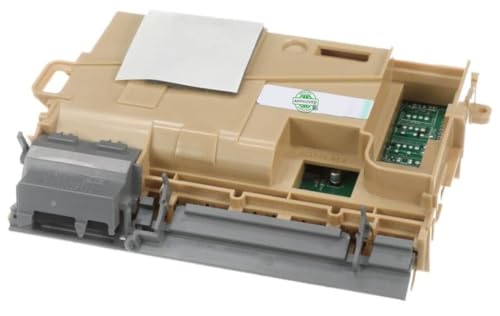
COMPATIBILITY: Direct replacement Electronic Control Board compatible with multiple brands including Maytag, Whirlpool and onthers, as models: WDT730HAMZ1, MDTS4224PZ0, WDP730HAMZ1

GENUINE OEM: Whirlpool Genuine OEM Parts are designed specifically for your appliance, meet Whirlpool engineering standards, and are crafted to ensure the quality of your appliance

☆ W11305293 Cntrl-Elec Made Exactly to Fit For Most Top Brand Dishwashers
Whirlpool Dishwasher Control Panel Issue Monitoring
When your Whirlpool dishwasher’s control panel malfunctions, it can disrupt your daily routine. Understanding how to monitor and diagnose the issue is crucial for effective troubleshooting. This section will guide you through the steps to identify and address control panel problems, ensuring your appliance operates smoothly once again.
After repairs, monitor the dishwasher for any recurring control panel issues. If problems persist, consider the following actions.
Recheck wiring connections: Ensure everything remains secure after repairs.
Consider professional help: If the problem continues, a technician may be needed for further diagnosis.
Regular monitoring can help catch issues early and prevent more significant problems down the line.

Hey, I’m Jake. I focus on cooling systems at Appliance Mastery, like fridges, freezers, and air conditioners.
I’ve worked in appliance repair for more than ten years and I’m certified through NASTeC. I’ve seen just about every fridge issue you can imagine.
My goal is to help you fix problems without stress. Whether it’s a freezer that won’t cool or an AC that keeps beeping, I’m here to walk you through it.