
A Samsung dryer that turns on but won’t spin often indicates a problem with the drive belt or rollers. Addressing these issues typically involves inspecting and replacing worn components to restore functionality.
Quick-Look Diagnostic Table for Samsung Dryer Issues
When your Samsung dryer powers on but fails to spin, it can be frustrating. This quick-look diagnostic table provides essential troubleshooting steps to help you identify potential issues, focusing on common problems like the drive belt and rollers. By following these guidelines, you can efficiently assess the situation and determine the necessary repairs.
| Symptom | Primary Suspect | Difficulty (1-5) |
|---|---|---|
| Dryer turns on but doesn’t spin | Drive belt or rollers | 3 |
| Unusual noises during operation | Worn rollers | 4 |
| Drum doesn’t rotate | Faulty motor | 5 |
Samsung Dryer Spin Failure Causes
When a Samsung dryer powers on but fails to spin, the drive belt is often the primary suspect. The belt connects the motor to the drum, allowing it to rotate. Over time, this belt can wear out or snap, preventing the drum from turning. If the belt appears intact, the rollers supporting the drum may be worn or damaged, causing friction that impedes movement.
Samsung Dryer Belt and Roller Repair Steps
If your Samsung dryer turns on but won’t spin, the issue may lie with the belt or rollers. Understanding how to diagnose and repair these components is crucial for restoring your dryer’s functionality. The following steps will guide you through the repair process, ensuring your appliance runs smoothly again.
Repairing a Samsung dryer involves a series of methodical steps. Follow this guide to effectively replace the drive belt and rollers.
Unplug the dryer from the electrical outlet to ensure safety.
Remove the front panel by unscrewing the screws securing it in place.
Detach the drum by lifting it out carefully. You may need to remove the belt from the motor pulley.
Inspect the drive belt for signs of wear or damage. If it appears frayed or broken, replace it with a new belt.
Check the rollers for wear. If they feel rough or do not spin freely, replace them.
Reassemble the dryer by reversing the disassembly steps. Ensure the belt is properly aligned on the motor pulley.
Plug the dryer back in and test its operation.
Samsung Dryer Roller Wear Symptoms
When a Samsung dryer won’t spin but powers on, one common culprit may be worn rollers. Identifying the symptoms of roller wear can help diagnose the issue and guide you toward effective repairs. Understanding these signs is crucial for restoring your dryer’s functionality and ensuring optimal performance.
Worn rollers can lead to various symptoms that may indicate the need for replacement. Identifying these signs early can prevent further damage.
Unusual noises during operation can signal roller wear.
Drum misalignment may occur if rollers are not functioning correctly.
Increased vibration can be a result of uneven drum movement.
Recommended Products

❤PREMIUM QUALITY: The upgraded samsung dryer repair kit made of premium quality material. The rollers are strong and wear-resistant, which make the dryer run stably and quietly. It designed with a high-quality rubber overall structure. The 6602-001655 dryer belt 92’’Length X 0.3’’Width. It is thickness is twice as thick as before and it is more durable. The center of the idler has a triangular design, which is more firm and stable. Meets OEM manufacturing requirements.

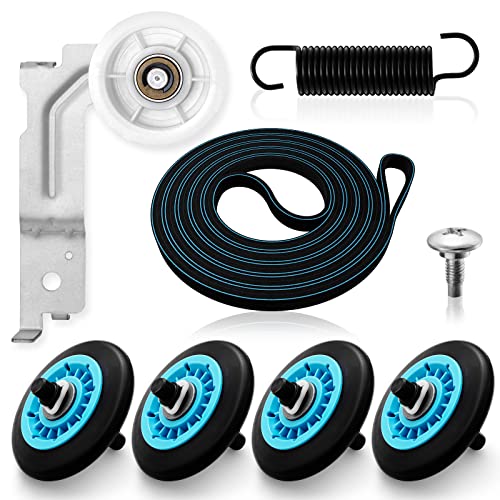
【MATERIAL UPGRADE】The samsung dryer roller replacement kit is designed with a high-quality rubber overall structure, which is strong and wear-resistant, not easy to crack. The samsung dryer roller bearing quality is more stable and quieter than ordinary bearings. The thickness of samsung dryer belt is upgraded and the length is standard. All samsung dryer repair kit has undergone strict quality inspection by the manufacturer---Meet OEM Samsung dryer parts standards.
Essential Tools for Samsung Dryer Repair
When tackling the issue of a Samsung dryer that won’t spin, having the right tools is crucial for an effective repair. This section outlines the essential equipment you’ll need to diagnose and fix problems related to the drive belt and rollers, ensuring your dryer operates smoothly once again. Being prepared with these tools can make the repair process more efficient and successful.
Before starting the repair, gather the necessary tools and parts to streamline the process. Having everything on hand will reduce downtime.
| Tool/Part | Purpose |
|---|---|
| Screwdriver | To remove screws on the panel |
| Replacement drive belt | To replace a worn or broken belt |
| Replacement rollers | To replace damaged or worn rollers |
| Multimeter | To test electrical components |
Recommended Products
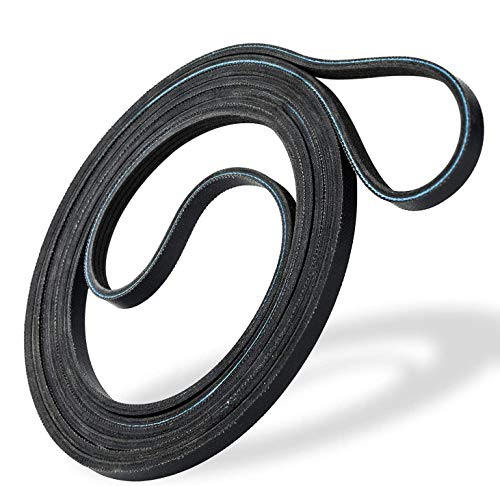
IDEAL FIT FOR MANY MODELS - 6602-001655 dryer belt is compatible with many popular branded dryers which include Samsung and Whirlpool.

Package include: 4 x dryer drum rollers DC97-16782A, 1 x dryer drive belt 6602-001655 and 1 x dryer pulley DC93-00634A. Compatibility: this is aftermarket part replace Samsung Dryer. Model Identification: USE Ctrl + F to SEARCH your model number inside the Product Description

[Fit For Samsung Dryer Repair Kit]: DC97-16782A Dryer Roller Replacement Kit for SAMSUNG Dryer Parts DV48H7400EW/A2 DV210AEW/XAA DV40J3000EW/A2 DV42H5200GP/A3 DV42H5200EF/A3 DV45H7000EW/A2 DV42H5200EP/A3 DV42H5200EW/A3 DV48J7700EW/A2 DV48H7400EW/A2
Samsung Dryer Repair Safety Guidelines
When tackling repairs on a Samsung dryer that won’t spin, safety should be your top priority. Understanding the necessary precautions can help prevent accidents and ensure a smooth repair process. This section outlines essential safety guidelines to follow before you begin any diagnostic or repair work.
Safety should always be a priority when performing repairs. Follow these precautions to minimize risks.
Always unplug the dryer before starting any repair work.
Wear safety gloves to protect your hands from sharp edges.
Ensure the area is well-lit to avoid accidents.
Samsung Dryer Post-Repair Functionality Checks
After addressing the issues with the belt and rollers in your Samsung dryer, it’s essential to conduct a series of functionality checks. These steps will help ensure that the dryer operates efficiently and that the repairs have resolved the spinning problem. Proper testing can prevent future issues and confirm that your appliance is back in optimal working condition.
Once the repair is complete, conduct a few checks to ensure everything is functioning correctly.
Verify that the drum spins freely without obstruction.
Listen for any unusual sounds during operation.
Check for proper alignment of the belt on the motor pulley.
By following these steps, you can effectively address the issue of a Samsung dryer that turns on but won’t spin. Regular maintenance of the drive belt and rollers can prevent future problems, ensuring your dryer operates efficiently.

Hey, I’m Jake. I focus on cooling systems at Appliance Mastery, like fridges, freezers, and air conditioners.
I’ve worked in appliance repair for more than ten years and I’m certified through NASTeC. I’ve seen just about every fridge issue you can imagine.
My goal is to help you fix problems without stress. Whether it’s a freezer that won’t cool or an AC that keeps beeping, I’m here to walk you through it.