
The Electrolux Power Flow Head Reset Button can restore functionality to your carpet cleaner when it fails to operate. Pressing this button resets the system, allowing the device to resume effective cleaning.
Electrolux Power Flow System Components
The Electrolux Power Flow system is designed to optimize carpet cleaning by maintaining consistent suction and water flow. When the system malfunctions, it can lead to ineffective cleaning and frustration. Familiarizing yourself with the components and their functions can help you troubleshoot issues quickly.
The reset button is a crucial feature that can often resolve common problems. Knowing when and how to use it can save time and effort.
Recommended Products

Includes Quality Nylon Crimp Terminals for 16-14 Gauge Wire


Power Flow Head Malfunction Symptoms
Understanding the symptoms of a malfunctioning Power Flow Head is crucial for effective carpet cleaning. Identifying these issues early can help you restore your device’s performance and maintain optimal cleaning results. This section outlines the common signs that indicate your Power Flow Head may need attention.
Recognizing the symptoms of a malfunctioning Power Flow Head can help you address problems promptly. Here are some common signs indicating a reset may be necessary:
| Symptom | Primary Suspect | Difficulty (1-5) |
|---|---|---|
| Loss of suction | Clogged filter | 2 |
| Water not dispensing | Blocked hose | 3 |
| Motor not starting | Electrical issue | 4 |
| Unusual noises | Mechanical failure | 3 |
If you experience any of these symptoms, your first step should be to check for clogs or blockages. If those are clear, proceed to reset the system.
Step-by-Step Guide to Reset the Power Flow Head
If you’re experiencing issues with your Electrolux Power Flow Head, resetting it can often restore its carpet cleaning capabilities. This step-by-step guide will walk you through the process, ensuring you can quickly get back to effective cleaning without hassle. Follow these instructions carefully to troubleshoot and resolve any problems you may encounter.
Resetting the Electrolux Power Flow Head is a straightforward process. Follow these steps to restore functionality:
Unplug the carpet cleaner from the electrical outlet to ensure safety.
Locate the reset button on the Power Flow Head, usually found near the motor housing.
Press and hold the reset button for at least five seconds.
Release the button and plug the cleaner back into the outlet.
Test the machine to see if it operates correctly.
If the cleaner does not function after resetting, further troubleshooting may be necessary.
Safety Steps for Electrolux Power Flow Reset
When using the Electrolux Power Flow Head, safety is paramount, especially during the reset process. Understanding the necessary precautions can help prevent accidents and ensure effective carpet cleaning. This section outlines essential safety steps to follow while resetting your device, allowing you to maintain both your equipment and your home environment.
Before attempting any repairs or resets, ensure you take the necessary safety precautions. Here are some essential steps:
Wear gloves to protect your hands from debris.
Disconnect the power supply to prevent electrical shocks.
Work in a well-lit area to see all components clearly.
These measures will help ensure a safe and effective troubleshooting process.
Additional Power Flow Head Troubleshooting Steps
If you’re experiencing issues with your Electrolux Power Flow Head, additional troubleshooting steps can help restore its performance. These methods address common problems that may arise during carpet cleaning, ensuring your appliance operates efficiently. Follow these guidelines to effectively resolve any lingering issues and enhance your cleaning experience.
If resetting the Power Flow Head does not resolve the problem, consider these additional troubleshooting steps:
Check the filter for clogs and clean or replace it as needed.
Inspect the hoses for blockages or damage.
Examine electrical connections for signs of wear or corrosion.
Addressing these areas can often resolve issues that prevent your carpet cleaner from functioning properly.
Electrolux Power Flow Head Maintenance Guide
Maintaining the Electrolux Power Flow Head is essential for optimal carpet cleaning performance. This guide provides step-by-step instructions on how to effectively reset the unit’s button, ensuring that your cleaning tasks are efficient and thorough. Understanding these maintenance procedures can significantly enhance the longevity and functionality of your appliance.
Regular maintenance can extend the life of your Electrolux Power Flow Head and improve its performance. Here are some tips to keep your cleaner in top shape:
Clean filters after every use to prevent clogs.
Empty the dirty water tank regularly to avoid overflow.
Inspect hoses for cracks or leaks periodically.
Store the cleaner in a dry place to prevent mold growth.
Implementing these practices will help maintain optimal cleaning performance and reduce the frequency of issues.
Power Flow Head Reset Safety Precautions
When using the Electrolux Power Flow Head reset button, it’s essential to prioritize safety to prevent any accidents or damage. Understanding the necessary precautions can help ensure a smooth and effective carpet cleaning experience while minimizing risks associated with improper use. This section outlines key safety measures to keep in mind during the reset process.
Always ensure the carpet cleaner is unplugged before performing any maintenance or troubleshooting steps. This will prevent accidents and ensure your safety.
Troubleshooting Electrolux Power Flow Head Issues
If you continue to experience issues with the Electrolux Power Flow Head, consult the user manual for additional troubleshooting tips. If problems persist, consider contacting a professional for repairs. Regular maintenance and prompt attention to issues can keep your carpet cleaner running efficiently.
Recommended Products
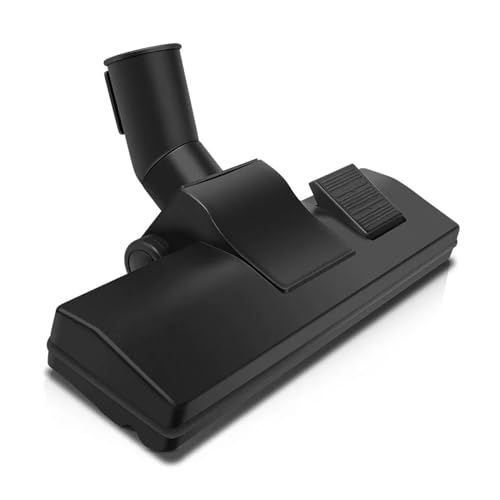
Hard Floor Brush Vacuum Cleaner Suction Head Parts Carpet Rugs Brush 32mm & 35mm Vacuum Cleaner Parts

Hey, I’m Jake. I focus on cooling systems at Appliance Mastery, like fridges, freezers, and air conditioners.
I’ve worked in appliance repair for more than ten years and I’m certified through NASTeC. I’ve seen just about every fridge issue you can imagine.
My goal is to help you fix problems without stress. Whether it’s a freezer that won’t cool or an AC that keeps beeping, I’m here to walk you through it.