
Ever had that moment of frustration when you’re all set to start a load of laundry, but your Samsung washer decides otherwise? Picture this: you press the start button, but nothing happens. What gives? Don’t worry, we’ve got your back! In this article, we’ll unravel the mystery behind why your Samsung washer is refusing to kick into gear.
Imagine the convenience of having your laundry done at the push of a button, only to be met with silence. It’s a common scenario that many Samsung washer owners face. But fear not, as we’re here to guide you through troubleshooting steps and solutions to get your washer up and running again in no time.
Common Reasons for Samsung Washer Not Starting
Having your Samsung washer not start can be frustrating, but understanding the common issues can lead you to a quick resolution. Here are some reasons why your washer may not be starting:
- Door not properly closed: If the door isn’t shut tight, the washer won’t start as a safety measure.
- Power supply issues: Check if the washer is securely plugged in and there are no electrical problems.
- Faulty door latch: A malfunctioning door latch can prevent the washer from starting.
- Tripped circuit breaker: A tripped breaker can disrupt the power supply to the washer.
- Control board problems: Issues with the control board can also cause the washer not to start.
Troubleshooting these common problems step by step can help you pinpoint the issue and get your Samsung washer up and running in no time.
Checking Power Supply
When your Samsung washer fails to start, one crucial aspect to investigate is the power supply. Without adequate power, your washer won’t be able to kick into action. Here’s how to check this:
- Inspect the power cord: Ensure it’s properly plugged into a working outlet. Sometimes, cords can come loose without you realizing it.
- Check the outlet: Test the outlet with another electronic device to see if it’s functioning. If the device works but the washer doesn’t, move on to the next step.
- Reset the circuit breaker: Look for any tripped breakers in your electrical panel. If you find one, reset it and try starting your washer again.
- Voltage fluctuations: In case of power surges, it may be a good idea to use a voltage stabilizer to protect your washer from electrical damage.
- Professional help: If you’re unsure about dealing with electrical issues, it’s always best to call a professional to diagnose and fix the problem.
Troubleshooting Tips
If everything seems fine with the power supply, move on to other possible causes. Stay calm and approach each step methodically to identify the source of the problem.
Recommended Products

The Samsung DC61-01722B Leveling Leg is a genuine OEM (Original Equipment Manufacturer) part designed and engineered to exact specifications

The DC97-21786A Washplate, Pulsator Assembly is a genuine Original Equipment Manufacturer (Authentic OEM) part from Samsung that fits various models from the following brands of washers: Samsung. Make sure to check below for your part number

MAKE YOUR MACHINES STACKABLE: Save more space in your laundry room by stacking your Bespoke Washer and Dryer with our Bespoke Stacking and MultiControlä Combo Kit, which securely stacks your dryer on top of your washer
Door/Lid Issues
If your Samsung washer isn’t starting, the door or lid may be the culprit. Here’s what you can do:
- Check for Obstructions: Ensure there are no items blocking the door or lid from closing properly.
- Inspect the Latch: Make sure the door/lid latch is functioning correctly and isn’t damaged.
- Restart the Machine: Try restarting the washer after firmly closing the door or lid.
Remember to always handle the door/lid of your washer with care to prevent any further issues.
Recommended Products

【𝐎𝐄𝐌 𝐃𝐂𝟔𝟒-𝟎𝟎𝟓𝟏𝟗𝐁 𝐖𝐀𝐒𝐇𝐄𝐑 𝐃𝐎𝐎𝐑 𝐋𝐎𝐂𝐊】: The DC64-00519B washing machine door lock switch locks the door of the washing machine and prevents the door from opening during washing and spinning. DC64-00519B Door lock switch Assembly is an NEW PRODUCT and the materials used are better and the seams of the product are better treated and less likely to leak. Package includes 1 x DC64-00519B Washer door lock. The switch is specified for 120V, 50/60Hz
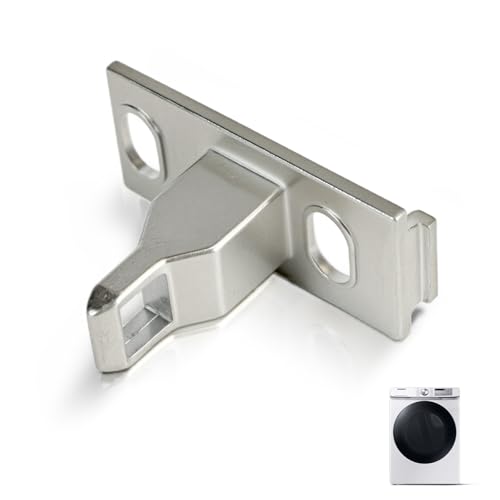
Compatible with Samsung Model: WW25B6900AX WW25B6900AW WW25B6800AW WW10TA046BE WW10T554DAW WW10T554DAN WV60A9900AV WV55M9605MV WF56H9110CW WF56H9100AW WF56H9100AV WF56H9100AG WF53DBH700AFA5 WF53BB8900ATUS WF53BB8900AGUS WF53BB8900ADUS WF53BB8700AVUS WF53BB8700ATUS WF520ABW WF520ABP WF51CG8000AWA5 WF51CG8000AVA5 WF511ABW WF511ABR WF50T8500AV WF50R8500AV WF50K7500AW WF50K7500AV WF50BG8300AVUS WF50BG8300AEUS WF50A8800AV WF50A8600AV WF50A8600AE WF50A8500AV WF501ANW WF46DBH500AVA5 WF46DBH100AWA5 WF46BG6500AVUS WF46BG6500AEUS WF46BB6700AVUS WF46BB6700ADUS WF461ASP WF461ABW WF461ABP WF45T6200AW WF45T6000AW WF45T6000AV WF45T6000AP WF45R6300AW WF45R6300AV WF45R6300AP WF45R6100AW WF45R6100AV

Restore Functionality to Your Washer - If your washer won’t start or keeps showing door errors, the issue could be your latch switch. This replacement for Samsung washer door lock switch is designed to restore secure locking and safety features in your front load machine. It's compatible with dc64-00519b, dc64-00519d, and 8182634-461970200692-ken-more-whirlpool-samsung part numbers. Ideal for fast DIY fixes, this high-quality part prevents door-related interruptions during wash cycles
Control Panel Problems
If your Samsung washer isn’t starting, issues with the control panel could be the culprit. Here are a few reasons why this might be happening:
- Power Button Malfunction: Ensure the power button is working correctly. A faulty power button can prevent the washer from starting.
- Error Code Display: Check for any error codes displayed on the control panel. These codes can provide valuable insight into the issue.
- Control Lock Feature: The control lock feature may be activated, preventing the washer from starting. Refer to the user manual for instructions on how to disable this feature.
Remember, addressing Control Panel Problems promptly can help resolve the issue and get your washer up and running smoothly again.
Troubleshooting Steps
If your Samsung washer isn’t starting, there are a few steps you can take to troubleshoot the issue.
- Check Power Supply: Ensure your washer is properly plugged into a working power outlet. Sometimes, a loose connection can prevent the washer from starting.
- Inspect Door/Lid: Make sure the door or lid is fully closed and not obstructed. Any issues with the latch can also prevent the washer from starting.
- Control Panel: Check the control panel for any error codes or signs of malfunction. It’s essential to address any control panel issues promptly.
Conclusion
Ensuring your Samsung washer starts smoothly is vital for hassle-free laundry days. By checking the power supply, door/lid, and control panel, you can troubleshoot common issues effectively. Addressing these factors promptly can help resolve any problems and get your washer back up and running in no time. Remember, a little maintenance goes a long way in keeping your appliance in top condition.
Frequently Asked Questions
My Samsung washer is not starting at all. What should I do?
Ensure the power supply is connected properly and there are no issues with the outlet. Check if the door/lid is completely closed and free from any obstructions that may prevent it from starting.
How do I troubleshoot if my Samsung washer displays error codes on the control panel?
Refer to the user manual for error code meanings and troubleshooting steps. Unplug the washer for a few minutes, restart it, and see if the error persists. If it does, contact Samsung customer service for further assistance.
What should I do if my Samsung washer is making unusual noises or not responding to controls?
Inspect the washer for any loose items inside that may be causing the noise. Try resetting the washer by unplugging it for a few moments and then plugging it back in. If the issue continues, contact a Samsung service technician for evaluation and repair.
Hi, I’m Charlie, and I cover all things laundry here at Appliance Mastery.
I’ve spent over eight years working on washing machines, dryers, and dishwashers. I also have a degree in mechanical engineering, which helps me understand how these appliances really work.
I try to make every guide clear and practical. If you’re stuck with a noisy dryer or a leaking washer, I’ll help you figure out what’s wrong and how to fix it.