
If your Electrolux stackable washer and dryer won’t run hot, the issue may stem from a faulty heating element or thermostat. Addressing these components can restore proper functionality and ensure your laundry comes out clean and dry.
Electrolux Washer and Dryer Issue Diagnosis Table
When your Electrolux stackable washer and dryer fails to generate heat, it can disrupt your laundry routine. This diagnosis table provides a systematic approach to identifying common issues that may prevent your unit from running hot, helping you troubleshoot effectively and restore functionality. Understanding these potential problems is essential for efficient repair and maintenance.
Understanding the symptoms and potential causes can streamline your troubleshooting process. The following table outlines common issues, their primary suspects, and difficulty levels for repairs.
| Symptom | Primary Suspect | Difficulty (1-5) |
|---|---|---|
| Washer runs but not hot | Faulty heating element | 3 |
| Dryer runs but not hot | Defective thermostat | 4 |
| Inconsistent drying | Clogged vent | 2 |
| Error codes displayed | Control board failure | 5 |
Diagnosing Heating Issues in Stackable Units
When a stackable washer and dryer fails to produce heat, it can disrupt your laundry routine and lead to frustration. Understanding the common causes of heating issues in these compact units is essential for effective troubleshooting. This section will guide you through the diagnostic process to identify and resolve the problem efficiently.
To effectively resolve heating issues, you must first identify the root cause. Common culprits include:
Heating element: This component heats the air for drying. If it fails, the dryer will not produce hot air.
Thermostat: This regulates the temperature within the dryer. A malfunctioning thermostat can prevent the dryer from reaching the desired heat level.
Ventilation issues: Blockages in the venting system can restrict airflow, leading to inadequate heating.
Step-by-Step Fix for Heating Issues
If your Electrolux stackable washer and dryer is struggling to produce heat, it can be frustrating and inconvenient. This section provides a detailed, step-by-step guide to diagnosing and fixing heating issues, ensuring your laundry routine can get back on track without unnecessary delays. Follow these instructions carefully to restore proper function to your appliance.
Follow these steps to troubleshoot and fix your Electrolux stackable washer and dryer heating problems.
Unplug the unit to ensure safety during repairs.
Inspect the heating element for visible damage. If damaged, replace it with a new one.
Test the thermostat for continuity using a multimeter. If it shows no continuity, replace the thermostat.
Check the venting system for blockages. Clean out any lint or debris. Ensure the vent is properly connected and not kinked.
Reassemble the unit and plug it back in. Run a test cycle to check for proper heating.
Recommended Products

❤【PACKAGE INCLUDES】-- 1 x 134792700 Dryer Heating Element, 1 x 137032600 Thermal Limiter, 1 x 3204267 Dryer High-limit Thermostat
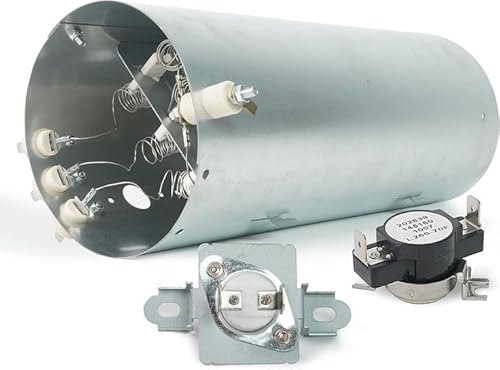
🔧 【Package Includes】 – This dryer heating element 134792700 kit contains:✅ 1 x 134792700 Heater – Rated at 240V 5500W, featuring 3 coil elements housed in durable material for long-lasting performance.✅ 1 x 137032600 Thermal Limiter – Prevents overheating and ensures safe temperature regulation.✅ 1 x 3204267 Dryer High-Limit Thermostat – Protects the dryer by preventing excessive temperature fluctuations.

Upgrade 279838 Dryer Heating Element: Pulluty 279838 heating elements have excellent heat and abrasion resistance with up to 95% nickel-chromium content. The heating wire is 25% longer than other common dryer replacement parts.Heats more evenly without damaging clothes. Meets OEM manufacturing standards.
Electrolux Error Code Diagnosis Guide
When your Electrolux stackable washer and dryer won’t run hot, understanding the error codes can help pinpoint the issue. This guide provides a comprehensive look at common error codes associated with heating problems, enabling you to diagnose and address the malfunction effectively. By following these insights, you can restore your appliance’s functionality and ensure optimal performance.
Electrolux appliances may display error codes when issues arise. Understanding these codes can help you diagnose problems more effectively.
E61: Indicates a heating element issue. Check the heating element and thermostat.
E64: Suggests a problem with the temperature sensor. Test and replace if necessary.
E70: Relates to venting issues. Inspect the venting system for blockages.
Heating Maintenance for Electrolux Units
Maintaining the heating function in Electrolux stackable washers and dryers is crucial for optimal performance. If your unit isn’t running hot, understanding the common issues and solutions can help restore its efficiency. This section will guide you through essential maintenance tips and troubleshooting steps to ensure your laundry appliances operate effectively.
Regular maintenance can prevent heating issues in your Electrolux stackable washer and dryer. Consider the following tips:
Clean the lint filter after every use to ensure proper airflow.
Inspect the venting system at least once a year for blockages.
Schedule professional maintenance every few years to check internal components.
When to Contact a Repair Technician
If your Electrolux stackable washer and dryer is still not running hot after attempting basic troubleshooting, it may be time to consider professional help. Certain issues, such as malfunctioning heating elements or control boards, require specialized knowledge and tools for proper diagnosis and repair. Understanding when to seek assistance can save you time and prevent further damage to your appliance.
If you’ve followed the troubleshooting steps and the unit still won’t run hot, it may be time to call a professional. Consider the following scenarios:
Persistent error codes that do not resolve with basic troubleshooting.
Unusual noises or smells during operation.
Electrical issues that could pose safety risks.
Heating Troubleshooting Steps for Electrolux Units
If your Electrolux stackable washer and dryer isn’t producing heat, it can disrupt your laundry routine. Understanding the common issues and troubleshooting steps specific to these units is essential for identifying the problem and restoring functionality. This section outlines practical methods to diagnose and resolve heating issues effectively.
Addressing heating problems in your Electrolux stackable washer and dryer requires a systematic approach. Begin with basic troubleshooting and escalate to professional help if necessary. Regular maintenance can also help prevent future issues.

Hey, I’m Jake. I focus on cooling systems at Appliance Mastery, like fridges, freezers, and air conditioners.
I’ve worked in appliance repair for more than ten years and I’m certified through NASTeC. I’ve seen just about every fridge issue you can imagine.
My goal is to help you fix problems without stress. Whether it’s a freezer that won’t cool or an AC that keeps beeping, I’m here to walk you through it.