
A blinking light on your Samsung fridge after a power outage indicates a potential reset issue. This can often be resolved by following a series of straightforward steps to restore normal operation.
Samsung Fridge Blinking Light After Power Loss
A blinking light on your Samsung fridge usually signifies that the appliance is in a state of error or needs to be reset. This can happen after a power outage when the fridge’s internal systems may not restart correctly. Identifying the underlying cause is essential for effective troubleshooting.
| Symptom | Primary Suspect | Difficulty (1-5) |
|---|---|---|
| Light Blinking | Power Reset Needed | 2 |
| Temperature Fluctuation | Sensor Malfunction | 3 |
| No Cooling | Compressor Issue | 4 |
Samsung Fridge Blinking Light Issues Explained
Experiencing a blinking light on your Samsung fridge after a power outage can be frustrating and concerning. This section delves into the common causes behind this issue, providing insights into how to troubleshoot and restore normal functionality. Understanding these factors can help you quickly resolve the blinking light problem and ensure your refrigerator operates smoothly again.
Several factors may lead to the blinking light issue on your Samsung fridge. Understanding these can guide you in resolving the problem effectively.
Power Outage: Sudden loss of power can disrupt the fridge’s electronic components.
Faulty Sensors: Temperature sensors may malfunction, causing the fridge to misread its internal conditions.
Compressor Problems: If the compressor is not functioning correctly, it can trigger error codes.
Samsung Fridge Blinking Light Repair Steps
Experiencing a blinking light on your Samsung fridge after a power outage can be frustrating. This issue often indicates a need for troubleshooting to restore normal function. The following steps will guide you through the repair process, helping you resolve the blinking light and ensure your refrigerator operates smoothly again.
Follow these steps to restore your Samsung fridge to normal operation. Ensure you take necessary safety precautions before starting.
Unplug the Fridge: Disconnect the appliance from the wall outlet for at least 10 minutes.
Inspect the Power Cord: Check for any visible damage or fraying.
Reconnect the Fridge: Plug the fridge back in and observe if the light stops blinking.
Reset the Temperature Settings: Adjust the temperature settings to your desired level.
Check for Error Codes: If the light continues to blink, consult the user manual for specific error codes.
Essential Tools for Samsung Fridge Troubleshooting
When your Samsung fridge’s light starts blinking after a power outage, it can indicate various issues that need addressing. Having the right tools on hand can simplify the troubleshooting process, allowing you to quickly diagnose and resolve the problem. This section outlines the essential tools you’ll need to effectively restore power and functionality to your appliance.
Having the right tools can simplify the troubleshooting process. Here’s a checklist of items you may need.
Screwdriver Set: For accessing internal components.
Multimeter: To test electrical connections.
Replacement Sensors: If faulty sensors are suspected.
User Manual: For reference on error codes and settings.
Samsung Fridge Safety Precautions After Outage
After a power outage, it’s crucial to ensure your Samsung fridge operates safely and efficiently. Taking the right precautions can help prevent further issues and protect your food. This section outlines essential steps to follow for restoring your fridge’s functionality while minimizing risks.
Before you begin any troubleshooting, ensure you take safety precautions to avoid accidents.
Wear Gloves: Protect your hands while handling electrical components.
Turn Off Power: Always disconnect the fridge before working on it.
Ventilate Area: Ensure proper airflow to avoid exposure to refrigerants.
Common Sensor Issues in Samsung Fridges
Samsung fridges can experience various sensor issues, particularly after a power outage. These problems often manifest as blinking lights or inconsistent temperature readings, signaling that the sensors may need attention. Understanding these common sensor issues can help you troubleshoot effectively and restore your fridge to optimal performance.
Temperature sensors in Samsung fridges can fail, leading to incorrect readings and blinking lights. Regular maintenance can help prevent these issues.
Location: Sensors are usually located near the evaporator coils.
Signs of Failure: Inconsistent temperatures or a blinking light can indicate sensor problems.
Replacement: If a sensor is faulty, replacing it can restore normal function.
Samsung Fridge Professional Repair Indicators
When a Samsung fridge experiences a power outage, it may exhibit various blinking light patterns that indicate specific issues. Understanding these professional repair indicators can help diagnose problems effectively and determine whether a simple reset or a more extensive repair is necessary. This section will explore the common blinking light signals and their meanings for Samsung refrigerators.
If the blinking light persists after following the above steps, it may be time to seek professional help. A qualified technician can diagnose more complex issues such as compressor failures or circuit board problems.
Persistent Blinking: If the light does not stop after a reset.
Unusual Noises: Any strange sounds from the fridge can indicate internal issues.
Cooling Failure: If the fridge fails to maintain temperature despite troubleshooting.
Recommended Products

NEW DA41-00676J For Samsung Refrigerator LED Light Replacement AP6000168 PS11732779

Compatible include Samsung. Quality alternatives:DA41-00676J Compatible with Samsung Refrigerator LED Light. Part Number DA41-00676J AP6000168 PS11732779 EAP11732779.
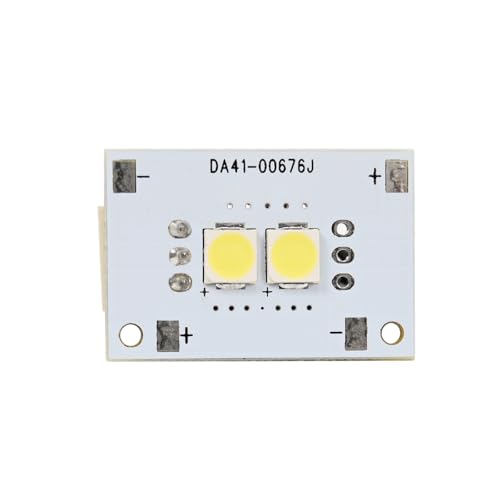
LED Light DA41-00676J 110729 AP6000168 PS11732779 For Samsung Refrigerator Replacement
Samsung Fridge Blinking Light Issues
Experiencing a blinking light on your Samsung fridge after a power outage can be frustrating and concerning. This issue often indicates a disruption in the appliance’s normal functioning, which can lead to further complications if not addressed promptly. Understanding the common causes and solutions for this blinking light can help restore your fridge to its optimal state.
Do not ignore persistent blinking lights as they may indicate serious issues that could lead to food spoilage or further appliance damage.
By following these steps and understanding the potential causes, you can effectively address the blinking light issue on your Samsung fridge after a power outage.

Hey, I’m Jake. I focus on cooling systems at Appliance Mastery, like fridges, freezers, and air conditioners.
I’ve worked in appliance repair for more than ten years and I’m certified through NASTeC. I’ve seen just about every fridge issue you can imagine.
My goal is to help you fix problems without stress. Whether it’s a freezer that won’t cool or an AC that keeps beeping, I’m here to walk you through it.