
To turn off the filter warning light on a Samsung fridge, you need to reset the filter indicator. This process is straightforward and can be completed in a few simple steps, ensuring your fridge operates without unnecessary alerts.
Samsung Fridge Filter Warning Light Explained
The filter warning light on a Samsung fridge alerts users when it’s time to replace the water filter. This feature is crucial for maintaining water quality and ensuring the fridge operates efficiently. Ignoring this warning can lead to reduced water flow and potential damage to the appliance.
Samsung Fridge Filter Warning Reset Symptoms
When your Samsung fridge displays a filter warning, it signals that it’s time to address the water filter status. Recognizing the symptoms associated with this warning can help you maintain optimal performance and ensure clean water and ice. Understanding these signs is crucial for timely intervention and effective maintenance.
If the filter warning light remains illuminated after replacing the filter, it may indicate a need for a reset. Common symptoms include:
Continuous warning light despite a new filter
Reduced water flow from the dispenser
Unusual noises during water dispensing
| Symptom | Primary Suspect | Difficulty 1-5 |
|---|---|---|
| Warning light stays on | Filter not reset | 2 |
| Low water pressure | Clogged filter | 3 |
| No water flow | Filter installation issue | 4 |
Resetting Samsung Fridge Filter Warning Light
If your Samsung fridge is displaying a filter warning light, it’s essential to reset it to ensure optimal performance. This guide provides clear steps to turn off the warning light quickly and effectively, allowing you to maintain your refrigerator’s efficiency without unnecessary interruptions. Follow these instructions to manage your appliance with ease.
Resetting the filter light is a simple process that can be completed in a few minutes. Follow these steps to turn off the warning light:
Locate the Control Panel on your Samsung fridge.
Press and Hold the Filter Reset Button for about three seconds. This button is often labeled as “Filter Reset” or “Reset.”
Check the Display to confirm that the filter light has turned off.
Recommended Products

Ensures proper water flow without a filter and helps maintain dispenser and ice maker performance
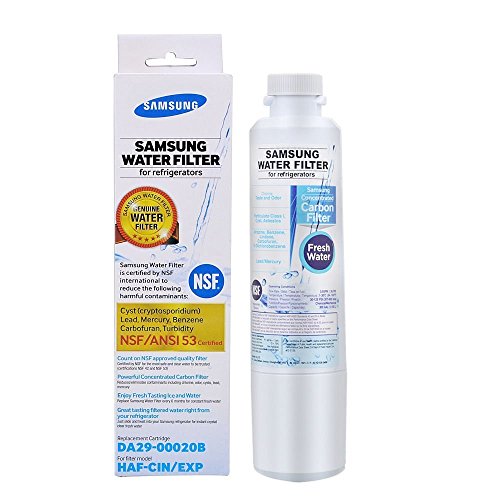
Samsung genuine water filter eliminates over 99% of numerous potentially harmful contaminants, using a high grade carbon block.

Compatible: The Refrigerator Door Switch Fit for Samsung Cecilware all kinds of 2-pin refrigerator door lights,fits for samsung RF4267HARS,RS267TDRS,RSG307AARS,RF4287HARS,RF263BEAESR,RS25H5000SR,RF30HBEDBSR,RF323TEDBSR,RF28HMEDBSR,RS265TDRS etc.
Samsung Fridge Filter Light Reset Steps
If your Samsung fridge’s filter light is on and needs resetting, follow these straightforward steps to turn off the warning light quickly. This guide will help you navigate the reset process, ensuring your fridge operates efficiently without the constant reminder to change the filter.
If the above method does not work, try this alternative:
Unplug the Fridge from the power source.
Wait for 5-10 Minutes before plugging it back in.
Repeat the Filter Reset Procedure as outlined above.
Samsung Fridge Filter Warning Troubleshooting Steps
If your Samsung fridge is displaying a filter warning light, it’s essential to address the issue promptly to ensure optimal performance. This section outlines straightforward troubleshooting steps to help you reset the filter warning light and maintain your refrigerator’s efficiency. Follow these guidelines to resolve the warning and keep your appliance running smoothly.
If the filter warning light remains on after attempting to reset, consider these troubleshooting steps:
Check Filter Installation: Ensure the filter is correctly installed and securely locked in place.
Inspect for Leaks: Look for any water leaks around the filter area that could indicate improper installation.
Replace the Filter Again: If the filter is old or damaged, replacing it may resolve the issue.
Recommended Products

FRESH FILTERED WATER: Samsung water filters reduce contaminants, giving your family fresh tasting water
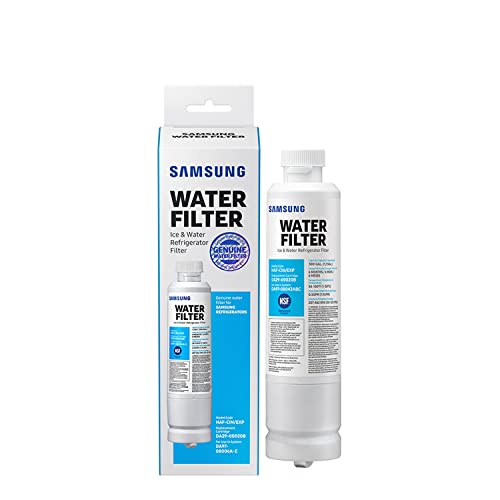
FRESH FILTERED WATER: Samsung water filters reduce contaminants, giving your family fresh tasting water

Note: This product is round, not square. Replacement for DA29-00020B (HAF-CIN), not compatible with DA97-17376B (HAF-QIN).
Samsung Fridge Filter Warning Troubleshooting Steps
If your Samsung fridge is displaying a filter warning light, it’s essential to address the issue promptly to maintain optimal performance. The following troubleshooting steps will guide you through the process of resetting the filter warning, ensuring your appliance continues to function efficiently and effectively.
If the warning light persists despite following all reset procedures, it may indicate a deeper issue. Consider contacting a professional technician if:
The fridge is under warranty.
There are signs of electrical issues.
You are uncomfortable performing further troubleshooting.
Maintenance Tips for Your Samsung Fridge
Maintaining your Samsung fridge is essential for optimal performance and longevity. Regular upkeep not only ensures efficient cooling but also helps prevent common issues, such as filter warning lights. This section provides practical tips to keep your appliance running smoothly and effectively.
Regular maintenance can help prevent filter warning issues in the future. Consider these tips:
Replace Filters Regularly: Change the water filter every six months or as recommended by the manufacturer.
Clean the Fridge: Regularly clean the interior and exterior to ensure optimal performance.
Monitor Water Quality: If you notice a change in water taste or odor, check the filter and replace it if necessary.
| Maintenance Task | Frequency | Importance |
|---|---|---|
| Replace water filter | Every 6 months | High |
| Clean condenser coils | Every 6 months | Medium |
| Inspect door seals | Annually | High |
Samsung Fridge Filter Warning Reset Guide
If your Samsung fridge is displaying a filter warning light, it’s essential to reset it promptly to ensure optimal performance. This guide provides clear steps to turn off the filter warning light, helping you maintain your appliance efficiently and avoid unnecessary disruptions in your kitchen routine. Follow these instructions to easily manage your fridge’s filter settings.
Resetting the filter warning light on a Samsung fridge is essential for maintaining optimal performance. Regular maintenance and prompt attention to warning lights can help extend the life of your appliance and ensure the quality of your drinking water.

Hey, I’m Jake. I focus on cooling systems at Appliance Mastery, like fridges, freezers, and air conditioners.
I’ve worked in appliance repair for more than ten years and I’m certified through NASTeC. I’ve seen just about every fridge issue you can imagine.
My goal is to help you fix problems without stress. Whether it’s a freezer that won’t cool or an AC that keeps beeping, I’m here to walk you through it.