
The SE code on a Samsung dishwasher indicates a drainage issue, often caused by a clogged filter or a malfunctioning drain pump. Addressing this problem typically involves inspecting and cleaning the filter, checking the drain hose, and testing the pump for functionality.
Samsung Dishwasher SE Code Symptoms Explained
Recognizing the symptoms associated with the SE code can help in diagnosing the issue effectively. Common signs include water pooling at the bottom of the dishwasher, an error message on the display, and the machine failing to complete a cycle. Understanding these symptoms can guide you in troubleshooting the problem efficiently.
| Symptom | Primary Suspect | Difficulty (1-5) |
|---|---|---|
| Water pooling in the bottom | Clogged filter | 2 |
| Error message displayed | Malfunctioning pump | 3 |
| Cycle not completing | Blocked drain hose | 2 |
Samsung Dishwasher SE Code Triggers and Solutions
The SE code on a Samsung dishwasher indicates a drainage issue, often caused by clogs or problems with the drain pump. Understanding the triggers of this error can help users troubleshoot effectively, ensuring their appliance runs smoothly. This section explores common causes of the SE code and offers practical solutions for resolving drainage problems.
Several root causes can trigger the SE code on your Samsung dishwasher. It is essential to investigate each potential issue to determine the most effective solution. The most common causes include:
Clogged filter: Food debris can accumulate, obstructing water flow.
Blocked drain hose: Kinks or obstructions can prevent proper drainage.
Faulty drain pump: A malfunctioning pump may not expel water effectively.
Troubleshooting SE Code on Samsung Dishwasher
Encountering the SE code on your Samsung dishwasher can be frustrating, as it indicates a drainage issue that needs immediate attention. Understanding the underlying causes and effective solutions is crucial for restoring your appliance’s performance. This section will guide you through troubleshooting steps to resolve the SE code and ensure your dishwasher operates smoothly again.
Follow these steps to resolve the SE code issue on your Samsung dishwasher. Each step is crucial to ensure proper functioning.
Turn off the dishwasher and unplug it from the power source for safety.
Remove the bottom rack to access the filter and drain area.
Take out the filter and clean it under running water to remove debris.
Inspect the drain hose for kinks or blockages and clear any obstructions.
Check the drain pump by listening for unusual noises when the dishwasher is running. If silent, it may need replacement.
Reassemble the dishwasher and plug it back in. Run a test cycle to ensure the SE code is resolved.
Essential Tools for Samsung Dishwasher Repair
When addressing the SE code on a Samsung dishwasher, having the right tools is crucial for effective troubleshooting and repairs. This section outlines the essential equipment needed to diagnose drainage issues and perform necessary fixes, ensuring your appliance operates smoothly and efficiently. Equip yourself with these tools to tackle common problems and restore your dishwasher’s functionality.
Having the right tools and supplies can simplify the repair process. Gather the following items before starting:
Screwdriver set: For removing panels if necessary.
Towels: To soak up any water that spills during repairs.
Bucket: To catch water when cleaning the filter.
Replacement pump: If the existing pump is faulty.
Recommended Products

【PACKAGE INCLUDES】- DD94-01002A Dishwasher Brackets and Clips contains 2 x Mounting Brackets and 6 x Mounting Screws(3 Different Sizes). The 3 different sizes of screws can better fit different sizes of dishwashers and cabinets, ensuring that the screws are not exposed and remain aesthetically pleasing while holding the dishwasher securely in place. The size of DD94-01002A mounting bracket is approximately 3.47 inches in length, 0.58 inches in high, 0.98 inches in wide. The DD94-01002A Dishwasher Bracket Kit can solve the FOLLOWING SYMPTOMS: The old one is damaged. Dishwasher moves. Dishwasher falling off cabinet. Dishwasher will tilt forward. Dishwasher shakes

✅Direct Fit Replacement – Compatible with Samsung dishwasher part number DD81-02144A,DD63-00081A(B) designed to match original specifications for a seamless fit and finish.
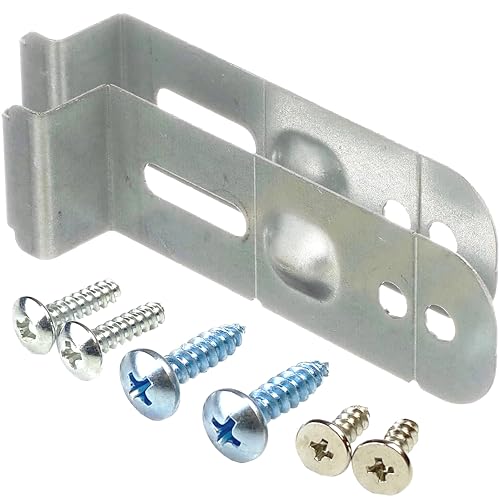
✅【【PARTS NUMBER】: dishwasher mounting install kit part # DD94-01002A , DD61-00465A , Includes 2 mounting brackets and 6 mounting screws.
Samsung Dishwasher SE Code Prevention Tips
The SE code on a Samsung dishwasher indicates a drainage issue that can disrupt your cleaning cycle. Understanding how to prevent this error is essential for maintaining optimal performance and avoiding costly repairs. Here are some practical tips to help you keep your dishwasher running smoothly and prevent the SE code from appearing.
Regular maintenance can help prevent the recurrence of the SE code. Implement these tips to keep your dishwasher running smoothly:
Clean the filter regularly: At least once a month to prevent clogs.
Inspect the drain hose: Ensure it is free of kinks and blockages.
Run hot water before starting: This can help dissolve grease and food particles.
Samsung Dishwasher SE Code Professional Help Timing
When your Samsung dishwasher displays the SE code, it indicates a drainage issue that may require professional attention. Understanding when to seek expert help can save you time and prevent further damage. This section explores the signs that suggest it’s time to call a technician for effective troubleshooting and repair.
If the SE code persists after following the troubleshooting steps, it may indicate a more complex issue. Consider calling a professional if:
The drain pump replacement does not resolve the issue.
You notice electrical problems or unusual noises.
The dishwasher is under warranty, and you prefer professional service.
Recommended Products

DC31-00178A DIRECT SUBSTITUTE FOR : ▲ Includes 1 x upgraded OEM DC31-00178D samsung washer drain pump. ▲If washer was √Making noise √ Will not drain √Pump but will...
Samsung Dishwasher SE Code Consequences
The SE code on a Samsung dishwasher indicates a drainage issue that can lead to poor cleaning performance and potential water damage. Understanding the consequences of this error is crucial for maintaining your appliance’s efficiency and longevity. Addressing the SE code promptly can help prevent further complications and ensure your dishwasher operates smoothly.
Ignoring the SE code may lead to further damage and costly repairs. Address the issue promptly to maintain your dishwasher’s efficiency.

Hey, I’m Jake. I focus on cooling systems at Appliance Mastery, like fridges, freezers, and air conditioners.
I’ve worked in appliance repair for more than ten years and I’m certified through NASTeC. I’ve seen just about every fridge issue you can imagine.
My goal is to help you fix problems without stress. Whether it’s a freezer that won’t cool or an AC that keeps beeping, I’m here to walk you through it.