
Have you ever walked into your kitchen only to find your stove’s digital display blank? It can be frustrating when you rely on that screen to cook your favorite meals. You’re not alone—many people face this problem, and it often feels like a hassle to figure out what went wrong.
This article will help you troubleshoot the issue and get your stove back in working order. You’ll learn about common causes of a non-functioning display and simple steps you can take to fix it. With a little guidance, you’ll be back to cooking up delicious dishes in no time.
Key Takeaways
- Power Supply Issues: Ensure the stove is plugged in, check for tripped circuit breakers, and test the outlet to confirm functionality.
- Wiring and Connections: Inspect the stove’s wiring for frays, ensure connector pins are clean and secure, and verify all wiring connections are tight.
- Troubleshooting Steps: Follow a systematic approach to diagnose issues, including examining the control board and performing resets when necessary.
- Possible Solutions: In case of persistent display problems, consider replacing the digital display or resetting the stove after checking the circuit breaker.
- Preventive Maintenance: Regularly clean the control panel, inspect wiring, and ensure tight connections to minimize the risk of display malfunctions.
- Professional Help: Schedule periodic inspections by a technician to catch potential issues early and maintain optimal stove performance.
Common Issues with Stove Digital Displays
Digital displays on stoves can face various issues, causing them to malfunction. Understanding these common problems allows you to troubleshoot effectively.
Recommended Products

The GE Appliances Control Board is a genuine OEM (Original Equipment Manufacturer) part designed and engineered to exact specifications

The WB27X45466 Control Board + Display is a genuine Original Equipment Manufacturer (Authentic OEM) part from General Electric that fits various models from the following brands of range/wall ovens: GE. Make sure to check below for your part number

Quality Craftsmanship: The Frigidaire 5304511908 Oven Control Board and Clock is designed and engineered by Frigidaire to exact specifications, which, unlike non-genuine parts, ensures optimal performance for your appliance
Power Supply Problems
Power supply issues often cause digital displays to go blank. Check these points:
- Unplugged Stove: Ensure your stove’s power cord is securely plugged into the outlet.
- Tripped Circuit Breaker: Inspect your circuit breaker for tripped switches. Resetting it may fix the issue.
- Faulty Outlet: Test the outlet with another device. If it doesn’t work, you may need an electrician.
- Wiring Check: Inspect the stove’s wiring for frays or disconnections. Secure any loose wires.
- Control Board: Examine the control board for signs of damage. A damaged board often requires replacement.
- Connector Pins: Ensure connector pins are clean and seated properly. Poor connections disrupt the signal to the display.
Troubleshooting Steps
Follow these steps to address the blank digital display on your stove.
Recommended Products
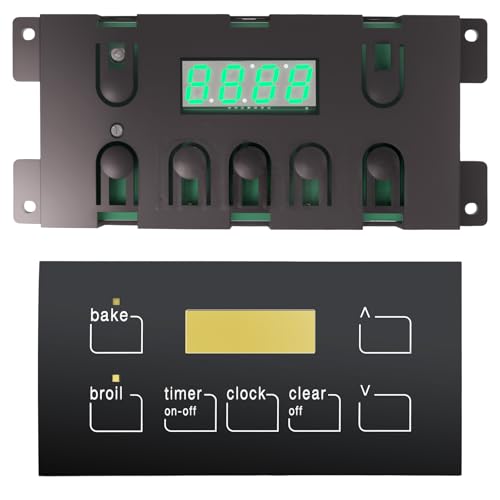
【Frigidaire Oven Control Board】This frigidaire oven control board (Part 5304518661) directly replaces multiple part numbers: 316455410, 316222800, 316222802, 316222802R, AP6886161, 4931113, 5304427745, PS12717913, ensuring accurate compatibility and reliable performance.

Compact Design: This sleek control panel features a simple, minimalistic layout with a digital display and five button controls. [Replaces Part Number]:5304518661, 316455410, 316222800, 316222802, 316222802R, AP6886161, 4931113, 5304427745, PS12717913.
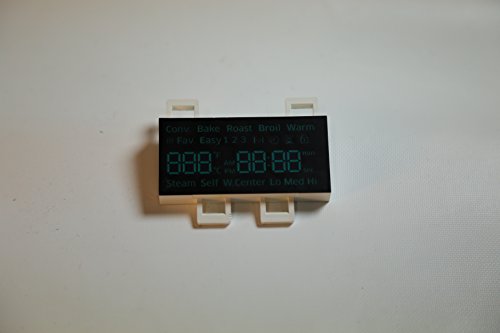
The Samsung DE07-00129A LED Display Board is a genuine OEM (Original Equipment Manufacturer) part designed and engineered to exact specifications
Checking the Power Source
- Ensure the Stove is Plugged In: Verify that the stove’s power cord is securely connected to an outlet.
- Examine the Circuit Breaker: Check the circuit breaker for any tripped switches. Reset any that may have tripped.
- Test the Outlet: Plug a different device into the same outlet. If that device works, the outlet is functional.
- Inspect for Power Interruptions: If you’ve experienced recent power outages, the stove settings may need resetting.
- Look for Frayed Wires: Examine the power cord and internal wiring for any visible damage.
- Check the Connector Pins: Remove the control panel and inspect the connector pins for cleanliness. Ensure they’re free of debris and corrosion.
- Secure Connections: Make sure all wiring connections are tight and properly seated to avoid disruptions.
- Evaluate the Control Board: Visually inspect the control board for signs of burn marks or damage, which could indicate a malfunction.
Performing these checks can help restore your stove’s digital display functionality.
Possible Solutions
When facing a stove’s digital display issue, several solutions might restore functionality. You can follow these steps to troubleshoot effectively.
Recommended Products

【OE Number】The DG96-00850A Switch Membrane Replacement Model Is A Versatile Replacement Option That Is Fully Compatible With Several Popular Samsung Stove Oven Models,including NX60A6711ST/AA-00,NX60A6711SS/AA-01,NX60A6711SS/AA-00,and NX60A6711SS/AA-02.

【Package Includes】 Stove drip pan include 2 8" and 2 6" porcelain drip pans. Color is black. MP22YA electric range burner element coil Unit Set include 2 x MP15YA 6" 1500W 230V 4-Turns & 2 x MP21YA 8" 2100W 230V 5-Turns

【𝙋𝙤𝙨𝙞𝙩𝙞𝙫𝙚𝙡𝙮 𝙍𝙚𝙫𝙞𝙚𝙬𝙚𝙙 𝙛𝙤𝙧 𝙎𝙩𝙪𝙧𝙙𝙞𝙣𝙚𝙨𝙨】---【UPGRADED】MP22YA Electric Stove Range Surface Burner Coil Unit Set is made of made of high temperature resistant stainless steel alloy material. Titanium is added to the stainless steel alloy, so our MP22YA surface burner elements has higher resistivity, higher temperature resistance, stronger oxidation resistance, better wear resistance, not easy to embrittlement, and smaller deformation when the burner works in the electric furnace.★The Burner Element solves the following problems for your stove:①The surface element is not heating up and the end connection was corroded.②Element will not heat.③Element will not start
Replacing the Digital Display
If the digital display remains non-functional after basic troubleshooting, replacing it may be necessary. Start by:
- Identifying the Model: Check your stove’s model number. This ensures you purchase the correct display replacement.
- Purchasing a New Display: Buy a compatible digital display from a reputable retailer or the manufacturer’s website.
- Powering Down the Stove: Unplug the stove for safety before you begin the replacement process.
- Accessing the Control Panel: Remove screws or clips around the control panel to access the display.
- Disconnecting Old Display: Detach the old display unit carefully, noting any wiring connections.
- Installing New Display: Connect the new display unit, ensuring all wires are secure and in their correct positions.
- Reassembling the Stove: Reattach the control panel and plug the stove back in. Test the new display to confirm it’s working.
Resetting the Stove
Sometimes, a simple reset can fix the digital display issue. To reset your stove, follow these steps:
- Unplug the Stove: Disconnect it from the power outlet. Wait at least 5 minutes to allow any residual charge to dissipate.
- Check the Circuit Breaker: Locate your home’s circuit breaker panel. Ensure the breaker for the stove hasn’t tripped. If it has, reset it.
- Reconnect the Stove: Plug the stove back in after waiting.
- Perform a Reset Function: Some stoves have a reset button. Look for this in the control panel or refer to the user manual for specific instructions.
- Test the Display: Check if the digital display lights up. If it’s still blank, further troubleshooting or professional assistance may be needed.
By taking these steps, you can often resolve digital display issues effectively, helping you return to your cooking routine efficiently.
Preventive Measures
Taking preventive measures can significantly reduce the likelihood of your stove’s digital display malfunctioning. Implementing regular maintenance and following electrical safety precautions will keep your stove in optimal condition.
Regular Maintenance Tips
- Clean the Surface Regularly: Wipe down the control panel and surrounding surfaces to prevent dust buildup. Use a mild detergent and damp cloth for cleaning.
- Inspect the Wiring: Check the power cord and internal wiring periodically for frays or damage. Look for signs of wear or overheating, which can indicate potential problems.
- Secure Connections: Ensure that all wiring connections remain tight and properly seated. Loose connections can lead to intermittent power loss affecting the display.
- Test Outlets Periodically: Test the stove’s outlet with a multimeter or plug in another device to verify it’s supplying power. This helps identify outlet issues before they affect your stove.
- Use the Stove Regularly: Regular use of the stove can keep components functioning correctly. Frequent operation can help catch small issues early before they escalate.
- Unplug When Not in Use: Always unplug your stove when it’s not in use for extended periods. This prevents potential power surges and reduces risk of damage.
- Avoid Overloading Circuits: Ensure your stove operates on a dedicated circuit. Overloading can trip breakers frequently, leading to power supply inconsistencies.
- Install a Surge Protector: Using a surge protector helps shield your stove from electrical spikes, which can damage the control board and display.
- Be Cautious with Liquid Spills: Wipe up any spills immediately to prevent moisture from affecting the control panel. Moisture can cause shorts and other display problems.
- Schedule Professional Inspections: Consider having a technician inspect your stove periodically. An expert can spot potential issues and advise on necessary maintenance steps.
Implementing these preventive measures creates a safer and more reliable cooking environment, reducing the chances of display malfunctions and ensuring your stove operates efficiently.
Conclusion
Dealing with a blank digital display can be a hassle but you don’t have to let it disrupt your cooking. By following the troubleshooting steps outlined in this post you can often pinpoint the issue and get your stove back in working order. Regular maintenance and being mindful of your stove’s condition can go a long way in preventing future problems.
Remember to stay proactive with your appliance care and don’t hesitate to reach out for professional help if needed. With a little attention and care your stove can continue to be a reliable companion in the kitchen. Happy cooking!
Frequently Asked Questions
What causes a blank digital display on my stove?
A blank digital display can be caused by several issues, including an unplugged stove, tripped circuit breakers, faulty outlets, damaged wiring, or a malfunctioning control board. It’s essential to check these areas to identify the root cause of the malfunction.
How can I troubleshoot the display issue?
Begin by ensuring the stove is plugged in and check for tripped circuit breakers. Test the outlet with another device to verify functionality. Inspect the power cord and internal wiring for damage, clean connector pins, and secure all wiring connections.
What should I do if basic troubleshooting doesn’t work?
If initial troubleshooting doesn’t resolve the issue, consider replacing the digital display. Identify your stove model, purchase a compatible replacement, and carefully follow the installation instructions. Alternatively, try resetting the stove by unplugging it and checking the circuit breaker.
How can I prevent display malfunctions in the future?
To prevent display issues, regularly maintain your stove by cleaning the control panel, inspecting wiring for damage, and securing connections. Unplug the stove when not in use, avoid overloading circuits, and schedule professional inspections as needed.
Is it safe to attempt repairs on my stove myself?
While some simple troubleshooting is safe for most users, significant repairs, particularly those involving electrical components, may require professional help. If unsure about any repairs, it’s best to consult a technician for safety and proper installation.

Hey, I’m Jake. I focus on cooling systems at Appliance Mastery, like fridges, freezers, and air conditioners.
I’ve worked in appliance repair for more than ten years and I’m certified through NASTeC. I’ve seen just about every fridge issue you can imagine.
My goal is to help you fix problems without stress. Whether it’s a freezer that won’t cool or an AC that keeps beeping, I’m here to walk you through it.