
Have you ever been in the middle of cooking your favorite meal when your LG stove suddenly shows the F19 error code? It’s frustrating, right? You’re not alone. Many people face this issue, and it can leave you wondering what went wrong and how to fix it.
Key Takeaways
- Understanding F19 Error Code: The F19 error code on LG stoves indicates communication issues, often linked to the oven temperature sensor’s malfunction or wiring problems.
- Common Causes: Key causes include a faulty oven temperature sensor, damaged wiring, a failing control board, and inconsistent power supply.
- Troubleshooting Steps: To resolve the F19 error, check the sensor and wiring connections, test the control board, and reset the stove if necessary.
- When to Seek Professional Help: If troubleshooting does not solve the problem, it’s advisable to consult a professional technician to prevent further damage.
- Preventive Maintenance: Regular cleaning, inspection of wiring, and yearly testing of the temperature sensor can help prevent future occurrences of the F19 error code.
- Importance of Professional Servicing: Regular professional maintenance ensures expert diagnosis, safe repairs, and adherence to warranty requirements, extending your stove’s lifespan.
Overview Of LG Stove F19 Error Code
The F19 error code on LG stoves usually indicates a problem with the stove’s communication system, specifically related to the oven temperature sensor. You might see this error when the stove cannot properly read or relay temperature information to the control board.
Common Causes
- Faulty Oven Temperature Sensor: A malfunctioning sensor may send incorrect temperature readings. This could cause the F19 error to display.
- Wiring Issues: Damaged or loose wires connecting the sensor to the control board can disrupt communication, leading to this error.
- Control Board Failure: A failing control board may misinterpret signals from the temperature sensor, resulting in the F19 error code.
- Power Supply Problems: Inconsistent power supply can impact the stove’s overall functioning, sometimes triggering this error.
Steps to Troubleshoot
- Inspect the Sensor: Check the oven temperature sensor for any visible damage. If you notice frayed wires or scorch marks, consider replacing it.
- Examine Wiring Connections: Ensure all connections are secure between the sensor and control board. Tighten any loose clamps or connections.
- Test the Control Board: If other components seem functional, the control board might need testing. Use a multimeter to check for continuity.
- Reset the Stove: Sometimes, simply turning off the stove for a few minutes resets the system and clears the error code.
When to Call a Professional
If troubleshooting doesn’t resolve the F19 error code, it’s wise to contact a professional technician. They can diagnose more complex issues like control board failures or wiring problems. It’s better to seek help than risk causing further damage to your appliance.
Common Causes Of F19 Error Code
The F19 error code on LG stoves often stems from a few familiar issues. Understanding these causes helps in troubleshooting effectively.
Recommended Products

𝗣𝗘𝗥𝗙𝗘𝗖𝗧 𝗙𝗜𝗧 - Our upgraded dg32-00002b sam.sung temperature sensor is exact compatible with Samsung and LG range. DG32-00002B Equal with range oven parts # EBG61305805, 6322B62214A, DG32-00002A, PS4240743, PS11732697, 2087461, AP4343210, PS2567734, EAP2567734. (Cable Length: 82mm, Probe Length: 100mm, Temperature Range: -50~+300C)

PERFECT FIT: 2026 Upgraded DG32-00002B temperature sensor can exact for Sam.sung and L.G oven .Equal with oven parts: DG32-00002B 6322B62214A DG32-00002A EBG61305805 PS4240743 PS11732697 2087461 AP4343210 PS2567734 EAP2567734.Cable Length: 82mm Probe Length: 100mm Temperature Range:-50~+300C

Package includes 1 x DG32-00002B OEM range oven temperature sensor
Sensor Malfunction
A faulty oven temperature sensor frequently triggers the F19 error code. This sensor measures the oven’s temperature, ensuring accurate cooking. If the sensor is defective or damaged, it can send incorrect readings to the control board. You can test the sensor’s resistance using a multimeter. The ideal resistance should be around 1,100 ohms at room temperature. If the readings are significantly off, replacing the sensor is necessary.
Wiring Issues
Wiring problems can also lead to the F19 error code. Loose or damaged wiring connections disrupt communication between the sensor and control board. Start by visually inspecting the wiring for signs of wear or disconnection. Ensure all connectors are secure. If any wires appear frayed or broken, replacing them can often resolve the issue.
Control Board Problems
A malfunctioning control board can cause communication errors, resulting in the F19 code. The control board processes signals from the temperature sensor. If this board is defective, it may misinterpret signals, triggering errors. Testing the control board may require specialized tools. If the board shows signs of damage or unresponsive behavior, replacing it is the recommended solution.
Troubleshooting Steps
Addressing the F19 error code on your LG stove involves a few key steps. Follow these instructions to identify and resolve the issue effectively.
Recommended Products
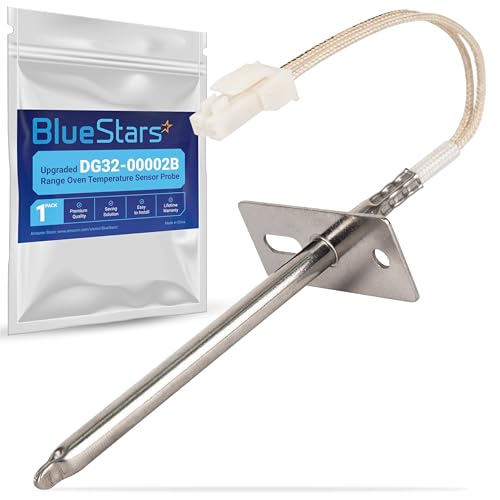
IMPORTANT NOTE: 2026 Upgrade version - Ultra Durable DG32-00002B EBG61305805 Temperature Sensor Probe works with Samsung and LG ranges. It is not universal. If you're not sure whether or not a parts you're ordering fits your model, please feel free to contact with us before ordering. Include your Model number. We can verify the part will fit your model
![[Upgraded] BlueStars 12001656 Oven Temperature Sensor for Whirlpool Kenmore](https://m.media-amazon.com/images/I/41Lm2bY-lqL._SL500_.jpg)
IMPORTANT NOTE: Please check the model number carefully before ordering. You can send us your oven model number, we can help you confirm if it fits or not. Don't hesitate to contact us if you have any concerns with your purchase, we will be here to help.

PERFECT OEM REPLACEMENT: Oven temperature sensor probe assembly replaces GE WB21X5301 and compatible part numbers, restoring accurate oven temperature control and consistent heating performance. Engineered to meet or exceed OEM specifications for fit, function, and durability. Ideal solution for correcting inaccurate temperature readings in electric ovens and ranges.
Resetting The Stove
Resetting your stove can often resolve temporary errors. To reset the stove, unplug it from the wall outlet or turn off the circuit breaker. Wait for at least five minutes before plugging it back in or switching the circuit breaker on. This simple reset might clear the F19 error and restore normal operation.
Checking Wiring Connections
Inspecting wiring connections helps ensure that all components communicate properly. Start by turning off the stove and unplugging it for safety. Open the back panel to access the wiring. Look for loose, frayed, or damaged wires, particularly those connected to the oven temperature sensor and control board. Tighten any loose connections and replace faulty wires as needed. After checking, reassemble the stove and power it on to see if the error persists.
Replacing Faulty Components
If resetting the stove and checking connections doesn’t solve the problem, consider replacing faulty components. Begin with the oven temperature sensor. You can test its resistance with a multimeter; a reading outside the standard range indicates a need for replacement. If the sensor is functioning well, examine the control board for any visible signs of damage. If damaged, replacing the control board may be necessary for proper operation.
Preventive Measures
To minimize the chances of encountering the F19 error code on your LG stove, implement regular maintenance and consider professional servicing as needed.
Recommended Products

【Compatible with】: Compatible with LG including 76033 76037 96047 619530 LDE3015SB LDE3015ST LDE3015SW LDE3017SB LDE3017ST LDE3017SW LDE3019ST LDE3031ST LDE3035ST LDE3035SW LDE3037BD LDE3037SB LDE3037ST LDG3011ST LDG3015ST LDG3016ST LDG3031ST LDG3035ST LDG3036BD LDG3036ST LDG3037ST LRE3012SB LRE3012ST LRE3012SW LRE3021ST LRE3023SB LRE3023ST LRE3023SW LRE3025ST LRE30451SB LRE30451ST LRE30451SW LRE30453SB LRE30453ST LRE30453SW LRE30453WW LRE3060ST LRE3061BD LRE3061ST LRE30755SB LRE30755ST LRE30755SW LRE30757SB LRE30757ST etc. Use CTRL+F to search your model for fit confirmation

【Premium Quality for Accurate & Durable Service】Built to last and perform. Our DG32-00002B Temperature Sensor is constructed with a high-quality 304 stainless steel body and features an imported CLASS B PT1000 element component for exceptional accuracy and stability. Manufactured to meet OEM standards, suitable for Sam-sung and L-G range oven. Replacement number :EBG61305805 DG32-00002A, 2087461, AP4343210, PS2567734, EAP2567734 gas stove igniter. It reliably operates across a wide temperature range of -50°C to +300°C, ensuring consistent performance under the demanding conditions of your kitchen. (Cable Length: 82mm, Probe Length: 100mm)

DG32-00002B Oven Temperature Sensor
Regular Maintenance Tips
- Clean the Stove: Regularly clean the stove, especially around the oven temperature sensor. Food debris can interfere with readings.
- Inspect Wiring Connections: Periodically check wiring connections for any signs of wear or damage. Tighten loose wires to ensure stable communication.
- Test the Temperature Sensor: Use a multimeter to check the sensor’s resistance at least once a year. Replace it if it shows abnormal readings.
- Check the Control Board: Look for any visible signs of damage or corrosion on the control board. Address issues promptly to prevent bigger problems.
- Reset the Stove: After performing maintenance, unplug the stove or turn off the circuit breaker for a few minutes to reset its systems.
Importance Of Professional Servicing
Professional servicing plays a crucial role in maintaining the performance of your LG stove.
- Expert Diagnosis: Technicians are trained to diagnose complex issues beyond basic troubleshooting. They can pinpoint problems that aren’t easily visible.
- Safe Repairs: Professionals follow safety protocols while handling electrical components, reducing the risk of accidents or further damage.
- Preventative Maintenance: Regular professional servicing can extend the lifespan of your stove. Technicians can identify potential issues before they escalate.
- Warranty Compliance: Many extended warranties require professional servicing to remain valid. Keeping records of professional maintenance can protect your investment.
Conclusion
Dealing with the F19 error code on your LG stove can be a hassle but you’re not alone in this. By following the troubleshooting steps outlined and keeping an eye on maintenance you can often resolve the issue yourself. Remember to check the oven temperature sensor and wiring connections as these are common culprits. If you find that the problem persists don’t hesitate to call in a professional. They can provide the expertise needed to get your stove back in working order. With a little effort you can enjoy cooking again without the stress of error codes.
Frequently Asked Questions
What does the F19 error code on an LG stove signify?
The F19 error code indicates a communication problem within the stove, often linked to the oven temperature sensor. This code can arise from issues such as a faulty sensor, damaged wiring, control board malfunction, or power supply complications.
How can I troubleshoot the F19 error code on my LG stove?
To troubleshoot the F19 error, start by resetting the stove by unplugging it or turning off the circuit breaker for at least five minutes. Then inspect the oven temperature sensor and wiring connections for damage. If issues persist, test or replace the control board.
What is the main cause of the F19 error code?
The primary cause of the F19 error code is usually a faulty oven temperature sensor, which measures the oven’s temperature. Other potential causes include wiring issues, a damaged control board, and power supply problems—all of which disrupt proper communication.
When should I contact a professional for the F19 error code?
If basic troubleshooting, like inspecting the sensor and connections, does not resolve the F19 error code, it’s best to contact a professional technician. They can diagnose more complex issues and provide safe, effective repairs.
How can I prevent the F19 error code from appearing?
To prevent the F19 error code, regularly maintain your stove by cleaning it and inspecting wiring connections. Test the oven temperature sensor annually and check the control board for visible damage. Additionally, consider professional servicing to catch problems early.

Hey, I’m Jake. I focus on cooling systems at Appliance Mastery, like fridges, freezers, and air conditioners.
I’ve worked in appliance repair for more than ten years and I’m certified through NASTeC. I’ve seen just about every fridge issue you can imagine.
My goal is to help you fix problems without stress. Whether it’s a freezer that won’t cool or an AC that keeps beeping, I’m here to walk you through it.