
If your Samsung dishwasher is stuck in a delay start cycle, a simple reset can resolve the issue quickly. This process typically involves a combination of button presses that will clear the current cycle and restore normal functionality.
Understanding Samsung Dishwasher Delay Start Issues
Delay start cycles can be frustrating, especially when they prevent your dishwasher from running as expected. This issue often arises due to a temporary glitch in the control panel or a minor software error. Understanding how to reset your appliance can save you time and prevent unnecessary service calls.
Samsung Dishwasher Delay Start Issues Explained
Samsung dishwashers are designed with a delay start feature that allows users to schedule cycles conveniently. However, this functionality can sometimes malfunction, leaving cycles stuck and users frustrated. Understanding the common issues related to the delay start can help you troubleshoot effectively and restore your dishwasher to optimal performance.
| Symptom | Primary Suspect | Difficulty |
|---|---|---|
| Dishwasher stuck in delay | Control panel glitch | 2 |
| Cycle not starting | Software error | 3 |
| Unresponsive buttons | Power supply issue | 4 |
Samsung Dishwasher Delay Start Issues Explained
If your Samsung dishwasher is stuck on a delay start cycle, understanding the underlying issues can help you troubleshoot effectively. This section delves into common reasons for these delays, providing insights into how to identify and resolve the problem quickly. By addressing these issues, you can restore your dishwasher’s functionality and efficiency.
Before proceeding with the reset, it’s essential to identify the root cause of the delay start issue. Common culprits include:
Control panel malfunctions that can cause the dishwasher to freeze.
Software glitches that may occur after power outages or surges.
Faulty wiring that affects the communication between components.
Samsung Dishwasher Stuck Cycle Indicators
When your Samsung dishwasher is stuck in a cycle, it can be frustrating and inconvenient. Understanding the indicators that signal a malfunction is crucial for diagnosing the issue quickly. This section will help you identify the specific signs that your dishwasher may be experiencing a stuck cycle, allowing for a more efficient reset and resolution.
Recognizing the symptoms can help pinpoint the issue quickly. Watch for:
The display showing an error code.
The dishwasher failing to start after the delay period.
Buttons that do not respond when pressed.
Samsung Dishwasher Delay Start Reset Steps
If your Samsung dishwasher is stuck in a delay start cycle, resetting it can often resolve the issue quickly. This section outlines the specific steps to effectively reset your dishwasher, helping you get back to normal operation without unnecessary delays. Follow these instructions to troubleshoot and restore your appliance’s functionality.
Follow these steps to reset your Samsung dishwasher and clear the delay start cycle:
Turn off the dishwasher by pressing the power button.
Unplug the unit from the wall socket to cut power completely. Wait for at least 5 minutes.
Plug the dishwasher back in and turn it on.
Press and hold the Start/Cancel button for 3 seconds until the display lights up.
Select a new wash cycle to ensure the reset was successful.
Recommended Products

✅ Precision Fit for Samsung – Specially designed replacement for toe kick panels DD81-02144A. Custom-fit alignment ensures easy mounting with no modifications needed.

SMART DRY WITH AUTORELEASE DOOR: The Smart Dry with AutoRelease Door system circulates warm air to deliver 2.5x better drying performance¹ without damaging plastic ware. It intelligently senses and adjusts drying temperature and time to avoid wasting energy.
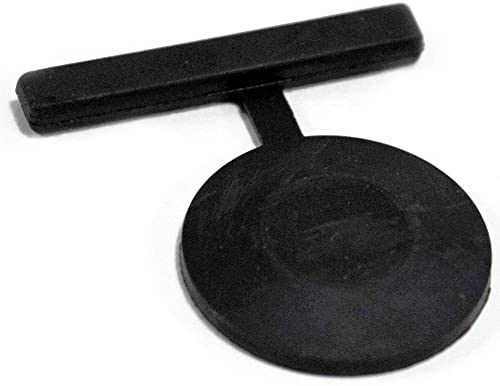
For DD66-00045A Samsung Vane-check Drain dishwasher New
Samsung Dishwasher Wiring Issues to Check
If your Samsung dishwasher is experiencing delays or stuck cycles, wiring issues could be the culprit. Understanding how to identify and troubleshoot these problems can help restore your appliance’s functionality. This section will guide you through the key wiring components to check for potential faults.
If the problem persists after the reset, consider checking the wiring or consulting a professional.
Samsung Dishwasher Delay Start Power Supply Fixes
If your Samsung dishwasher is stuck in a delay start cycle, addressing power supply issues may be the key to resolving the problem. This section outlines specific fixes to restore functionality, ensuring your dishwasher operates efficiently and meets your needs without unnecessary delays. Understanding these power supply solutions can help you troubleshoot effectively and get your appliance back on track.
A power supply issue can also cause the dishwasher to get stuck in delay start. Ensure that:
The dishwasher is plugged into a working outlet.
The circuit breaker is not tripped.
There are no visible signs of damage to the power cord.
Recommended Products
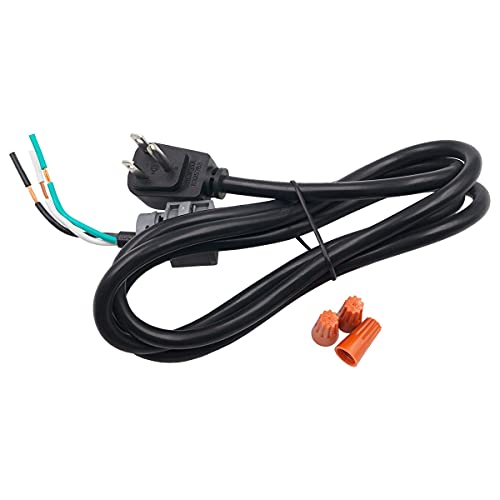
Alternate part numbers include AP3797606, WX09X70910DS, 1093961, AH968258, EA968258, GPFQDCORD, PS968258, WD06X10020, WX09X70909, WX09X70909RB, and WX09X70910RB.

1. Material and Functionality: The DD66-00045A is a crucial component designed for Samsung dishwashers, crafted from high-quality plastic material. Its primary function entails filtering impurities and residues from the circulating water within the dishwasher, ensuring optimal cleanliness of the internal water and enhancing both washing efficiency and machine longevity.

The DA35-00099G Compressor Start Relay is a genuine Original Equipment Manufacturer (Authentic OEM) part from Samsung that fits various models from the following brands of refrigerators: Samsung. Make sure to check below for your part number
Samsung Dishwasher Circuit Breaker Check
If your Samsung dishwasher is experiencing issues with stuck cycles, a circuit breaker check is a crucial step in diagnosing the problem. This process can help determine whether a power interruption is affecting the appliance’s performance. Understanding how to inspect the circuit breaker can lead to a quick resolution and restore your dishwasher’s functionality.
To check the circuit breaker:
Locate your home’s electrical panel.
Inspect the breakers for any that are in the “off” position.
Reset any tripped breakers by flipping them back to the “on” position.
Samsung Dishwasher Control Panel Reset Steps
If your Samsung dishwasher is stuck in a cycle, resetting the control panel can often resolve the issue. This section outlines the specific steps needed to effectively reset your dishwasher’s control panel, helping you get back to normal operation quickly and efficiently. Follow these instructions to troubleshoot and restore functionality.
If the control panel is unresponsive, it may require further investigation. Here are steps to troubleshoot:
Inspect for moisture around the control panel that can cause short circuits.
Clean the control panel with a soft, dry cloth to remove any debris.
Test the buttons for responsiveness after cleaning.
Samsung Dishwasher Control Panel Risks
The control panel of a Samsung dishwasher is crucial for its operation, but it can also be a source of frustration when issues arise. Understanding the potential risks associated with the control panel can help users identify problems early and take the necessary steps to resolve them. This section will explore common control panel issues and their implications for your dishwasher’s performance.
Do not attempt to open the control panel if you are not familiar with appliance repair. This can void the warranty.
Samsung Dishwasher Professional Repair Indicators
When troubleshooting a Samsung dishwasher, recognizing the signs that indicate a need for professional repair is crucial. Certain symptoms can signal underlying issues that simple resets or adjustments won’t resolve. Understanding these indicators can help you determine when to seek expert assistance to restore your appliance’s functionality efficiently.
If your Samsung dishwasher continues to experience issues after following these steps, it may be time to contact a professional technician. Signs that indicate the need for expert help include:
Persistent error codes that do not clear.
Unusual noises during operation.
Inconsistent performance across multiple cycles.
Samsung Dishwasher Maintenance Tips for Longevity
Regular maintenance is essential for keeping your Samsung dishwasher running efficiently and prolonging its lifespan. By following a few straightforward tips, you can prevent common issues and ensure that your appliance remains in top condition. These practices not only enhance performance but also help avoid costly repairs down the line.
Maintaining your Samsung dishwasher and addressing issues promptly can extend its lifespan. Regularly check for software updates and keep the appliance clean to prevent future problems.

Hey, I’m Jake. I focus on cooling systems at Appliance Mastery, like fridges, freezers, and air conditioners.
I’ve worked in appliance repair for more than ten years and I’m certified through NASTeC. I’ve seen just about every fridge issue you can imagine.
My goal is to help you fix problems without stress. Whether it’s a freezer that won’t cool or an AC that keeps beeping, I’m here to walk you through it.