
The DC error code on a Samsung dryer indicates door and balance issues that can disrupt drying cycles. Addressing these problems typically involves checking the door latch and ensuring the dryer is level.
Understand Samsung Dryer DC Error Code
The DC error code usually signals that the dryer door is not securely closed or that the dryer is unbalanced. This can lead to inefficient drying and potential damage to the appliance. Identifying the root cause is essential for effective troubleshooting.
Recommended Products

Part Number--Dryer door switch replacement for samsung part number PS4210964 2071594 AP4578931 DC64-00828A DC64-00828B DC64-00828A. Compatible with some Samsung Kenmore Dryer

PARTS NUMBER: samsung dc96-00887c dryer thermal fuse replacement ( DC96-00887A )
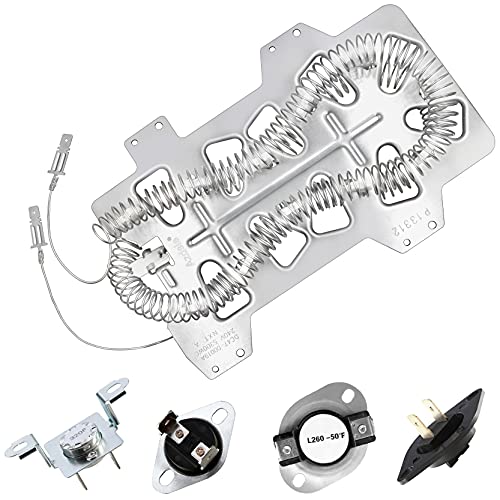
Azdele Heating element for samsung dryer: dc47-00019a samsung heating element wire is 25% longer than other dryer wires, increasing the resistance by 65% and producing stable heating.
Samsung Dryer Error Code Diagnostic Table
When dealing with a Samsung dryer that displays the DC error code, it’s essential to understand the underlying issues related to door and balance problems. This diagnostic table provides a comprehensive overview of the error, helping you identify the specific cause and guiding you through effective troubleshooting steps to restore your dryer’s functionality.
| Symptom | Primary Suspect | Difficulty (1-5) |
|---|---|---|
| Door not closing | Faulty door latch | 2 |
| Dryer vibrating excessively | Uneven load | 3 |
| Error code persists | Leveling issue | 4 |
Samsung Dryer Repair Tools and Supplies
When addressing DC error codes in Samsung dryers, having the right tools and supplies is essential for effective repairs. This section outlines the necessary equipment and materials that will help you tackle door and balance issues efficiently, ensuring your dryer operates smoothly and reliably once again.
Before starting repairs, gather necessary tools and supplies. This ensures you have everything on hand for a smooth process.
Screwdriver: For removing the door latch
Level: To check dryer balance
Towel: For cleaning surfaces
Replacement parts: Door latch or leveling feet if needed
Safety Precautions for Samsung Dryer Repair
When addressing DC error codes in Samsung dryers, it’s crucial to prioritize safety during repairs. Understanding the potential hazards involved in working with electrical appliances will help ensure a secure environment. This section outlines essential safety precautions to follow before attempting any troubleshooting or repairs on your dryer.
Always prioritize safety when working on appliances. Unplug the dryer to prevent electrical hazards.
Ensure the area around the dryer is clear of obstructions. This allows for easy access and minimizes the risk of accidents.
Samsung Dryer Door Latch Inspection Steps
When dealing with the DC error code on your Samsung dryer, inspecting the door latch is a crucial step in resolving door and balance issues. A malfunctioning door latch can prevent the dryer from operating properly, leading to frustration and potential damage. This guide will outline the necessary steps to effectively inspect and troubleshoot the door latch.
Start by inspecting the door latch. If it appears damaged or worn, replace the latch. Follow these steps:
Unplug the dryer to ensure safety.
Remove the screws holding the door latch in place.
Install the new latch and secure it with screws.
Reconnect the dryer and test the door closure.
Next, check the dryer balance. An unbalanced dryer can cause excessive vibrations and may trigger the DC error code.
Use a level to check the dryer’s position.
Adjust the leveling feet as needed to achieve a flat surface.
Load the dryer evenly to prevent imbalance during operation.
Samsung Dryer DC Error Code Door Latch Solutions
Encountering the DC error code on your Samsung dryer can be frustrating, particularly when it signals door latch or balance issues. This section provides practical solutions to address these problems, ensuring your dryer operates smoothly and efficiently. Follow these steps to troubleshoot and resolve the DC error code effectively.
The door latch is a common source of the DC error code. If the latch does not engage properly, it can lead to the dryer thinking the door is open. Inspect the latch for any obstructions or damage.
Clean the latch area to remove debris.
Test the latch by closing the door firmly.
Replace the latch if it does not click into place.
Samsung Dryer DC Error Code Balance Solutions
When your Samsung dryer displays the DC error code, it typically indicates issues with the door or balance. Addressing these problems is crucial for optimal performance and efficiency. This section provides practical solutions to help you resolve balance-related issues and ensure your dryer operates smoothly.
An unbalanced load can also trigger the DC error code. Ensure that items in the dryer are distributed evenly.
Avoid overloading the dryer.
Mix heavy and light items to balance the load.
Stop the dryer during operation if it vibrates excessively and redistribute items.
Samsung Dryer Final Check for DC Error Code
When troubleshooting the DC error code on your Samsung dryer, it’s essential to perform a final check to ensure all components are functioning correctly. This step will help confirm that door and balance issues are resolved, allowing your dryer to operate efficiently and effectively. Follow these guidelines to complete your assessment and restore optimal performance.
After making repairs, conduct a thorough check. Ensure the door closes securely and the dryer is stable. Run a short cycle to confirm that the DC error code does not reappear.
Monitor the dryer for any unusual sounds or vibrations.
Inspect the door latch during operation to ensure it remains engaged.
Samsung Dryer DC Error Code Troubleshooting Steps
Encountering a DC error code on your Samsung dryer can be frustrating, often indicating door and balance issues that disrupt its operation. This section provides a comprehensive guide to troubleshooting these specific problems, ensuring your dryer runs smoothly and efficiently once again. Follow these steps to identify and resolve the underlying causes of the DC error code.
If the DC error code continues to appear despite repairs, further investigation may be needed. Check the wiring and connections related to the door latch.
Inspect wiring for frays or disconnections.
Test the door switch with a multimeter to ensure it functions correctly.
Consult the user manual for specific troubleshooting steps related to your dryer model.
Taking these steps can effectively resolve the DC error code on your Samsung dryer.

Hey, I’m Jake. I focus on cooling systems at Appliance Mastery, like fridges, freezers, and air conditioners.
I’ve worked in appliance repair for more than ten years and I’m certified through NASTeC. I’ve seen just about every fridge issue you can imagine.
My goal is to help you fix problems without stress. Whether it’s a freezer that won’t cool or an AC that keeps beeping, I’m here to walk you through it.