
Samsung dryer error codes indicate specific issues that may arise during operation. Understanding these codes can help you troubleshoot problems efficiently, saving time and repair costs.
Quick-Look Table for Samsung Dryer Error Codes
Understanding the error codes displayed on your Samsung dryer is essential for effective troubleshooting. This quick-look table provides a concise overview of common error symbols, helping you identify issues quickly and take appropriate action. Familiarizing yourself with these codes can save time and reduce frustration during laundry day.
This table summarizes common Samsung dryer error codes, their meanings, and the difficulty level of troubleshooting each issue.
| Error Code | Meaning | Difficulty (1-5) |
|---|---|---|
| HE | Heating Element Issue | 3 |
| DC | Door Circuit Issue | 2 |
| dE | Door Open Issue | 1 |
| tE | Thermistor Error | 4 |
| SE | Control Board Error | 5 |
Samsung Dryer Error Code Malfunctions Explained
Understanding the various error codes displayed by your Samsung dryer is essential for effective troubleshooting. Each code signifies a specific malfunction, allowing you to identify and address issues promptly. This section delves into the most common error codes, providing clarity on what they mean and how to resolve them.
Each error code corresponds to a specific malfunction. Identifying the root cause is essential for effective troubleshooting.
HE indicates a problem with the Heating Element. This could be due to a burned-out element or a faulty thermostat.
DC suggests a Door Circuit issue, often caused by a misaligned door or a defective door switch.
dE points to an Open Door situation, usually resolved by ensuring the door is fully closed.
tE relates to a Thermistor Error, which may require replacing the thermistor or checking wiring connections.
SE signifies a Control Board Error, often needing a technician’s expertise for diagnosis and repair.
Samsung Dryer Error Code Troubleshooting Guide
Understanding the error codes displayed on your Samsung dryer is crucial for effective troubleshooting. This guide will help you decode these symbols, allowing you to identify issues and take appropriate action. By following the insights provided, you can ensure your dryer operates smoothly and efficiently.
Follow these steps to address the most frequently encountered Samsung dryer error codes.
Samsung Dryer Heating Element Troubleshooting
When your Samsung dryer fails to heat properly, it can lead to frustration and damp laundry. Understanding the potential issues with the heating element is crucial for effective troubleshooting. This section will guide you through common problems and solutions related to your dryer’s heating element, helping you restore its functionality.
Unplug the dryer to ensure safety.
Remove the back panel to access the heating element.
Inspect the heating element for signs of damage or breaks.
Test the element with a multimeter for continuity.
Replace the heating element if it is faulty.
Samsung Dryer Door Circuit Error Solutions
When your Samsung dryer displays a door circuit error, it indicates a potential issue with the door latch or the door switch. Understanding the specific error codes can help you troubleshoot effectively. This section will guide you through common solutions to resolve door circuit errors and ensure your dryer operates smoothly again.
Check the door alignment to ensure it closes properly.
Inspect the door switch for functionality.
Test the door switch with a multimeter.
Replace the door switch if it is defective.
Samsung Dryer Thermistor Error Solutions
Understanding the thermistor error codes in your Samsung dryer is crucial for effective troubleshooting. These codes indicate temperature irregularities that can affect drying performance and efficiency. By addressing these issues promptly, you can ensure your dryer operates smoothly and prolong its lifespan.
Unplug the dryer to eliminate electrical hazards.
Locate the thermistor on the blower housing.
Remove and test the thermistor for resistance.
Replace the thermistor if readings are outside the normal range.
Samsung Dryer Control Board Error Solutions
Understanding the error codes displayed by your Samsung dryer is crucial for effective troubleshooting. The control board plays a vital role in diagnosing issues, and knowing how to interpret these signals can save you time and money. This section will guide you through common error codes and their corresponding solutions, ensuring your dryer operates smoothly again.
Unplug the dryer to ensure safety.
Inspect the control board for visible damage or burnt components.
Check all wiring connections for loose or corroded contacts.
Consult a technician if the control board needs replacement.
Additional Tips for Samsung Dryer Maintenance
Maintaining your Samsung dryer is essential for optimal performance and longevity. In this section, you’ll find practical tips to help you keep your appliance running smoothly, prevent common issues, and ensure efficient drying cycles. Regular maintenance can save you time and money while enhancing the overall functionality of your dryer.
Regular maintenance can prevent many issues that lead to error codes.
Clean the lint filter after every use to ensure proper airflow.
Inspect the venting system for blockages at least once a year.
Check the dryer drum for foreign objects that could cause mechanical issues.
Run a diagnostic test periodically to catch potential problems early.
Recommended Products

❤PREMIUM QUALITY: The upgraded samsung dryer repair kit made of premium quality material. The rollers are strong and wear-resistant, which make the dryer run stably and quietly. It designed with a high-quality rubber overall structure. The 6602-001655 dryer belt 92’’Length X 0.3’’Width. It is thickness is twice as thick as before and it is more durable. The center of the idler has a triangular design, which is more firm and stable. Meets OEM manufacturing requirements.

【Perfectly Compatible】:DC97-16742A dryer lint trap screen filter with flap replacement compatible with Samsung Dryer and replace these part numbers: DC61-03048A DC97-16742A, DC61-02610A, AP5306681, PS4221839, AP4578784, 2069511, B00D6MDHNG etc. We have listed all matching models in the description. If you're not sure whether or not a parts you're ordering fits your model, please feel free to contact us, We can verify if it will fit
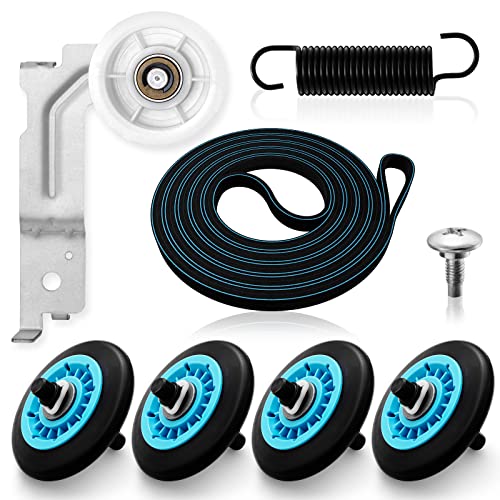
【MATERIAL UPGRADE】The samsung dryer roller replacement kit is designed with a high-quality rubber overall structure, which is strong and wear-resistant, not easy to crack. The samsung dryer roller bearing quality is more stable and quieter than ordinary bearings. The thickness of samsung dryer belt is upgraded and the length is standard. All samsung dryer repair kit has undergone strict quality inspection by the manufacturer---Meet OEM Samsung dryer parts standards.
Common Samsung Dryer Symbols
Understanding the common symbols displayed on your Samsung dryer can help you troubleshoot issues effectively. Each symbol serves as a communication tool, offering insights into the machine’s status and potential problems. Familiarizing yourself with these symbols will enable you to respond appropriately and maintain optimal performance.
Understanding the symbols on your Samsung dryer can provide further insights into its operation.
Drying Cycle Symbols indicate the selected drying mode, such as Normal, Heavy, or Delicate.
Status Indicators show whether the dryer is running, paused, or completed.
Error Symbols flash when there is a malfunction, prompting you to check the manual for specific error codes.
Samsung Dryer DIY Repair Risks and Warnings
When tackling DIY repairs on your Samsung dryer, it’s essential to be aware of potential risks and warnings that could arise. Understanding these factors can help you avoid costly mistakes and ensure your safety throughout the repair process. This section outlines critical considerations to keep in mind before attempting any fixes on your appliance.
Attempting repairs without proper knowledge can lead to further damage or safety hazards. Always consult the user manual or a professional technician if unsure about any steps.

Hey, I’m Jake. I focus on cooling systems at Appliance Mastery, like fridges, freezers, and air conditioners.
I’ve worked in appliance repair for more than ten years and I’m certified through NASTeC. I’ve seen just about every fridge issue you can imagine.
My goal is to help you fix problems without stress. Whether it’s a freezer that won’t cool or an AC that keeps beeping, I’m here to walk you through it.