
A Cooling Light on a Samsung Dryer indicates that the dryer is in a cooling down phase after a cycle. This feature helps prevent damage to clothes by allowing them to cool before removal. If the light remains on longer than expected, troubleshooting is necessary to ensure proper function.
Understand the Samsung Dryer Cooling Light Function
The Cooling Light serves a specific purpose in the drying process. It activates when the dryer stops heating and begins to cool down the clothes. This phase is crucial for preventing heat damage and ensuring that garments are safe to handle. If the light stays on longer than usual, it may indicate an underlying issue that needs attention.
Recommended Products

❤PREMIUM QUALITY: The upgraded samsung dryer repair kit made of premium quality material. The rollers are strong and wear-resistant, which make the dryer run stably and quietly. It designed with a high-quality rubber overall structure. The 6602-001655 dryer belt 92’’Length X 0.3’’Width. It is thickness is twice as thick as before and it is more durable. The center of the idler has a triangular design, which is more firm and stable. Meets OEM manufacturing requirements.

DC97-16782A Kit Includes- 4 × DC97-16782A upgraded dryer drum roller (includes roller wheel and roller axle), 1 × 6602-001655 dryer drum drive belt ( 0.3in Width,92 in Long ), 1 x DC93-00634A dryer idler pulley assembly (1 screw and 1 Spring include). extensive compitible for samsung dryers
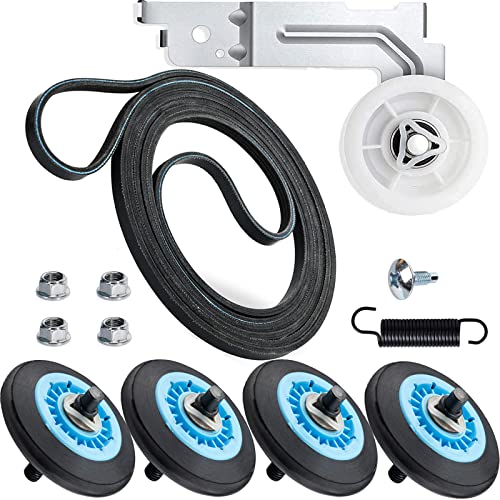
✅【Upgraded High-quality】The upgraded rollers and belt are design adopted good rubber so that they have high wear-resistant, long lifetime and non-deformation features, etc. The center of the idler has a triangular design, which is more firm and stable. The ball bearings quality are more stable and quieter than ordinary bearings. All dryer repair kits have been undergone strict quality inspection by the manufacturer---Meet OEM standards.
Symptoms of Samsung Dryer Cooling Light Malfunctions
When the cooling light on your Samsung dryer malfunctions, it can disrupt your laundry routine and leave you unsure about the appliance’s performance. Recognizing the symptoms associated with this issue is crucial for effective troubleshooting. This section outlines the common signs that indicate a problem with the cooling light and what they might mean for your dryer.
When the Cooling Light behaves unexpectedly, several symptoms may arise. Recognizing these can help diagnose the problem quickly. Here are some common signs to look for:
Extended Cooling Period: The light remains on for an unusually long time.
Dryer Stops Mid-Cycle: The dryer halts operation before the cycle completes.
Unusual Noises: Grinding or rattling sounds may occur during the cooling phase.
Overheating: Clothes feel excessively hot when removed.
| Symptom | Primary Suspect | Difficulty (1-5) |
|---|---|---|
| Extended Cooling Period | Faulty Thermostat | 3 |
| Dryer Stops Mid-Cycle | Broken Heating Element | 4 |
| Unusual Noises | Worn Drum Rollers | 2 |
| Overheating | Blocked Vent | 3 |
Samsung Dryer Cooling Light Issue Causes
Understanding the causes behind the cooling light issue on your Samsung dryer is essential for effective troubleshooting. This section delves into the common reasons why the cooling light may activate, helping you identify the underlying problems and guiding you toward practical solutions for a smoother laundry experience.
Understanding the root causes can streamline the troubleshooting process. Common factors that may lead to issues with the Cooling Light include:
Thermostat Malfunction: A faulty thermostat may not accurately read temperatures, causing extended cooling times.
Heating Element Failure: If the heating element is broken, the dryer may stop prematurely.
Vent Blockage: A clogged vent can lead to overheating, triggering the cooling light to stay on longer.
Drum Roller Wear: Worn drum rollers can cause the dryer to make unusual noises and affect performance.
Samsung Dryer Cooling Light Troubleshooting Steps
If your Samsung dryer is displaying the cooling light, it indicates that the drying cycle has ended and the drum is cooling down. Understanding the implications of this light can help you troubleshoot any potential issues and ensure your dryer operates efficiently. The following steps will guide you through resolving common problems associated with the cooling light.
Follow these steps to address problems with the Cooling Light on your Samsung Dryer. Each step includes specific actions to take.
Unplug the Dryer: Safety first. Disconnect the power supply before starting any repairs.
Inspect the Vent: Check the vent for blockages. Clean it thoroughly to ensure proper airflow.
Test the Thermostat: Use a multimeter to check the thermostat’s functionality. Replace it if it shows no continuity.
Examine the Heating Element: Inspect the heating element for breaks or damage. Replace it if necessary.
Check Drum Rollers: Look for wear on the drum rollers. Replace any that are damaged or excessively worn.
Essential Tools for Samsung Dryer Repairs
When tackling repairs on your Samsung dryer, having the right tools is crucial for effective troubleshooting and maintenance. This section outlines the essential equipment you’ll need to address common issues, ensuring you can confidently handle repairs and keep your dryer running smoothly. Equip yourself with these tools to simplify the repair process and enhance your efficiency.
Having the right tools and supplies can make the repair process smoother. Gather these items before starting:
Multimeter: For testing electrical components.
Screwdriver Set: To remove panels and access internal parts.
Vacuum: For cleaning out the vent and internal areas.
Replacement Parts: Thermostat, heating element, or drum rollers as needed.
Safety Steps for Samsung Dryer Repairs
When addressing issues with your Samsung dryer, safety should always be your top priority. Understanding the necessary precautions can help prevent accidents and ensure a smooth repair process. This section outlines essential safety steps to follow before attempting any maintenance or repairs on your appliance.
Before beginning any repairs, ensure that you take necessary safety precautions. Here are some important measures to follow:
Wear Safety Gear: Use gloves and safety glasses to protect yourself.
Work in a Well-Lit Area: Ensure you have adequate lighting to see small parts clearly.
Read the Manual: Familiarize yourself with the dryer’s manual for specific instructions and safety warnings.
Samsung Dryer Cooling Light Performance Check
Understanding the cooling light on your Samsung dryer is essential for maintaining optimal performance. This section provides a detailed examination of what the cooling light indicates and offers practical steps to troubleshoot any issues. By following these guidelines, you can ensure your dryer operates efficiently and effectively.
After completing the repairs, monitor the dryer’s performance closely. Check if the Cooling Light behaves normally and if the dryer completes cycles without issues. If problems persist, further investigation may be necessary.
Samsung Dryer Cooling Light Expert Assistance Options
If your Samsung dryer’s cooling light is illuminated, it may indicate a need for professional help. Understanding the various expert assistance options available can ensure your appliance is serviced correctly and efficiently. This section outlines the best ways to seek support for your dryer issues.
If troubleshooting does not resolve the issue, consider consulting a professional technician. Persistent problems may indicate more complex issues that require expert intervention. Do not hesitate to reach out for help to avoid further damage to your dryer.

Hey, I’m Jake. I focus on cooling systems at Appliance Mastery, like fridges, freezers, and air conditioners.
I’ve worked in appliance repair for more than ten years and I’m certified through NASTeC. I’ve seen just about every fridge issue you can imagine.
My goal is to help you fix problems without stress. Whether it’s a freezer that won’t cool or an AC that keeps beeping, I’m here to walk you through it.