
If your Samsung front load dryer won’t spin, the most common issues are a faulty drive belt or a defective motor. Addressing these problems can often be accomplished through a DIY approach, saving you time and money.
Samsung Dryer Spin Failure Symptoms
Understanding the symptoms is crucial for diagnosing your dryer. Common signs include the dryer making noise but not spinning, or it failing to start altogether. A thorough diagnosis will help you pinpoint whether the issue lies with the belt, motor, or another component.
| Symptom | Primary Suspect | Difficulty (1-5) |
|---|---|---|
| Dryer makes noise but won’t spin | Drive belt | 3 |
| Dryer won’t start | Motor | 4 |
| Drum spins slowly | Worn belt | 2 |
Essential Tools for Samsung Dryer Repair
When tackling the issue of a Samsung front load dryer that won’t spin, having the right tools is crucial for an effective repair. This section outlines the essential equipment you’ll need to diagnose and fix problems related to the belt and motor, ensuring a smoother and more efficient repair process. Being well-prepared can save time and enhance your confidence as you work.
Before you begin, ensure you have all necessary tools and supplies ready. This preparation will streamline the process and reduce frustration.
Screwdriver set (Phillips and flathead)
Replacement drive belt
Multimeter for electrical testing
Safety gloves and goggles
Samsung Dryer Repair Safety Protocols
When tackling repairs on a Samsung front load dryer, ensuring safety is paramount. Familiarizing yourself with essential safety protocols can prevent accidents and protect both you and your appliance. This section outlines crucial steps to follow before beginning any repair work, helping you navigate the process with confidence.
Safety is paramount when working on electrical appliances. Always disconnect the dryer from the power source before starting any repairs. Wear safety gloves and goggles to protect yourself from sharp edges and debris.
Unplug the dryer from the wall outlet.
Turn off the water supply if applicable.
Ensure the work area is clean and well-lit.
Samsung Front Load Dryer Belt Replacement Guide
If your Samsung front load dryer is not spinning, a worn or broken belt may be the culprit. This guide will walk you through the steps to replace the dryer belt, ensuring your appliance runs smoothly again. With the right tools and a bit of patience, you can tackle this DIY repair with confidence.
If the drive belt is worn or broken, follow these steps to replace it. A new belt is often an affordable solution that can restore functionality.
Remove the dryer door by unscrewing the hinges.
Take off the front panel by removing screws at the top and bottom.
Inspect the drive belt for damage. If it is broken or frayed, replace it.
Install the new belt around the drum and motor pulley.
Reassemble the front panel and door, ensuring all screws are tight.
Recommended Products
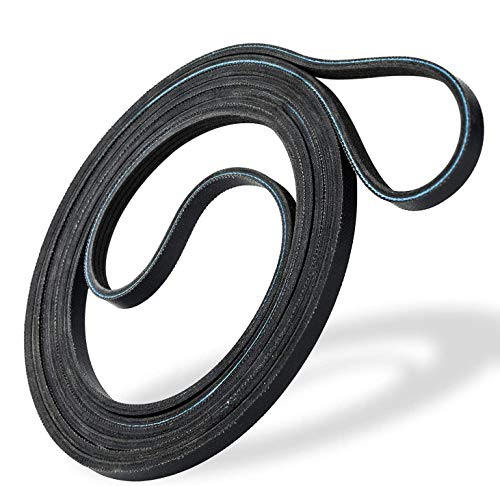
IDEAL FIT FOR MANY MODELS - 6602-001655 dryer belt is compatible with many popular branded dryers which include Samsung and Whirlpool.

❤PREMIUM QUALITY: The upgraded samsung dryer repair kit made of premium quality material. The rollers are strong and wear-resistant, which make the dryer run stably and quietly. It designed with a high-quality rubber overall structure. The 6602-001655 dryer belt 92’’Length X 0.3’’Width. It is thickness is twice as thick as before and it is more durable. The center of the idler has a triangular design, which is more firm and stable. Meets OEM manufacturing requirements.
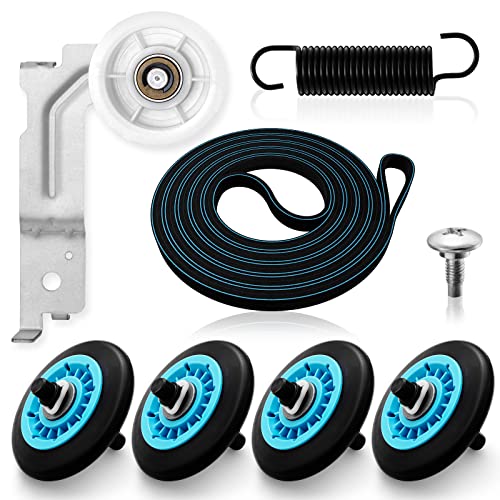
【MATERIAL UPGRADE】The samsung dryer roller replacement kit is designed with a high-quality rubber overall structure, which is strong and wear-resistant, not easy to crack. The samsung dryer roller bearing quality is more stable and quieter than ordinary bearings. The thickness of samsung dryer belt is upgraded and the length is standard. All samsung dryer repair kit has undergone strict quality inspection by the manufacturer---Meet OEM Samsung dryer parts standards.
Samsung Dryer Motor Troubleshooting Steps
When your Samsung front load dryer won’t spin, it often points to issues with the motor or the belt. Understanding the troubleshooting steps can help you identify the problem and determine whether a simple fix or a more in-depth repair is needed. This guide will walk you through the essential steps to diagnose motor-related issues effectively.
If the motor is the issue, the repair process is more complex. A multimeter will help you test whether the motor is receiving power.
Access the motor by removing the front panel as described earlier.
Disconnect the motor wiring harness.
Use a multimeter to test for continuity. If there is no continuity, the motor needs replacement.
Install the new motor by reversing the disconnection steps.
Reconnect the wiring harness and reassemble the dryer.
Samsung Front Load Dryer Spin Issues and Fixes
If your Samsung front load dryer is experiencing spin issues, it can be frustrating and inconvenient. Understanding the common causes behind these problems, such as belt or motor failures, is essential for effective troubleshooting. This guide will walk you through the necessary steps to diagnose and resolve these spin-related challenges.
Understanding additional common problems can help you troubleshoot effectively. Here are a few issues you might encounter.
Drum not spinning: Check for obstructions in the drum area.
Overheating: Clean the lint filter and vent to ensure proper airflow.
Electrical issues: Inspect the power cord for damage.
Recommended Products

What You Get: This DV42H5200EP/A3 DV42H5200EW/A3 dryer roller repair kit includes:◆4 × dryer drum rollers #DC97-16782A (reinforced bearings + rubber), ◆1 × dryer drum belt #6602-001655( 92-1/4 inch, 4-rib design), ◆1 × dryer idler pulley #DC93-00634A (metal alloy), ◆1 × DC61-01215B tension spring

100% LIFETIME PROTECTION: Enjoy reliable performance with our lifetime protection, ensuring that your product will always be covered for any defects or issues that may arise.

【Precise Compatibility,Buy with Confidence 】– This 6602-001655 dryer belt directly replaces OEM part numbers: 5PH2337, 6602-001314, AP4373659, PS4133825, 1935594, and more. Compatible with popular Samsung and Kenmore models including DV42H5200EP/A3, DV45H7000EW/A2, DV40J3000EW/A2, DVE50M7450W, etc. Not sure if it fits? Contact us and we’ll verify compatibility for you.
Samsung Dryer Maintenance for Optimal Performance
Maintaining your Samsung front load dryer is essential for ensuring optimal performance and longevity. Regular checks and simple DIY tasks can prevent common issues, such as the dryer not spinning. This guide will walk you through effective maintenance strategies to keep your appliance running smoothly and efficiently.
Regular maintenance can extend the life of your dryer. Implementing these practices will help avoid future issues.
Clean the lint filter after every use.
Inspect the venting system for blockages annually.
Check the drum for foreign objects that may cause damage.
Samsung Dryer Reassembly Final Checklist
Reassembling your Samsung front load dryer after addressing spinning issues is crucial for ensuring optimal performance. This final checklist will guide you through the essential steps to confirm that all components are securely in place, helping you avoid potential problems and ensuring your dryer operates smoothly once reassembled.
Before putting everything back together, double-check your work. Ensure all connections are secure and there are no leftover parts.
Verify the belt is properly installed.
Confirm the motor is connected correctly.
Ensure the front panel is aligned properly.
Samsung Dryer Test Cycle After Repair
After completing repairs on your Samsung front load dryer, it’s crucial to ensure everything is functioning correctly. The test cycle allows you to verify the effectiveness of your repairs, particularly focusing on the belt and motor. This step will help confirm that your dryer is back to optimal performance.
Once everything is reassembled, plug the dryer back in and run a test cycle. Monitor for any unusual noises or issues. If it spins smoothly, you have successfully completed the repair.
If problems persist, further investigation into other components may be necessary.

Hey, I’m Jake. I focus on cooling systems at Appliance Mastery, like fridges, freezers, and air conditioners.
I’ve worked in appliance repair for more than ten years and I’m certified through NASTeC. I’ve seen just about every fridge issue you can imagine.
My goal is to help you fix problems without stress. Whether it’s a freezer that won’t cool or an AC that keeps beeping, I’m here to walk you through it.