
If your Samsung dryer won’t start and displays a filter check message, the issue often stems from a clogged lint filter or a blocked vent. Cleaning these components typically resolves the problem, allowing your dryer to function properly again.
Identify the Issue with Your Samsung Dryer
If your Samsung dryer won’t start and displays a “Filter Check” message, it’s essential to identify the underlying issue before attempting any fixes. This guide will help you troubleshoot the problem effectively, ensuring your dryer operates smoothly again. Understanding the cause is the first step toward a quick and efficient resolution.
A dryer that won’t start can be frustrating. The filter check message indicates that the dryer’s sensors detect a problem with airflow.
This usually means the lint filter is dirty or the venting system is obstructed. Understanding the symptoms can help you diagnose the issue efficiently.
| Symptom | Primary Suspect | Difficulty (1-5) |
|---|---|---|
| Dryer won’t start | Clogged lint filter | 2 |
| Dryer won’t start | Blocked vent | 3 |
| Dryer won’t start | Faulty door switch | 4 |
Essential Tools for Samsung Dryer Cleaning
To effectively address the “Filter Check” issue with your Samsung dryer, having the right tools on hand is crucial. This section outlines the essential items you’ll need to clean your dryer thoroughly, ensuring it operates efficiently and resolves any startup problems related to filter maintenance. Being prepared will streamline the cleaning process and enhance your dryer’s performance.
Before you begin, gather the tools and supplies you will need for the cleaning process. Having everything on hand will streamline your efforts and minimize downtime.
Vacuum cleaner with hose attachment
Soft brush for lint removal
Screwdriver for vent access
Microfiber cloth for cleaning surfaces
Replacement lint filter if necessary
Samsung Dryer Cleaning Safety Precautions
Before tackling any cleaning tasks on your Samsung dryer, it’s essential to prioritize safety. Understanding the necessary precautions can help prevent accidents and ensure that your appliance operates efficiently. This section outlines key safety measures to follow while cleaning your dryer, particularly when addressing the filter check issue.
Safety is paramount when working with electrical appliances. Ensure the dryer is unplugged before starting any cleaning process. This prevents accidental starts and protects you from electrical hazards.
Unplug the dryer from the wall outlet.
Wear gloves to protect your hands from sharp edges.
Ensure the area is well-ventilated to avoid inhaling dust.
Samsung Dryer Lint Filter Cleaning Steps
When your Samsung dryer displays a “Filter Check” message and refuses to start, it often indicates that the lint filter needs attention. Proper cleaning of the lint filter is essential for optimal dryer performance and safety. Follow these straightforward steps to ensure your lint filter is clean and ready for use.
Follow these steps to clean the lint filter and venting system effectively. This will help restore your dryer’s functionality.
Remove the lint filter
Pull out the lint filter from its slot. Inspect it for any visible buildup.Clean the lint filter
Use a soft brush to remove lint. Rinse it under warm water for deeper cleaning. Allow it to dry completely before reinserting.Inspect the venting system
Disconnect the vent hose from the back of the dryer. Check for any obstructions or buildup.Clean the vent hose
Use a vacuum cleaner with a hose attachment to remove lint and debris from the vent hose. If the hose is excessively clogged, consider replacing it.Reattach the vent hose
Securely connect the vent hose back to the dryer and ensure it is not kinked or blocked.Plug in the dryer
Reconnect the dryer to the power source and test if it starts without displaying the filter check message.
Recommended Products

【3-Piece High-Value Set】 — Includes vent duct brush, lint trap brush, and flexible crevice tool. One kit replaces multiple single-purpose brushes — better value than buying separately.

【Perfectly Compatible】:DC97-16742A samsung dryer lint filter compatible with Samsung Dryer and replace these part numbers: DC61-03048A DC97-16742A, DC61-02610A, AP5306681, PS4221839, AP4578784, 2069511 etc. We have listed all matching models in the description, please search in it to make sure this is exactly the dryer lint filter you need. If you're not sure whether or not a parts you're ordering fits your model, please feel free to contact us, We can verify if it will fit

Home Essentials: Holikme dryer vent cleaner kit can easily help you to remove years of built up lint from your dryer vent, making your appliance runs more efficiently and securely; Suitable for most dryer types, please kindly check our product size information for reference in order to better shopping experience
Venting Problems Affecting Samsung Dryer Start
If your Samsung dryer won’t start and displays a filter check message, venting issues may be the culprit. Blocked or improperly installed vents can restrict airflow, leading to performance problems. Understanding how venting affects your dryer’s operation is essential for troubleshooting and ensuring efficient drying cycles.
Sometimes, the problem may not just be the lint filter. Several issues can arise within the venting system that can prevent your dryer from starting.
Kinks in the vent hose
Ensure the vent hose is straight and not pinched. Kinks can restrict airflow.External vent blockage
Check the external vent cap for obstructions such as bird nests or debris. Clear any blockages to ensure proper airflow.Vent length and diameter
Verify that the vent length and diameter comply with manufacturer specifications. Long or narrow vents can hinder performance.
Samsung Dryer Startup Problems Beyond Filter Issues
When your Samsung dryer won’t start and the filter check light is illuminated, it can be frustrating. However, there may be additional startup problems unrelated to the filter that require attention. Understanding these issues can help you troubleshoot effectively and get your dryer back in working order.
If cleaning the lint filter and venting system does not resolve the issue, consider other potential problems that may prevent your dryer from starting.
Faulty door switch
The dryer will not start if the door switch is malfunctioning. Test the switch for continuity with a multimeter.Defective thermal fuse
A blown thermal fuse can stop the dryer from operating. Inspect and replace if necessary.Control board issues
If all else fails, the control board may be faulty. Consult a professional for diagnosis and repair.
Recommended Products

❤PREMIUM QUALITY: The upgraded samsung dryer repair kit made of premium quality material. The rollers are strong and wear-resistant, which make the dryer run stably and quietly. It designed with a high-quality rubber overall structure. The 6602-001655 dryer belt 92’’Length X 0.3’’Width. It is thickness is twice as thick as before and it is more durable. The center of the idler has a triangular design, which is more firm and stable. Meets OEM manufacturing requirements.
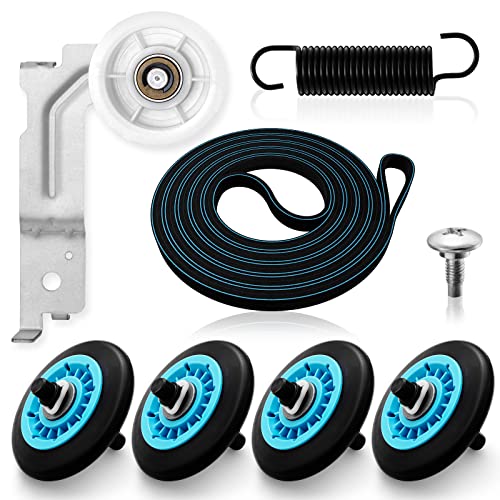
【MATERIAL UPGRADE】The samsung dryer roller replacement kit is designed with a high-quality rubber overall structure, which is strong and wear-resistant, not easy to crack. The samsung dryer roller bearing quality is more stable and quieter than ordinary bearings. The thickness of samsung dryer belt is upgraded and the length is standard. All samsung dryer repair kit has undergone strict quality inspection by the manufacturer---Meet OEM Samsung dryer parts standards.

DC97-16782A Kit Includes- 4 × DC97-16782A upgraded dryer drum roller (includes roller wheel and roller axle), 1 × 6602-001655 dryer drum drive belt ( 0.3in Width,92 in Long ), 1 x DC93-00634A dryer idler pulley assembly (1 screw and 1 Spring include). extensive compitible for samsung dryers
Samsung Dryer Filter Check Final Steps
If your Samsung dryer displays a “Filter Check” message and won’t start, it’s essential to follow the final steps to resolve the issue. Properly addressing the filter and vent system can restore functionality and ensure optimal performance. This guide outlines the necessary actions to take for a quick and effective cleaning solution.
After cleaning and troubleshooting, ensure that your dryer operates smoothly. Regular maintenance is key to preventing future issues.
Schedule routine cleaning
Clean the lint filter after every use and check the venting system regularly.Monitor dryer performance
Pay attention to any unusual noises or error messages. Early detection can save you from costly repairs.Consult the manual
Refer to the user manual for specific maintenance guidelines and troubleshooting tips tailored to your Samsung dryer model.

Hey, I’m Jake. I focus on cooling systems at Appliance Mastery, like fridges, freezers, and air conditioners.
I’ve worked in appliance repair for more than ten years and I’m certified through NASTeC. I’ve seen just about every fridge issue you can imagine.
My goal is to help you fix problems without stress. Whether it’s a freezer that won’t cool or an AC that keeps beeping, I’m here to walk you through it.