
Replacing the leak sensor in a Samsung dishwasher can prevent water damage and ensure optimal performance. This guide provides a step-by-step approach for a professional DIY replacement, making the process straightforward and efficient.
Samsung Dishwasher Leak Sensor Replacement Tools
Replacing the leak sensor in your Samsung dishwasher requires specific tools to ensure a smooth and effective process. Having the right equipment on hand not only facilitates the repair but also minimizes the risk of further damage. This section outlines the essential tools you’ll need to successfully complete the replacement.
Before beginning the replacement process, gather all necessary tools and materials. Having everything on hand will streamline your work and minimize interruptions.
Replacement Leak Sensor
Screwdriver Set
Pliers
Towel or Sponge
Bucket
Safety Gloves
Flashlight
Ensure you have a clean workspace to facilitate the replacement process.
Recommended Products

● High Sensitivity Detection Advanced sensing technology monitors for leaks in real-time, ensuring quick responses to prevent potential water damage. ● Compatible with...
Samsung Dishwasher Leak Sensor Safety Steps
When replacing the leak sensor in your Samsung dishwasher, safety should be your top priority. Understanding the necessary precautions can help prevent accidents and ensure a smooth repair process. This section outlines essential safety steps to follow before you begin the replacement, ensuring both your safety and the proper functioning of your appliance.
Preparation is key to a successful replacement. Start by turning off the dishwasher and unplugging it from the power source. This step is crucial for your safety.
Disconnect Water Supply
Locate the water supply valve and turn it off. This prevents any accidental leaks during the replacement.Empty the Dishwasher
Remove all dishes and utensils. This will provide easier access to the leak sensor and prevent any damage to your items.Wear Safety Gloves
Protect your hands from sharp edges and any residual water.
Samsung Dishwasher Leak Sensor Replacement Steps
Replacing the leak sensor in your Samsung dishwasher is a crucial maintenance task that can prevent water damage and ensure optimal performance. This guide provides detailed steps to help you navigate the replacement process with confidence, ensuring your appliance remains in top working condition. Follow these instructions carefully to complete the repair efficiently and effectively.
Follow these steps to replace the leak sensor effectively. Each step is designed to guide you through the process without complications.
Access the Dishwasher Base
Remove the lower dish rack and unscrew the cover panel at the bottom of the dishwasher. This exposes the leak sensor.Disconnect Old Leak Sensor
Carefully unplug the old leak sensor from its connector. Use pliers if necessary to grip and pull the connector free.Install New Leak Sensor
Align the new leak sensor with the connector and firmly plug it in. Ensure it is secure to avoid future leaks.Reassemble the Dishwasher
Replace the cover panel and screw it back into place. Make sure everything is tight and secure.Reconnect Water Supply and Power
Turn the water supply back on and plug the dishwasher back into the power source. Check for any leaks before running a cycle.
Recommended Products
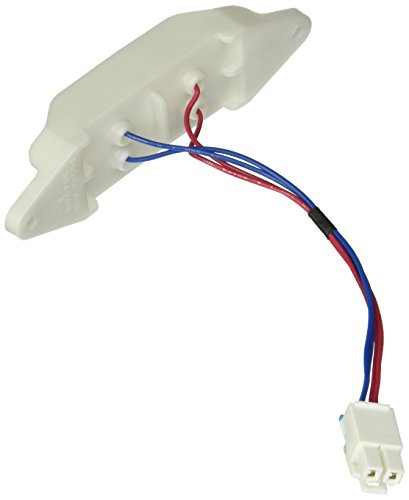
The Samsung DD94-01062A Leak Detector Sensor is a genuine OEM (Original Equipment Manufacturer) part designed and engineered to exact specifications Replacement Samsung...
Post-Replacement Samsung Dishwasher Leak Sensor Problems
After replacing the leak sensor in your Samsung dishwasher, you may encounter some unexpected issues. Understanding these potential problems can help you troubleshoot effectively and ensure your appliance operates smoothly. This section delves into common post-replacement challenges and offers solutions to keep your dishwasher running efficiently.
After replacing the leak sensor, you may encounter some common issues. Understanding these can help you troubleshoot effectively.
Sensor Not Responding
If the new sensor does not trigger, check the connection. Ensure it is firmly plugged in and free from debris.Persistent Leaks
If leaks continue, inspect the water supply line and connections. A loose fitting may be the culprit.Error Codes
If your dishwasher displays error codes, consult the user manual. This may indicate additional issues beyond the sensor.
Troubleshooting Tips for Samsung Dishwashers
When dealing with issues in Samsung dishwashers, understanding common problems and their solutions can save time and prevent further damage. This section provides practical troubleshooting tips that can help identify leaks, improve performance, and ensure your appliance operates efficiently. By following these guidelines, you can address issues confidently and maintain your dishwasher’s longevity.
Knowing how to troubleshoot can save time and effort. Here are some tips specific to Samsung dishwashers.
Check for Blockages
Inspect the drain and filter for clogs. Blockages can cause water to accumulate and trigger the leak sensor.Inspect Door Seal
A damaged door seal can lead to leaks. Examine it for cracks or wear and replace if necessary.Run a Diagnostic Cycle
Many Samsung dishwashers have a diagnostic mode. Running this can reveal underlying issues that need attention.
Testing the New Samsung Leak Sensor
After successfully installing the new leak sensor in your Samsung dishwasher, it’s crucial to ensure it functions correctly. This section will guide you through the testing process, helping you confirm that the sensor accurately detects leaks and operates as intended, ensuring your appliance remains in optimal condition. Follow these steps to verify the performance of your new sensor effectively.
Once the replacement is complete, it’s essential to test the dishwasher. This ensures that the new leak sensor is functioning correctly.
Run a Short Cycle
Start a short wash cycle to monitor for leaks. Observe the area around the sensor for any signs of water.Monitor Performance
Keep an eye on the dishwasher for the next few days. If issues arise, revisit the connections and seals.
| Step | Action | Notes |
|---|---|---|
| 1 | Access Base | Remove lower dish rack |
| 2 | Disconnect Sensor | Use pliers if needed |
| 3 | Install New Sensor | Ensure secure connection |
| 4 | Reassemble | Tighten all screws |
| 5 | Test Dishwasher | Run a short cycle |
Replace the leak sensor in your Samsung dishwasher to enhance performance. Follow these steps carefully to avoid complications.

Hey, I’m Jake. I focus on cooling systems at Appliance Mastery, like fridges, freezers, and air conditioners.
I’ve worked in appliance repair for more than ten years and I’m certified through NASTeC. I’ve seen just about every fridge issue you can imagine.
My goal is to help you fix problems without stress. Whether it’s a freezer that won’t cool or an AC that keeps beeping, I’m here to walk you through it.