
Installing a water filter in your Samsung refrigerator ensures clean drinking water and ice. This step-by-step guide provides clear instructions to replace your filter easily.
Essential Supplies for Samsung Filter Installation
Before starting the installation, gather the essential supplies to ensure a smooth process. You will need a new Samsung water filter, a towel, and possibly a pair of gloves. Having these items ready will save time and prevent unnecessary mess.
| Supply Item | Purpose |
|---|---|
| Samsung water filter | Provides clean drinking water |
| Towel | Catches spills during installation |
| Gloves | Keeps hands clean |
Recommended Products

[Replacement for models] Samsung DA97-17376B, DA97-08006C, HAF-QIN, HAF-QIN/EXP, GF-841, CF-17, AQF-FF45, WS645A, FL-RF45, MB-F45, RWF4200A, PP-RWF4200A-S. Please note it fits DA97-17376B (HAF-QIN), not DA29-00020B (HAF-CIN).

❄️Compatible Models:Samsung DA97-17376B, DA97-08006C, HAF-QIN/EXP, HAF-QIN,WS645A,WD-F45,PP-RWF4200A, RWF4200A,GF-841,FL-RF45,CF-17,AQF-FF45, MB-F45. Note: Designed for DA97-17376B (HAF-QIN) housing only – NOT for DA29-00020B (HAF-CIN).

Authoritative Certifications- ICEPURE RWF0700A replacement for Samsung DA29-00020B refrigerator water filter bears major Authoritative Certifications on markets, such as NSF/ANSI 42 and NSF/ANSI/CAN 372, European Food Grade Regulations EC-1935/2016, ROHS, REACH, BPA-Free, TUV and Australian Water Mark.
Preparing Your Samsung Refrigerator for Filter Change
Preparation is key to a successful filter installation. First, locate the water filter compartment in your refrigerator. This is usually found in the upper right corner of the fridge section or inside the bottom grill. Ensure that the refrigerator is unplugged to avoid any electrical issues during the process.
Unplug the refrigerator.
Locate the water filter compartment.
Remove any items obstructing access.
Samsung Refrigerator Old Water Filter Removal Steps
Removing the old water filter from your Samsung refrigerator is a crucial first step in ensuring clean and safe drinking water. This process is straightforward but requires attention to detail to avoid any mishaps. Follow these steps carefully to efficiently remove the old filter and prepare for the installation of a new one.
Removing the old filter requires careful handling to avoid spills. Follow these steps to ensure a clean removal.
Twist the old filter counterclockwise until it releases from the compartment.
Pull the filter straight out. Be prepared for some water to drip.
Dispose of the old filter properly.
Handling the Old Samsung Filter Safely
When replacing the water filter in your Samsung refrigerator, it’s crucial to handle the old filter safely to prevent spills and contamination. Proper disposal ensures that you maintain a clean environment and continue to enjoy fresh, filtered water. This section will guide you through the steps to safely manage your old filter during the replacement process.
Use a towel to catch any water that may leak.
Avoid touching the filter’s ends to maintain cleanliness.
Samsung Refrigerator Water Filter Installation Steps
Installing a water filter in your Samsung refrigerator is essential for ensuring clean and fresh drinking water. This step-by-step guide will walk you through the process, making it easy to replace your filter and maintain the quality of your water supply. Follow these instructions carefully to ensure a successful installation.
Installing the new filter is straightforward. Follow these steps carefully to ensure proper installation.
Take the new filter out of its packaging.
Align the filter with the compartment. The arrows on the filter should match the arrows in the compartment.
Insert the filter into the compartment and twist it clockwise until it locks into place.
Recommended Products

[𝐂𝐨𝐦𝐩𝐚𝐭𝐢𝐛𝐥𝐞 𝐰𝐢𝐭𝐡 𝐦𝐮𝐥𝐭𝐢𝐩𝐥𝐞 𝐦𝐨𝐝𝐞𝐥𝐬] DA29-00020B, HAF-CIN, HAF-CIN/EXP, RF28HMEDBSR, RS25J500DSR, RF263BEAESR, HDX FMS-2, DA29-00020B-1, DA97-08006A-1, RF4287HARS, RF263BEAESG, RF263TEAESG, RF28HFEDBSR, RF28HDEDBSR, RFG297HDRS, RS25H5111SR, RS25J500DSG, RF23J9011SR, RF263BEAESR/AA, RS265TDRS, RH22H9010SR, RF25HMEDBSR, RS25J500DSR/AA, RF28K9380SR, RF23J9011SR/AA, RF26J7500SR/AA, RF28HMEDBSR/AA, RF4287HABP, RFG298HDRS
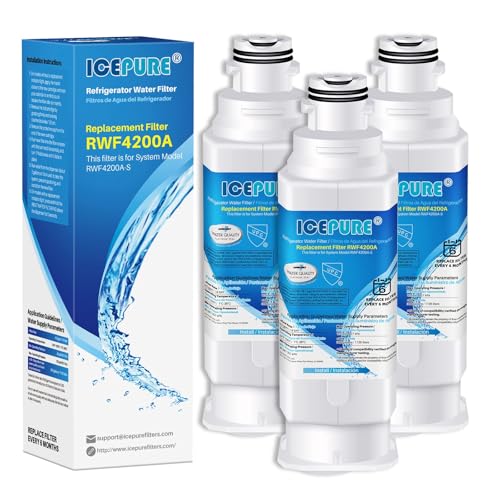
[Certified Quality You Can Trust] ICEPURE RWF4200A refrigerator water filter is certified by NSF/ANSI 42 & 372 (Lead-Free), European EC1935/2016, ROHS, REACH, BPA-Free, TUV, and Australian Water Mark, ensuring safe, clean drinking water. Applicable to Home, Kitchen, Office, Vacation home, Apartment, Residential House.

Crystala Filters Replacement for DA97-17376B Refrigerator Water Filter Statement: Tested & verified by independent laboratory testing, it can remove 97.9% chlorine and improve water’s smell and taste.
Samsung Refrigerator Water Filter Installation Check
Before diving into the installation process, it’s essential to ensure that you have the correct water filter for your Samsung refrigerator. This section outlines key checks to confirm compatibility and readiness, helping you avoid common pitfalls and ensuring a smooth installation experience. Proper preparation sets the stage for optimal performance of your water filtration system.
Ensure the filter is securely in place.
Check for any gaps or misalignment.
Flushing Process for Samsung Water Filter
Flushing the water filter in your Samsung refrigerator is a crucial step to ensure clean and safe drinking water. This process helps remove any carbon dust and contaminants that may have accumulated during manufacturing. Following the correct flushing procedure will enhance water quality and extend the lifespan of your filter.
Flushing the new filter is crucial to remove any carbon dust and ensure clean water. Follow these steps to complete the flushing process.
Turn on the water supply to the refrigerator.
Fill a container with at least 2-3 gallons of water.
Dispense water from the water dispenser for about 5 minutes.
Samsung Refrigerator Filter Flushing Importance
Flushing the water filter in your Samsung refrigerator is a crucial step to ensure optimal performance and water quality. This process helps remove any impurities or air pockets that may have accumulated during installation, allowing for a cleaner and more efficient water supply. Understanding the importance of this step will enhance your overall experience with your refrigerator’s water filtration system.
Flushing the filter helps remove any contaminants and ensures optimal performance.
Samsung Refrigerator Water Filter Installation Issues
Installing a water filter in your Samsung refrigerator can sometimes present unexpected challenges. From compatibility concerns to improper seating of the filter, various issues may arise during the installation process. Understanding these potential pitfalls can help ensure a smooth and successful installation, allowing you to enjoy clean, filtered water without hassle.
Sometimes, issues may arise during or after installation. Here are common problems and their solutions.
| Issue | Solution |
|---|---|
| Water leakage | Ensure filter is securely locked |
| Poor water flow | Flush the filter longer |
| Filter warning light on | Reset the filter indicator |
Samsung Refrigerator Water Filter Maintenance Tips
Maintaining your Samsung refrigerator’s water filter is essential for ensuring clean, great-tasting water and ice. Regular upkeep not only enhances performance but also extends the lifespan of the filter. This section provides practical tips to help you effectively care for your water filter and keep your refrigerator operating at its best.
Regular maintenance of your water filter ensures optimal performance and longevity. Follow these guidelines for upkeep.
Replace the filter every six months or as indicated by your refrigerator.
Check for any leaks periodically.
Clean the filter compartment during each replacement.
Samsung Refrigerator Water Filter Maintenance Tips
Proper maintenance of your Samsung refrigerator’s water filter is essential for ensuring clean, great-tasting water and ice. Regular checks and timely replacements can enhance the efficiency of your appliance and extend its lifespan. Here are some practical tips to help you maintain your water filter effectively.
Neglecting regular maintenance can lead to poor water quality and potential damage to your refrigerator.
Samsung Refrigerator Water Filter Installation Summary
Installing a water filter in your Samsung refrigerator is essential for ensuring clean and great-tasting water and ice. This summary provides a concise overview of the steps involved in the installation process, making it easier for you to maintain your appliance and enjoy fresh water at home. Follow these guidelines to complete the task efficiently and effectively.
Installing a water filter in your Samsung refrigerator is a simple task that can significantly improve water quality. Following these steps ensures a successful installation and ongoing maintenance.

Hey, I’m Jake. I focus on cooling systems at Appliance Mastery, like fridges, freezers, and air conditioners.
I’ve worked in appliance repair for more than ten years and I’m certified through NASTeC. I’ve seen just about every fridge issue you can imagine.
My goal is to help you fix problems without stress. Whether it’s a freezer that won’t cool or an AC that keeps beeping, I’m here to walk you through it.