
Changing the Samsung fridge filter with an ice maker is a straightforward process that can save you money and ensure clean water and ice. This guide outlines the necessary steps to effectively replace the filter without incurring any costs.
Essential Tools for Samsung Fridge Filter Change
To successfully change the filter in your Samsung fridge with an ice maker, having the right tools on hand is crucial. This section outlines the essential equipment you’ll need to ensure a smooth and efficient filter replacement process, helping you avoid common pitfalls and maintain your appliance’s performance.
Before starting the filter replacement, ensure you have the right tools and supplies. This will make the process smoother and quicker. Here’s what you’ll need:
Replacement filter compatible with your Samsung fridge model
Screwdriver for any necessary panel removal
Towel to catch any water spills
Bucket to collect excess water
| Item | Purpose |
|---|---|
| Replacement filter | Provides clean water and ice |
| Screwdriver | Assists in panel removal |
| Towel | Catches spills |
| Bucket | Collects excess water |
Recommended Products
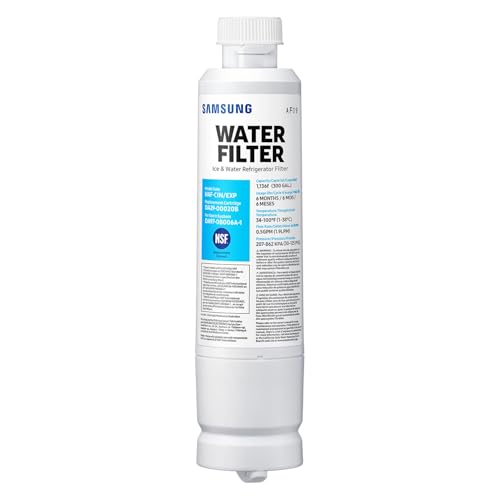
FRESH FILTERED WATER: Samsung water filters reduce contaminants, giving your family fresh tasting water

[Replacement for models] Samsung DA97-17376B, DA97-08006C, HAF-QIN, HAF-QIN/EXP, GF-841, CF-17, AQF-FF45, WS645A, FL-RF45, MB-F45, RWF4200A, PP-RWF4200A-S. Please note it fits DA97-17376B (HAF-QIN), not DA29-00020B (HAF-CIN).

[𝐂𝐨𝐦𝐩𝐚𝐭𝐢𝐛𝐥𝐞 𝐰𝐢𝐭𝐡 𝐦𝐮𝐥𝐭𝐢𝐩𝐥𝐞 𝐦𝐨𝐝𝐞𝐥𝐬] DA29-00020B, HAF-CIN, HAF-CIN/EXP, RF28HMEDBSR, RS25J500DSR, RF263BEAESR, HDX FMS-2, DA29-00020B-1, DA97-08006A-1, RF4287HARS, RF263BEAESG, RF263TEAESG, RF28HFEDBSR, RF28HDEDBSR, RFG297HDRS, RS25H5111SR, RS25J500DSG, RF23J9011SR, RF263BEAESR/AA, RS265TDRS, RH22H9010SR, RF25HMEDBSR, RS25J500DSR/AA, RF28K9380SR, RF23J9011SR/AA, RF26J7500SR/AA, RF28HMEDBSR/AA, RF4287HABP, RFG298HDRS
Samsung Fridge Ice Maker Filter Prep Steps
Preparation is key to a successful filter change. Begin by turning off the water supply to the fridge. This prevents any leaks during the process. Next, remove any food or items from the fridge door to create space for your work.
Turn off the water supply at the source
Clear the fridge door area
Place the towel under the filter area to absorb spills
Locate the Filter in Your Samsung Fridge
Identifying the filter’s location is crucial. Most Samsung fridges with ice makers have the filter located in the upper right corner of the fridge compartment or at the base of the appliance. Consult your user manual if you are unsure.
Open the fridge door fully
Check the upper right corner or the base
Refer to the user manual for specific details
Removing the Samsung Ice Maker Filter
Changing the ice maker filter in your Samsung fridge is a straightforward task that can enhance water quality and ice production. This section will guide you through the process of removing the existing filter, ensuring you have the right steps to complete this essential maintenance efficiently. Follow these instructions to keep your fridge running smoothly and your ice tasting fresh.
Once you’ve located the filter, it’s time to remove it. This step requires a gentle touch to avoid damaging any components. Follow these steps:
Twist the filter counterclockwise to release it.
Pull the filter straight out.
Inspect the old filter for any signs of damage or wear.
Be cautious not to spill any water during this process.
Install Samsung Ice Maker Filter Correctly
Installing the ice maker filter in your Samsung fridge is a straightforward process that can enhance the quality of your ice and water. Following the correct steps ensures optimal performance and longevity of your appliance. This guide provides detailed instructions to help you install the filter efficiently and effectively.
Installing the new filter is a straightforward task. Ensure you have the correct filter model for your Samsung fridge. Follow these steps for installation:
Align the new filter with the filter slot.
Push the filter in until it is snug.
Twist the filter clockwise until it locks into place.
Make sure the filter is securely fastened to prevent leaks.
Restore Samsung Fridge Water Flow After Filter Change
After replacing the water filter in your Samsung fridge, it’s essential to ensure that the water flow is properly restored, especially if your model includes an ice maker. This process can be straightforward, but it requires attention to detail to avoid any issues with water supply. Follow these steps to get your fridge running smoothly again.
After installing the new filter, it’s time to restore the water supply. This step ensures that the ice maker functions properly. Follow these instructions:
Turn the water supply back on
Check for leaks around the filter area
Run the ice maker for a few minutes to flush the system
Monitor the water flow and ice production for any irregularities.
Samsung Fridge Filter Replacement Issues
When dealing with Samsung fridge filter replacement, particularly for models equipped with an ice maker, various challenges can arise. Understanding these common issues is essential for ensuring a smooth replacement process and maintaining optimal performance. This section will address the typical problems users encounter and provide practical solutions to overcome them.
If you encounter issues after replacing the filter, consider these common problems:
Low water pressure: Check if the water supply is fully turned on.
Ice maker not working: Ensure the filter is properly installed.
Leaks: Inspect the filter installation for any gaps.
Maintain Your Samsung Fridge Filter
Maintaining your Samsung fridge filter is essential for ensuring clean water and ice production. Regularly changing the filter not only improves the quality of your drinking water but also enhances the efficiency of your ice maker. Follow these straightforward steps to keep your fridge running smoothly and save money on costly repairs.
Regular maintenance is essential for optimal performance. Change the filter every six months or sooner if you notice a decline in water quality. Keeping a schedule can help you avoid potential issues.
Set a reminder on your calendar
Purchase replacement filters in advance
Keep track of filter changes in a log
Advantages of Regular Samsung Filter Changes
Regularly changing the filter in your Samsung fridge, especially if it has an ice maker, offers numerous benefits that enhance both performance and health. Clean filters ensure better tasting water and ice while also improving the efficiency of your appliance. This simple maintenance task can prevent potential issues and extend the lifespan of your fridge.
Changing the filter regularly provides several advantages. Clean water and ice improve taste and quality. It also extends the lifespan of your fridge and ice maker.
Enhances water and ice quality
Reduces wear on the appliance
Prevents costly repairs
Monitoring Samsung Fridge Performance After Filter Change
After replacing the filter in your Samsung fridge, it’s essential to monitor its performance to ensure optimal functionality. Observing the ice maker and overall cooling efficiency can help identify any issues early on. This proactive approach will not only extend the life of your appliance but also maintain the quality of your food and beverages.
Ensure you have completed all steps correctly. Monitor the fridge and ice maker for any signs of issues. Regular maintenance will ensure your Samsung fridge continues to perform efficiently.

Hey, I’m Jake. I focus on cooling systems at Appliance Mastery, like fridges, freezers, and air conditioners.
I’ve worked in appliance repair for more than ten years and I’m certified through NASTeC. I’ve seen just about every fridge issue you can imagine.
My goal is to help you fix problems without stress. Whether it’s a freezer that won’t cool or an AC that keeps beeping, I’m here to walk you through it.