
The Electrolux Range Error Code F20 indicates a communication failure between the control board and other components. This issue can often be resolved by checking connections and replacing faulty parts, ensuring the appliance operates correctly.
Understand Electrolux Range Error Code F20
Error Code F20 typically arises when the control board cannot communicate with the oven’s components. This can stem from various issues such as loose connections, damaged wiring, or a malfunctioning control board itself. Identifying the underlying cause is essential for effective repair.
| Symptom | Primary Suspect | Difficulty 1-5 |
|---|---|---|
| Oven not heating | Control board | 3 |
| Display issues | Wiring harness | 2 |
| Error code persists | Faulty components | 4 |
Identify Root Causes of F20
When dealing with the Electrolux range error code F20, it’s essential to identify the underlying causes of communication failures. This error typically indicates issues within the appliance’s internal systems, which can stem from various factors such as wiring problems or faulty components. Understanding these root causes is crucial for effective troubleshooting and repair.
Communication failures can originate from multiple sources. Understanding these root causes will help in diagnosing the problem effectively.
Loose Connections: Check all wiring connections to ensure they are secure.
Damaged Wiring: Inspect for frayed or broken wires that may disrupt communication.
Faulty Control Board: A malfunctioning control board may need replacement if other components are functioning correctly.
Step-by-Step Fix for F20 Error
When encountering the Electrolux F20 error code, it indicates a communication failure within the range. This section provides a detailed, step-by-step guide to diagnose and resolve the issue effectively, ensuring your appliance operates smoothly again. Follow these instructions carefully to restore proper function and avoid further complications.
Follow these steps to troubleshoot and repair the F20 error code:
Unplug the Range: Ensure safety by disconnecting the power supply.
Inspect Wiring Harness: Open the back panel and check for loose or damaged wires.
Reconnect Loose Wires: Secure any loose connections you find.
Test Continuity: Use a multimeter to check the continuity of wires.
Replace Damaged Wires: Cut and splice in new wire sections as needed.
Check Control Board: If no wiring issues are found, inspect the control board for signs of damage.
Replace Control Board: If the board is faulty, remove it and install a new one.
Plug in and Test: Reconnect the power and test the range to ensure the error is cleared.
Essential Tools for Electrolux F20 Repair
When addressing the Electrolux F20 error code, having the right tools is crucial for effective diagnosis and repair of communication failures. This section outlines the essential equipment and resources needed to troubleshoot the issue efficiently, ensuring a smoother repair process and minimizing downtime. Proper preparation can significantly enhance the likelihood of resolving the error swiftly.
Gather the following tools and supplies before starting the repair:
Screwdriver set
Multimeter
Replacement wiring
New control board (if needed)
Electrical tape
Recommended Products


【Reliable Quality】 KSD301 snap disc thermostat with USA-made EMS bimetal disc, 3.5mm large contacts, UL&CUL approved (E527363). Precise & durable.
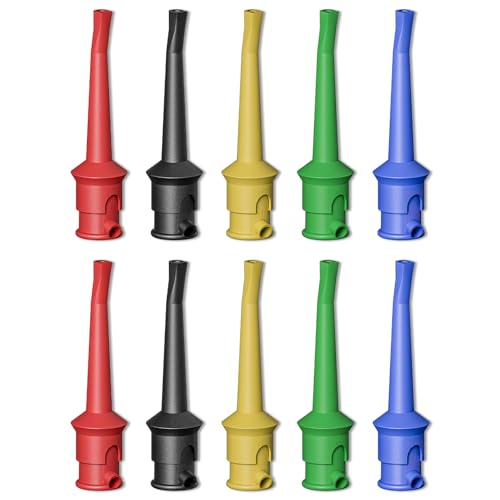
Test hook clips are made of high-conductivity copper and ABS. Total length approx. 5.5cm. Port diameter: 4mm including welding port(compatible with bare wires up to φ2.8mm).
Electrolux Range F20 Communication Problems
When your Electrolux range displays the F20 error code, it indicates a communication failure within the appliance. This issue can disrupt cooking functions and may stem from various underlying causes. Understanding the specific communication problems associated with the F20 code is essential for effective troubleshooting and repair.
Understanding common issues can help in diagnosing F20 errors more effectively.
Electrolux F20 Wiring Communication Issues
When encountering the Electrolux F20 error code, it’s crucial to understand that this indicates a wiring communication failure within the appliance. Identifying the specific wiring issues can help streamline the diagnostic process, ensuring that the necessary repairs are made efficiently to restore proper functionality.
Wiring issues often lead to communication failures. Regularly inspect wiring for signs of wear or damage.
Look for frayed wires
Ensure connectors are tight
Replace any damaged sections
Electrolux F20 Control Board Failure Reasons
Understanding the reasons behind the Electrolux F20 error code is essential for effective troubleshooting. This section delves into the common causes of control board failures, helping you identify potential issues that may disrupt communication within your range. By pinpointing these failures, you can take informed steps toward resolving the problem.
Control boards can fail due to age or electrical surges. If the board is not responding, it may need replacement.
Check for burnt components
Test functionality with a multimeter
Replace if necessary
Electrolux F20 User Error Triggers
Understanding the user error triggers associated with the Electrolux F20 code is essential for effective troubleshooting. This section delves into common mistakes that can lead to communication failures, helping users identify and rectify issues quickly. By recognizing these triggers, you can enhance the performance of your Electrolux range and minimize disruptions.
Sometimes, user error can trigger the F20 code. Ensure the range is used according to the manufacturer’s guidelines.
Verify settings are correct
Avoid overloading the oven
Follow maintenance recommendations
Electrolux F20 Repair Completion Checklist
When addressing the Electrolux F20 error code, it’s essential to follow a systematic approach to ensure effective repairs. The completion checklist provided below outlines key steps and considerations to help diagnose and resolve communication failures, ensuring your range operates smoothly once again. Adhering to this checklist can streamline the repair process and enhance your troubleshooting efforts.
After completing the repairs, ensure everything is reassembled correctly.
Double-check all connections
Test the range multiple times
Monitor for any recurring issues
If the F20 error persists after these steps, consider contacting a professional technician for further diagnosis.

Hey, I’m Jake. I focus on cooling systems at Appliance Mastery, like fridges, freezers, and air conditioners.
I’ve worked in appliance repair for more than ten years and I’m certified through NASTeC. I’ve seen just about every fridge issue you can imagine.
My goal is to help you fix problems without stress. Whether it’s a freezer that won’t cool or an AC that keeps beeping, I’m here to walk you through it.