
Ever had a laundry day disaster when your Samsung dryer suddenly decides it’s done heating up? Picture this: you’re left with damp clothes and a sense of frustration. But fret not, because in this article, you’ll uncover the secrets to fixing your Samsung dryer when it’s not heating up.
Imagine the convenience of having your dryer back in action, efficiently drying your clothes in no time. No more waiting around for ages or dealing with damp garments – just quick and effective drying cycles. You deserve hassle-free laundry days, and we’re here to guide you through the process of getting your Samsung dryer heating up again.
Ready to bid farewell to the cold air coming from your dryer? Let’s dive into the simple steps that will have your Samsung dryer heating like a pro in no time.
Common reasons for Samsung dryer not heating
Has your Samsung dryer stopped heating up during laundry sessions? There could be various reasons causing this issue. It’s essential to pinpoint the root cause before proceeding with any fixes. Here are some common reasons why your Samsung dryer may not be heating up:
- Faulty Heating Element: If the heating element is defective, the dryer won’t produce heat.
- Thermal Fuse Issues: A blown thermal fuse can disrupt the dryer’s heating function.
- Faulty Thermal Cut-Off Fuse: A malfunctioning thermal cut-off fuse can also lead to heating problems.
- Broken Heating Coil: If the heating coil is broken or damaged, the dryer won’t generate heat effectively.
- Clogged Air Vent: A blocked air vent can restrict airflow, causing the dryer to overheat and shut off the heating element.
Identifying the specific cause behind your Samsung dryer’s heating issues is the first step towards resolving the problem. By understanding these common reasons, you can troubleshoot the dryer more effectively and restore its heating functionality.
Checking the power source
When your Samsung dryer is not heating up, the power source should be the first thing you check. Ensure:
- The dryer is plugged in properly
- The circuit breaker hasn’t tripped
- The power outlet is functioning correctly
If the power source isn’t the issue, it’s time to move on to other potential causes of the heating problem.
Recommended Products

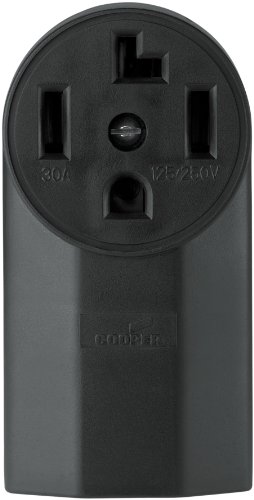
Features heavy galvanized steel and mounting strap to resist corrosion.

Flush Mount Power Outlet: Flush mount receptacle feature a heavy gauge galvanized steel mounting strap for corrosion resistance. Fits in BOTH single and 2-Gang box styles.
Inspecting the heating element
When your Samsung dryer stops heating, a faulty heating element could be the culprit. Here’s how you can inspect it:
- Unplug the dryer and locate the heating element.
- Use a multimeter to check for continuity.
- If there is no continuity, the heating element is defective and needs to be replaced.
- Ensure the element is not grounded. If it is, there might be a short circuit.
Remember to consult the dryer’s manual for specific instructions on accessing and testing the heating element.
| Important Points |
|---|
| Multimeter reading: No continuity |
| Possible issue: Defective heating element |
Recommended Products
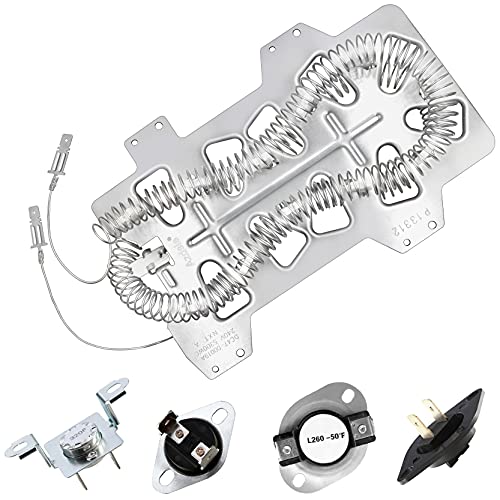
Azdele Heating element for samsung dryer: dc47-00019a samsung heating element wire is 25% longer than other dryer wires, increasing the resistance by 65% and producing stable heating.

✅Upgraded Design: 2026 UPGRADE DC47-00019A Samsung dryer heating element is made of 95 % nickel chrome material, durable in high temperature. The length of the dv42h5000ew/a3 heating wire is longer than OEM dryer replacement parts, increasing the resistance by 65%. It has a longer heat-resistant service life.

【Fits Models】This Dryer Heating Element kit fits Samsung Dryer parts: dv42h5000ew/a3 dve50r5400v/a3 dve50m7450w/a3 dv45h7000ew/a2 dv40j3000ew/a2 dv42h5200ep/a3 dve50r5200w/a3 dv48h7400ew/a2 dv42h5200ew/a3 dv42h5000ew a3 series etc.
Testing the thermal fuse
To ensure your Samsung dryer is functioning correctly, it’s crucial to test the thermal fuse when troubleshooting heating issues. Here’s how you can effectively conduct this test:
- Start by unplugging your dryer to guarantee your safety during the testing process.
- Locate the thermal fuse, typically found along the airflow path within the dryer. You may need to consult your dryer’s manual for precise guidance on its location.
- Use a multimeter to check for continuity in the thermal fuse. If there is no continuity detected, it signifies a faulty thermal fuse that needs to be replaced.
Remember, Testing the thermal fuse is a vital step in diagnosing heating problems in your Samsung dryer. By following this testing process, you can efficiently determine if the thermal fuse is the root cause of the heating issue.
Recommended Products

DC47-00016A dryer thermal fuse kit:DC47-00016A dryer thermal cut-off thermostat shuts off the motor when dryer overheats;DC96-00887A thermal fuse will shuts off the heat if the dryer overheats;DC32-00007A thermistor temperature sensor can monitor and regulate the temperature inside the dryer;DC47-00018A dryer thermostat which will shuts off the heating element when the dryer overheats.

PARTS NUMBER: samsung dc96-00887c dryer thermal fuse replacement ( DC96-00887A )

⚠️ Compatible models 40289032010 40289032011 40289032012 40299032010 40299032011 40299032012 DV203AGS/XAA DV203AGW/XAA DV206AES/XAA DV206AGS/XAA DV209AEW/XAA DV209AEWXAA DV209AGW/XAA DV210AEW/XAA DV210AEW/XAA-IN01 DV210AEW/XAC DV210AGW/XAA DV210AGWXAA DV218AEB/XAA DV218AEB/XAC DV218AEW/XAA DV218AEW/XAC DV218AGB/XAA DV218AGW/XAA DV219AEB/XAA DV219AEB/XAA DV219AEW/XAA DV219AEWXAA DV219AGB/XAA DV219AGW/XAA DV219AGWXAA DV220AEW/XAA DV220AEWXAA DV220AEW/XAC DV220AGW/XAA DV220AGW/XAA-IN01 DV231AEW/XAA DV231AEWXAA DV231AGW/XAA DV2C6BEW/XAA DV2C6BEWXAA DV2C6BGW/XAA DV306LEW/XAA DV306LGW/XAA DV316BEC/XAA DV316BEW/XAA DV316BGC/XAA DV316BGW/XAA
Resetting the high limit thermostat
So, what if your Samsung dryer is still not heating after checking and replacing the thermal fuse? The high limit thermostat might be the culprit. Here’s what you can do:
- Locate the high limit thermostat: It’s typically found on the heating element housing or the ducting that leads to the dryer drum.
- Reset the thermostat: You can usually reset it by pressing the small button on the thermostat. It can trip if the dryer is overheating.
- Check for continuity: Use a multimeter to check for continuity. No continuity could mean the thermostat needs replacement.
- Verify proper venting: Ensure the dryer vent isn’t clogged as this can cause overheating and trip the thermostat.
- Clean the lint filter: A clogged lint filter can lead to overheating issues as well.
- Test the dryer: After resetting the thermostat, test the dryer to see if the issue is resolved.
- Remember safety: Always unplug the dryer before attempting any repairs or resets to avoid any accidents.
Do you think resetting the high limit thermostat could be the solution to your Samsung dryer not heating issue? It’s worth a try before moving on to more complex fixes.
Conclusion
So there you have it – a guide to troubleshooting and fixing a Samsung dryer that’s not heating up. Remember to prioritize safety, check the high limit thermostat, ensure proper venting, clean the lint filter, and test your dryer. By following these steps, you can hopefully resolve the heating issue without the need for more complicated repairs. Keep your Samsung dryer running smoothly and efficiently by staying on top of maintenance and addressing any problems promptly. Happy drying!
Frequently Asked Questions
How do I troubleshoot a Samsung dryer that is not heating after replacing the thermal fuse?
If your Samsung dryer is still not heating after replacing the thermal fuse, the high limit thermostat might be the issue. Try locating and resetting the thermostat, checking for continuity, ensuring proper venting, cleaning the lint filter, and testing the dryer. Safety is essential, and resetting the high limit thermostat can often resolve heating problems before exploring more advanced solutions.
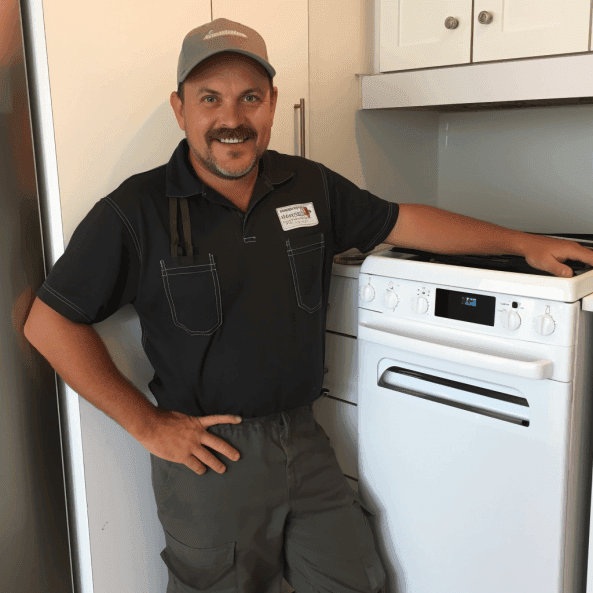
Hi, I’m Charlie, and I cover all things laundry here at Appliance Mastery.
I’ve spent over eight years working on washing machines, dryers, and dishwashers. I also have a degree in mechanical engineering, which helps me understand how these appliances really work.
I try to make every guide clear and practical. If you’re stuck with a noisy dryer or a leaking washer, I’ll help you figure out what’s wrong and how to fix it.