
Is your Kenmore Elite freezer display not working? You’re not alone. Many people face this frustrating issue, and it can leave you wondering if your food is safe or if you need to call for repairs.
In this article, you’ll find practical tips and troubleshooting steps to help you identify the problem and potentially fix it yourself. Whether it’s a simple reset or a more complex issue, you’ll gain the confidence to tackle the situation head-on. Let’s get your freezer back in working order so you can focus on what really matters—keeping your food fresh and your kitchen running smoothly.
Key Takeaways
- Identify Common Issues: Power supply problems, malfunctioning display panels, and unresponsive buttons are the most common reasons for a non-working Kenmore Elite freezer display.
- Troubleshooting Steps: Start with basic checks like inspecting the power cord, testing the outlet, and resetting the freezer to resolve display issues effectively.
- Repair Solutions: Consider replacing the display panel as a potential fix for persistent problems, ensuring proper compatibility with your model before starting.
- Professional Help: If basic troubleshooting fails, consult warranty options or seek local or authorized repair services for expert assistance.
- Preventive Maintenance: Regular cleaning, checking air vents, and scheduling inspections can help maintain the appliance’s health and prevent future display problems.
- Monitor Temperature: Keep the freezer at 0°F (-18°C) and use a thermometer to ensure optimal performance, preventing issues with the display and food preservation.
Common Issues With Kenmore Elite Freezer Display
The Kenmore Elite freezer display may not function correctly due to several troubles. Identifying these issues can help you troubleshoot effectively.
Power Supply Problems
Power supply issues often lead to a malfunctioning display. Check the following:
- Cord Connection: Ensure the power cord is securely plugged into the outlet.
- Outlet Functionality: Test the outlet with another device to confirm it’s working.
- Tripped Circuit Breaker: Inspect your circuit breaker for any tripped switches.
If everything checks out, try unplugging the freezer for a few minutes and then plugging it back in.
Malfunctioning Display Panel
A malfunctioning display panel can prevent you from monitoring temperature and settings. Look for these signs:
- Flickering or Blank Screen: If the display flickers or stays blank, it may indicate a deeper electrical issue.
- Unresponsive Buttons: If buttons don’t respond when pressed, dirt or moisture may be obstructing them.
- Error Codes: Displaying error codes can signal specific problems; refer to your user manual for meanings.
To address these issues, consider cleaning the panel gently with a soft cloth. If problems persist, replacing the display panel may be necessary, and consulting a professional could provide additional guidance.
Troubleshooting Steps
Start with simple solutions to restore your Kenmore Elite freezer display. Follow these troubleshooting steps to pinpoint and resolve the issue.
Recommended Products

Compatible Models: Compatible with Crosley CFUF Series Freezers 14 cu. ft. Models: CFUF14LW0, CFUF14LW1, CFUF14LW3, 17 cu. ft. Models: CFUFH17PW1, 21 cu. ft. Models: CFUFH211PW1.Compatible with Frigidaire FFU Series Freezers 14 cu. ft. Models: FFU14F5HWA, FFU14F5HWB, FFU14F5HWC etc, 17 cu. ft. Models: FFU17F5HWB, FFU17F5HWC, FFU17F5HWD etc, 21 cu. ft. Models: FFU21F5HWA, FFU21F5HWB, FFU21F5HWC and more.Compatible with Frigidaire LFFU Series Freezers 14 cu. ft. Models: LFFU14F5HWA, LFFU14F5HWB, LFFU14F5HWC etc, 17 cu. ft. Models: LFFU17F5HWA, LFFU17F5HWB and more.【Contact Us for Compatibility: If the part number 297370600 matches but your model is missing, message us for confirmation】

[ Fix ] Symptoms of a failing user control board include:(1)Inconsistent or fluctuating interior temperatures. (2)Failure of lights or other electrical accessories. (3)Poor fan or defrost performance issues. (4)Error codes displayed on control panels.

297370600 (AP5318915) replaces 2020880, 297241800, 297345500, 297366100, AH3502428, EA3502428, PS3502428
Checking Power Connection
- Inspect the Power Cord: Ensure the power cord connects securely to both the freezer and the wall outlet.
- Examine the Outlet: Plug another device into the outlet to check if it provides power. If it doesn’t, consider using a different outlet.
- Check the Circuit Breaker: Locate your circuit breaker panel and see if the breaker for the freezer is tripped. If it is, reset it by flipping the switch back to the “On” position.
- Unplug the Freezer: Disconnect the freezer from the power source by unplugging it for about five minutes.
- Reconnect the Power: After five minutes, plug it back in and check if the display works.
- Perform a Factory Reset: If the display remains unresponsive, refer to the owner’s manual to perform a factory reset, usually done by pressing a specific sequence of buttons on the control panel.
By following these steps, you can troubleshoot and potentially resolve display issues with your Kenmore Elite freezer.
Repair Solutions
Addressing a malfunctioning Kenmore Elite freezer display involves practical solutions ranging from simple fixes to professional help. Here are the primary repair options you can consider.
Recommended Products

Product Size: 240351601 Refrigerator freezer lower white door shelf bin. It can only be installed on the freezer door of a side-by-side refrigerator, it will not fit in the fridge-side slots, Its length is 10.6 inches, width is 5.1 inches, and height is 2.8 inches. 𝐏𝐥𝐞𝐚𝐬𝐞 𝐧𝐨𝐭𝐞: 𝐓𝐡𝐢𝐬 𝐢𝐬 𝐚 𝐝𝐨𝐨𝐫 𝐬𝐡𝐞𝐥𝐟 𝐛𝐢𝐧 𝐖𝐈𝐓𝐇𝐎𝐔𝐓 𝐀 𝐁𝐎𝐓𝐓𝐎𝐌. 𝐄𝐧𝐬𝐮𝐫𝐞 𝐭𝐡𝐢𝐬 𝐢𝐬 𝐭𝐡𝐞 𝐜𝐨𝐫𝐫𝐞𝐜𝐭 𝐬𝐭𝐲𝐥𝐞 𝐟𝐨𝐫 𝐲𝐨𝐮𝐫 𝐧𝐞𝐞𝐝𝐬 𝐛𝐞𝐟𝐨𝐫𝐞 𝐩𝐮𝐫𝐜𝐡𝐚𝐬𝐢𝐧𝐠. Please confirm the size before purchasing to avoid buying the wrong one
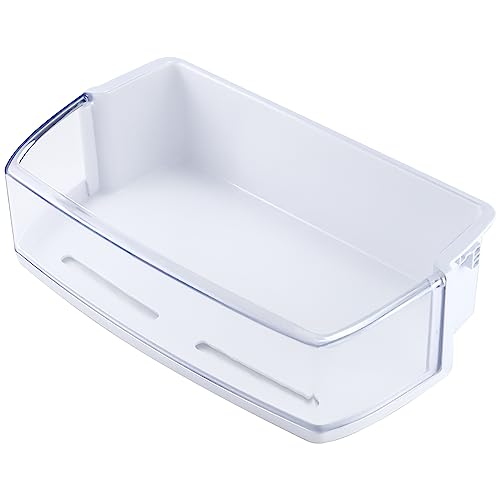
【AAP73631502 SHELF BIN】The second picture details the product size,please compare your old AAP73631502 LFX28968ST refrigerator door shelf bin with ours before purchase to avoid receiving the wrong AAP73631502 LFX28968ST refrigerator door shelf bin AAP73631502 refrigerator shelf replacement replaces AAP73631503 AP5673810 AP5673811 PD00005335 EAD61445219 2443758 AP4563994 PS2581944 EAP2581944,ken-more refrigerator parts shelf only fits on the top right side of the refrigerator

Replacement AED37133172 Stainless Steel Freezer Door Handle For LG Refrigerator
Replacing the Display Panel
Replacing the display panel may solve persistent issues. Before starting, gather tools like a screwdriver and a replacement panel specific to your model. Follow these steps:
- Unplug the Freezer: Safety first. Disconnect the unit from the power source.
- Remove the Front Cover: Using a screwdriver, take off the screws holding the front panel.
- Disconnect the Old Panel: Carefully unplug the wires from the faulty display.
- Attach the New Panel: Connect the new display panel by matching the wires correctly.
- Reattach the Front Cover: Secure the cover back with screws, making sure everything fits tightly.
- Plug in the Freezer: Reconnect the freezer to the power, and check if the display functions correctly.
Perform proper checks on compatibility to ensure the new panel works well with your freezer model.
Professional Repair Options
If troubleshooting and replacing parts doesn’t fix the display, professional repair may be necessary. Consider these options:
- Warranty Check: Review your warranty status. If the freezer is still under warranty, contact Kenmore customer service to avoid extra costs.
- Local Appliance Repair Services: Find reputable appliance repair technicians in your area. Look for reviews or ask for recommendations from friends or family.
- Authorized Kenmore Repair: Seek authorized Kenmore repair services for expert assistance. These technicians have specialized knowledge about Kenmore products and parts.
- Estimates: Request estimates before committing to a repair to ensure transparency about costs.
By exploring these solutions, you can restore your Kenmore Elite freezer’s display functionality and maintain your kitchen’s efficiency.
Preventive Measures
To keep your Kenmore Elite freezer display functioning properly, implementing preventive measures is essential. These tips help maintain the appliance’s health and prevent future display issues.
Regular Maintenance Tips
- Clean the Freezer: Wipe down the interior regularly to remove dust and debris. This helps ensure proper air circulation, reducing the chance of display failures.
- Inspect the Power Cord: Check the power cord for damage or wear. Replace it if you notice any frayed or broken sections.
- Check Air Vents: Make sure air vents are not blocked by food items. Proper airflow is crucial for the freezer to operate efficiently.
- Schedule Periodic Inspections: Consider scheduling annual check-ups with a professional to identify and address potential issues before they escalate.
- Set Correct Temperature: Keep the freezer set at 0°F (-18°C) for optimal performance. A temperature above this can lead to display and food preservation problems.
- Use a Thermometer: Place an appliance thermometer inside the freezer to monitor its accuracy. This ensures it consistently maintains the correct temperature.
- Adjust Settings as Needed: If you notice fluctuations in food texture or temperature, adjust the settings accordingly and monitor the display for any changes.
- Observe Display Indicators: Pay attention to any warning lights or error codes that may appear on the display. Address these promptly to avoid further complications.
Following these preventive measures helps extend the life of your Kenmore Elite freezer and keeps its display functioning as expected.
Conclusion
Dealing with a malfunctioning Kenmore Elite freezer display can be frustrating but you’re not alone. By following the troubleshooting tips and repair solutions outlined, you can take control of the situation and restore your freezer’s functionality. Remember to keep up with regular maintenance to prevent future issues.
If you find that the display still isn’t working after your efforts don’t hesitate to reach out for professional help. Keeping your freezer in top shape ensures your food stays fresh and your kitchen runs smoothly. You’ve got this!
Frequently Asked Questions
What causes a Kenmore Elite freezer display to malfunction?
A malfunctioning display can be caused by various issues, including power supply problems, loose power cords, tripped circuit breakers, or defective display panels. Common symptoms include flickering screens, unresponsive buttons, and error codes.
How can I troubleshoot my freezer’s display?
Start by checking the power cord connection and testing the outlet with another device. Inspect the circuit breaker and try unplugging the freezer for about five minutes. If issues persist, consider performing a factory reset or cleaning the panel.
When should I replace the display panel?
If you have tried troubleshooting methods and the display is still unresponsive or showing error codes, it may be time to replace the display panel. Ensure that you follow safety precautions, such as unplugging the freezer before starting the replacement.
How often should I maintain my Kenmore Elite freezer?
Regular maintenance is essential to keep your freezer functioning properly. Clean the interior, check for power cord damage, and ensure air vents are clear. Scheduling professional inspections every few years can also help prevent problems.
What temperature should my Kenmore Elite freezer be set to?
For optimal performance, keep your freezer set at 0°F (-18°C). Use a thermometer to monitor the temperature accurately and adjust settings as needed to maintain food freshness.
What should I do if the troubleshooting steps don’t work?
If troubleshooting fails to resolve the display issue, consider checking the warranty status for possible repairs. You can also seek local appliance repair services or contact authorized Kenmore technicians for professional assistance.

Hey, I’m Jake. I focus on cooling systems at Appliance Mastery, like fridges, freezers, and air conditioners.
I’ve worked in appliance repair for more than ten years and I’m certified through NASTeC. I’ve seen just about every fridge issue you can imagine.
My goal is to help you fix problems without stress. Whether it’s a freezer that won’t cool or an AC that keeps beeping, I’m here to walk you through it.