
A Samsung dryer displaying an hourglass symbol typically indicates a software issue preventing it from starting. A simple software reset can often resolve this problem, restoring functionality without the need for professional service.
Understand the Hourglass Symbol on Samsung Dryers
The hourglass symbol on Samsung dryers serves as an important indicator of the appliance’s status and functionality. Understanding its meaning can help troubleshoot issues effectively, particularly when the dryer fails to start. This section will clarify the significance of the hourglass icon and its implications for your dryer’s operation.
The hourglass symbol on Samsung dryers signifies that the machine is in a waiting state. This can happen due to various reasons, including a software glitch or an interrupted cycle. Understanding this indicator helps in diagnosing the issue effectively.
Recognizing the hourglass symbol is crucial for timely intervention. Ignoring it can lead to prolonged downtime and potential damage to the machine. A software reset is often the most efficient solution.
Samsung Dryer Starting Issues Diagnosis
If your Samsung dryer is displaying an hourglass symbol and failing to start, it may indicate a software glitch or other underlying issues. Understanding the common causes behind these starting problems can help you troubleshoot effectively. This section will guide you through diagnosing the issues to get your dryer back in working order.
| Symptom | Primary Suspect | Difficulty (1-5) |
|---|---|---|
| Dryer won’t start | Software glitch | 2 |
| Hourglass symbol | Power supply issue | 3 |
| Unresponsive controls | Faulty control board | 4 |
Samsung Dryer Reset Preparation Steps
Before attempting to reset your Samsung dryer, it’s essential to prepare adequately to ensure a smooth process. This section outlines the necessary steps to take, including safety precautions and preliminary checks, to help you effectively troubleshoot the hourglass issue and restore your dryer to proper functioning. Following these guidelines will set the stage for a successful reset.
Before initiating a software reset, gather the necessary tools and ensure safety. You will need:
Screwdriver for accessing the control panel
Soft cloth for cleaning
User manual for reference
Safety precautions are essential. Unplug the dryer to prevent electrical shock before starting any work. Ensure the area is dry and free from clutter to avoid accidents.
Samsung Dryer Hourglass Reset Procedure
If your Samsung dryer displays an hourglass icon and won’t start, it may require a software reset to resolve the issue. This guide provides a step-by-step procedure to help you reset your dryer effectively, ensuring it returns to normal operation without the need for professional assistance. Follow the outlined steps to troubleshoot and restore functionality.
Follow these steps to reset your Samsung dryer and eliminate the hourglass symbol.
Unplug the dryer from the power outlet. Wait for at least 5 minutes to allow the internal systems to reset.
Press and hold the Start/Pause button for 5 seconds while the dryer is unplugged. This action discharges any residual power.
Reconnect the power to the dryer. Plug it back into the outlet.
Press the Power button to turn on the dryer. Check if the hourglass symbol has disappeared.
Select a drying cycle and press Start to test functionality.
If the dryer still does not start, further troubleshooting may be necessary.
Samsung Dryer Hourglass Power Supply Solutions
If your Samsung dryer displays an hourglass symbol and won’t start, it may indicate a power supply issue. Understanding how to troubleshoot and resolve these problems is essential for restoring functionality. This section provides effective solutions to help you address the power supply challenges your dryer may be facing.
Sometimes, the hourglass symbol may indicate a power supply issue. Inspect the following:
Power cord for damage or fraying
Wall outlet functionality by testing with another device
Circuit breaker to ensure it has not tripped
If any issues are found, address them before attempting another reset. A faulty power supply can prevent the dryer from operating properly.
Recommended Products

Samsung DC92-01729Q Dryer Electronic Control Board is for dryers; this electronic control board DC92-01729Q manages the functions of the dryer such as drying time and temperature

The Samsung DC92-01025D Main Control Board Assembly is a genuine OEM (Original Equipment Manufacturer) part designed and engineered to exact specifications

The DC97-21429D Electronic Control Board, PCB is a genuine Original Equipment Manufacturer (Authentic OEM) part from Samsung that fits various models from the following brands of dryers: Samsung
Samsung Dryer Control Board Issues
If your Samsung dryer is displaying an hourglass symbol and failing to start, it may be indicative of underlying control board issues. Understanding these problems is crucial for effective troubleshooting and resolution. This section will delve into common control board malfunctions and how they can impact your dryer’s performance.
A malfunctioning control board can also cause the hourglass symbol to appear. Symptoms of control board failure include:
Unresponsive buttons
Inconsistent cycle settings
Failure to start after multiple resets
If you suspect a control board issue, consider consulting a technician for diagnosis and repair. Replacing a control board can be complex and may require professional assistance.
Samsung Dryer Maintenance to Avoid Software Glitches
Regular maintenance of your Samsung dryer is essential to prevent software glitches that can disrupt its functionality. By following a few straightforward practices, you can ensure that your appliance operates smoothly and efficiently, minimizing the risk of encountering issues like the hourglass symbol. This guide offers practical tips to keep your dryer in optimal condition.
Regular maintenance can help prevent software glitches and other issues. Consider the following practices:
Clean the lint filter after every use to ensure proper airflow.
Inspect the exhaust duct periodically for blockages.
Keep the control panel clean to prevent button malfunctions.
Implementing these maintenance tips can extend the life of your Samsung dryer and improve its performance.
Recommended Products

[Stretch Universal Connector] PetOde dryer lint vacuum cleaner attachment is designed with a premium elasticated stretch universal connector that can be connected to most vacuum cleaners! Say goodbye to the worry of purchasing incompatible attachment models

[Parts Number]: DC97-16742A dryer lint trap replacement (Upgraded stainless steel mesh) with vent cleaner, DC97-16742A dryer lint filter replacement specifications: Approx. 12.9"L x 11.4"W, Grey. Dryer lint brush is 26.8 inches long to help you remove all lint from grooves (lint can cause gaps in the dryer lint filter installation)

【Perfectly Compatible】:DC97-16742A dryer lint trap screen filter with flap replacement compatible with Samsung Dryer and replace these part numbers: DC61-03048A DC97-16742A, DC61-02610A, AP5306681, PS4221839, AP4578784, 2069511, B00D6MDHNG etc. We have listed all matching models in the description. If you're not sure whether or not a parts you're ordering fits your model, please feel free to contact us, We can verify if it will fit
Samsung Dryer Hourglass Reset Risks
Resetting your Samsung dryer when it displays the hourglass icon can be a straightforward solution, but it’s essential to understand the potential risks involved. This section outlines the possible complications that may arise during the reset process, ensuring you are well-informed before proceeding with any troubleshooting steps. Being aware of these risks can help you make better decisions for your appliance’s maintenance.
Repeated software resets without addressing underlying issues can lead to further complications. Always investigate the root cause before relying on resets as a solution.
Samsung Dryer Hourglass Troubleshooting Steps
If your Samsung dryer displays an hourglass symbol and won’t start, it can be frustrating. This guide provides clear troubleshooting steps to help you identify and resolve the issue, ensuring your dryer operates smoothly once again. Follow these instructions to reset the software and restore functionality to your appliance.
If the dryer continues to display the hourglass symbol after performing a reset, consult the user manual for additional troubleshooting steps. If necessary, contact Samsung customer service for professional assistance.
Recommended Products

DC61-02627A Moisture Plate Sensor Fits for Samsung Kenmore Dryer.
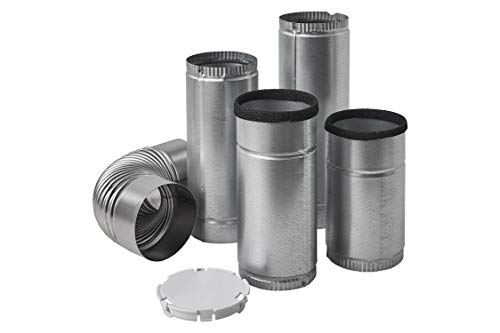
LAUNDRY VENT KIT: Side Vent Kit for Electric and Gas Dryers

✔✔【ITEM SPECIALITY 】:▶DC47-00016A Dryer Thermal Cut-Off Thermostat shuts off the motor when dryer overheats,which is located on the blower housing. ▶DC96-00887A Thermal Fuse with Bracket will shuts off the heat if the dryer overheats. ▶DC32-00007A thermistor temperature sensor can monitor and help regulate the temperature inside the dryer. ▶DC47-00018A Dryer High-Limit Thermostat maintains temperature between L260-50F, which will shuts off the heating element or burner when the dryer overheats

Hey, I’m Jake. I focus on cooling systems at Appliance Mastery, like fridges, freezers, and air conditioners.
I’ve worked in appliance repair for more than ten years and I’m certified through NASTeC. I’ve seen just about every fridge issue you can imagine.
My goal is to help you fix problems without stress. Whether it’s a freezer that won’t cool or an AC that keeps beeping, I’m here to walk you through it.