
The Samsung Front Loader Code UE indicates an unbalanced load, leading to excessive banging and shaking during the spin cycle. This issue can often be resolved by redistributing the laundry or adjusting the machine’s leveling feet.
Quick-Look Table for Samsung Front Loader Issues
When dealing with a Samsung front loader that exhibits banging and shaking, understanding the common issues is crucial for effective troubleshooting. The following quick-look table outlines typical problems associated with these machines, helping you identify and address the root causes efficiently. This resource will guide you through diagnosing and resolving the UE error code swiftly.
| Symptom | Primary Suspect | Difficulty 1-5 |
|---|---|---|
| Banging and shaking | Unbalanced load | 2 |
| Excessive noise | Worn shock absorbers | 3 |
| Vibration | Improper leveling | 2 |
| Leaking water | Damaged door seal | 4 |
Samsung Front Loader UE Code Banging Causes
The UE code typically arises when the washing machine detects an unbalanced load. This can occur due to a few factors, including unevenly distributed laundry, overloading the drum, or a malfunctioning suspension system. Addressing these issues is crucial for maintaining optimal performance and preventing further damage to the appliance.
Samsung Front Loader UE Banging and Shaking Solutions
If your Samsung front loader is experiencing banging and shaking issues indicated by the UE error code, you’re not alone. This common problem can disrupt laundry routines and lead to further complications if not addressed. Below are effective solutions to help stabilize your machine and restore its proper function.
To effectively resolve the banging and shaking, follow these steps:
Stop the washer and open the door to check the load.
Redistribute the laundry evenly around the drum.
Remove excess items if the drum is overloaded.
Check the leveling feet and adjust them to ensure the washer is stable.
Inspect the shock absorbers for wear and replace if necessary.
Recommended Products

Fit for Samsung Washer Door Seal: DC97-18094B front loader door seal fit for Samsung WF42H5000AW/A2 WF42H5200AW/A2 WF42H5200AF/A2 WF42H5200AP/A2;Designed to fit for Samsung Vrt washer,features accurate hole positions,leak-free washer door seal

Robust Sealing Solution: The DC97-04973B Washer Door Boot Spring Clip is a one-piece guardian that ensures your Samsung washer door stays tightly sealed, preventing leaks and maintaining optimal performance.
Samsung Front Loader Load Balance Importance
Understanding load balance in your Samsung front loader is crucial for optimal performance. An unbalanced load can lead to excessive banging and shaking during cycles, potentially damaging the machine over time. By ensuring proper load distribution, you can enhance the longevity of your washer and improve its efficiency.
Proper load distribution is essential for the efficient operation of a front loader. An unbalanced load can cause the drum to spin unevenly, leading to excessive noise and potential damage.
Samsung Front Loader Load Balancing Tips
When your Samsung front loader experiences banging and shaking, it may indicate an issue with load balancing. Properly distributing the laundry can prevent these disruptive movements and enhance the machine’s performance. Here are some effective tips to help you achieve optimal load balance and keep your washer running smoothly.
Mix large and small items to balance weight.
Avoid washing single heavy items, like a blanket, alone.
Use the same fabric type when possible to help balance the load.
Samsung Front Loader Leveling Feet Adjustment
If your Samsung front loader is experiencing excessive banging and shaking during cycles, improper leveling may be the culprit. Adjusting the leveling feet can significantly reduce vibrations and improve overall performance. This section will guide you through the necessary steps to ensure your washer is stable and functioning optimally.
An unlevel washer can exacerbate shaking and banging issues. Ensuring the washer is level helps maintain stability during operation.
Recommended Products
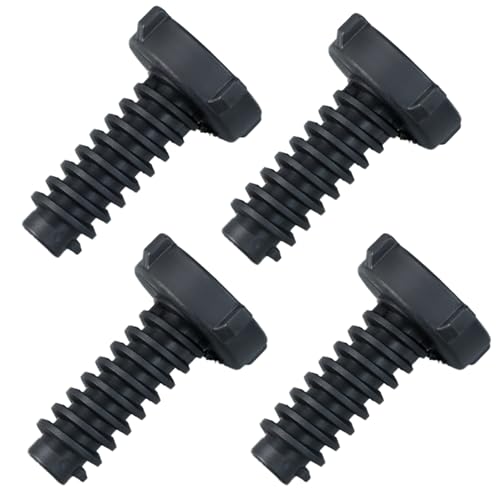
【PACKAGE】 4 Pcs 3.37” x 0.98” samsung washer leveling leg. Not include samsung washer leveling leg rubber pad. 【COMPATIBLE WITH SAMSUNG WASHER PARTS NUMBER】DC61-01722B, AP5578287, PS4206427, EAP4206427 and more samsung pedestal washer feet. 【Please see details page for more models, hold down ''CTRL'' + ''F" on your keyboard to find your model number to compare with our listing】

【DIMENSIONS】3.37’’H x 0.97’’ spiral diameter.【COMPATIBLE WITH SAMSUNG WASHER PARTS NUMBER】 DC61-01722B samsung leveling legs replacement, samsung washer leveling leg rubber pad and more

Product Information: 4-pack washing machine leveling legs for LG, with replace part number AFC72755401, solving leveling issues on all types of LG washing machines
Steps to Level Your Samsung Washer
If your Samsung front loader is experiencing banging and shaking, it may be due to an unlevel installation. Properly leveling your washer is crucial for optimal performance and can prevent further issues. Follow these steps to ensure your appliance is stable and functioning smoothly.
Use a level tool to check if the washer is even.
Adjust the front feet by twisting them to raise or lower.
Tighten the lock nuts after adjustments to secure the feet.
Samsung Front Loader Shock Absorber Inspection Guide
If your Samsung front loader is experiencing excessive banging and shaking during cycles, the shock absorbers may be the culprit. This guide will walk you through the inspection process, helping you identify issues and ensure your washer operates smoothly and quietly. Understanding how to assess these components is crucial for effective maintenance and repair.
Worn or damaged shock absorbers can lead to excessive movement during the spin cycle. Regular inspection can prevent larger issues.
Recommended Products

Applicable Models: Washer shock absorber is suitable for Samsung washing machine OEM contains WF20, WF21, WF32, WF33, WF35, WF39, WF40, WF41, WF42, WF43, WF44, WF45, WF46, WF50, WF56V, WF506, WF56V, etc. Front loading washing machine.

The Washer Shock Absorbers (Pack of 4) are Compatible with Samsung Washing Machines.

Reliable Performance:The DC66-00470A & DC66-00470B Washer Shock Absorber Kit is made of excellent quality material-metal, ABS, rubber, etc. It’s durable and rigorously tested to ensure that the product can be used for longer time as well as saving your money.
Samsung Front Loader Shock Absorber Leak Indicators
When your Samsung front loader exhibits signs of banging and shaking, it may be due to a leak in the shock absorbers. Understanding the indicators of this issue can help you diagnose the problem effectively. Identifying these signs early can prevent further damage and ensure your washer operates smoothly.
Visible leaks around the shock.
Loud banging noises during operation.
Excessive drum movement when the washer is running.
Samsung Front Loader UE Code Prevention Tips
If your Samsung front loader is displaying the UE code, it indicates an imbalance during the spin cycle, often resulting in excessive banging and shaking. Preventing this issue requires attention to several key factors that can help maintain stability and ensure smooth operation. Here are practical tips to keep your washer running efficiently and quietly.
Regular maintenance and attention to load distribution can prevent the UE code from appearing. Check the leveling feet and inspect shock absorbers periodically to ensure your Samsung front loader operates smoothly.

Hey, I’m Jake. I focus on cooling systems at Appliance Mastery, like fridges, freezers, and air conditioners.
I’ve worked in appliance repair for more than ten years and I’m certified through NASTeC. I’ve seen just about every fridge issue you can imagine.
My goal is to help you fix problems without stress. Whether it’s a freezer that won’t cool or an AC that keeps beeping, I’m here to walk you through it.