
Have you noticed your Dyson humidifier blinking a blue light and wondered what it means? You’re not alone. Many users face this puzzling situation, and it can be frustrating when you rely on your humidifier for comfort and air quality.
This article will help you understand what that blinking light signifies and why it occurs. You’ll learn about common issues and easy troubleshooting steps to get your humidifier back to working smoothly. By the end, you’ll feel more confident in maintaining your device and ensuring a healthy environment in your home.
Key Takeaways
- Blinking Blue Light Meaning: A blinking blue light on your Dyson humidifier indicates it may be in standby mode or needs attention due to issues like misaligned water tank or low water levels.
- Common Causes: Check for water tank seating, low water levels, upcoming filter maintenance, overheating protection, or firmware updates if your humidifier blinks blue.
- Effective Troubleshooting: Resolve blinking blue light issues by testing the water tank alignment, filling the tank, inspecting the filter, and checking for overheating.
- Maintenance Guidelines: Regularly check water levels, inspect and change the filter, clean the unit, and use distilled water to ensure optimal humidifier performance and longevity.
- Professional Help: Seek professional assistance if issues persist or if you notice unusual noises or leaks, especially if still under warranty.
Understanding Dyson Humidifiers
Dyson humidifiers are designed to improve indoor air quality while adding moisture to the air. Understanding their features and models can enhance your experience with these devices.
Overview of Dyson Humidifier Models
Dyson offers several humidifier models. Each model caters to different needs and environments.
- Dyson AM10: This model features UV-C light technology, which kills 99.9% of bacteria in water. It provides uniform humidity levels and has a nighttime mode for quieter operation.
- Dyson PH01: This model combines a humidifier with an air purifier, making it versatile for maintaining air quality. It includes a HEPA filter to capture allergens and pollutants.
- Dyson AM11: A more compact option, this model is suitable for smaller spaces. It offers essential features such as an easy-to-use remote control and programmable settings.
Common Features of Dyson Humidifiers
Dyson humidifiers are known for their innovative design and user-friendly features.
- Air Multiplier Technology: This feature ensures even distribution of moisture throughout the room. The lack of blades means a smooth airflow without choppy air.
- Smart Controls: Most models come with app connectivity, allowing you to control settings from your smartphone or tablet. You can monitor humidity levels in real-time.
- Filter Maintenance Alerts: Dyson humidifiers send alerts when it’s time to replace the filter. This ensures optimal performance and cleaner air.
- Quiet Operation: Designed to operate quietly, Dyson humidifiers won’t disrupt your environment. This makes them suitable for bedrooms and nurseries.
Understanding these elements helps you select the right model and utilize its features effectively.
Dyson Humidifier Blinking Blue Light
If your Dyson humidifier displays a blinking blue light, it’s important to understand what this indicates. This visual signal helps you troubleshoot issues to maintain optimal performance.
Recommended Products

𝐖𝐢𝐝𝐞𝐥𝐲 𝐂𝐨𝐦𝐩𝐚𝐭𝐢𝐛𝐥𝐞 - our TP10 filters are 100% compatible with Dyson pure hot & cool series HP1, PC1, TP04, TP06, TP07, TP09, TP10, TP11, HP06, HP07, HP04, HP09, HP10, HP11, PH02, PH01, PH03, PH04, HP4A, TP7A,TP4A, DP04, PH3A, HP2, PC2 air purifier humidify to ensure the humidify operate efficiently, delivering the same exceptional air cleaning power as the original. (𝐑𝐞𝐩𝐥𝐚𝐜𝐞𝐦𝐞𝐧𝐭 𝐩𝐚𝐫𝐭 𝐧𝐮𝐦𝐛𝐞𝐫 #𝟗𝟔𝟓𝟒𝟑𝟐-𝟎𝟏)Size: 4" L×1.38" THK×7.87" H (Each piece)

【COMPATIBLE MODEL】: This PH04 air puri-fier carbon fiber evaporator compatible with Dyson PH01 PH02 PH03 PH04 PH3A air cleaner puri-fier Humidifier, offers a seamless fit and optimal performance. Compare to part #970718-01. Please check your model before purchasing to ensure that you can buy the correct product
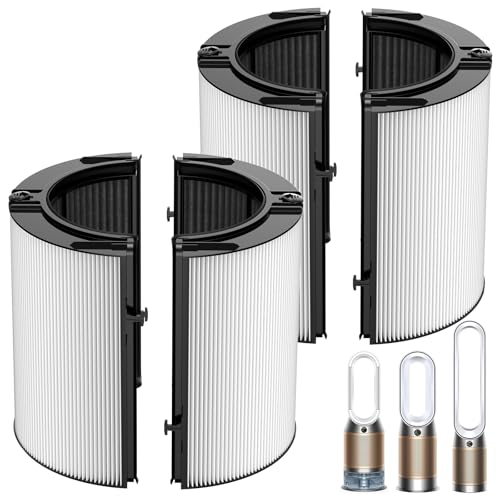
【𝐖𝐈𝐃𝐄𝐋𝐘 𝐂𝐎𝐌𝐏𝐀𝐓𝐈𝐁𝐋𝐄】- 360° Combination Glass HEPA and Activated Carbon Filter, fit for Dyson HP1, PC1,TP04, TP06, TP07, TP09, TP10, TP11, HP06, HP07, HP04, HP09, HP10, HP11, PH02, PH01, PH03, PH04, HP4A, TP7A,TP4A, DP04, PH3A Air Purifiers, Compatible with Dyson Pure Cool, Pure Hot Cool Cryptomic, and Humidify Cool Series Air Purifiers. Replacement Part Number: 965432-01
What Does Blinking Blue Light Indicate?
A blinking blue light typically means the humidifier is in standby mode or has encountered a minor issue. In standby mode, the humidifier prepares to operate but hasn’t yet started. If the blue light continues to blink after you’ve attempted to activate the device, it signals a potential malfunction that needs attention.
- Water Tank Issues: The water tank may not be seated correctly. If the tank isn’t positioned securely, it disrupts the humidifier’s function.
- Low Water Level: A low water level in the tank can trigger a blinking blue light. Ensure the tank has sufficient water for operation.
- Filter Service Alert: Some models alert you with a blinking blue light when the filter requires maintenance. Regularly check and replace filters as needed.
- Overheating Protection: Dyson humidifiers may blink blue as part of an overheating protection system. If airflow is blocked, the device cools down before resuming normal function.
- Firmware Updates: A blinking blue light may indicate that the humidifier is updating its software. This process typically resolves quickly and doesn’t require any action on your part.
By identifying the reason behind the blinking blue light, you can take the necessary steps to restore your humidifier’s performance effectively.
Troubleshooting the Blinking Blue Light
A blinking blue light on your Dyson humidifier indicates an issue that requires attention. Addressing this promptly ensures the device operates efficiently.
Steps to Resolve the Issue
- Check the Water Tank: Ensure the water tank is seated correctly. Remove it and reattach it firmly to eliminate any misalignment.
- Fill the Water Tank: Verify that the water level is adequate. Use distilled water to enhance the humidifier’s performance and prevent mineral buildup.
- Inspect the Filter: Confirm that the filter is clean and properly installed. Replace the filter if it’s clogged or past its service life to maintain optimal functionality.
- Monitor for Overheating: Check if the unit feels excessively warm. If so, turn it off and let it cool down for at least 30 minutes before restarting.
- Update Firmware: Ensure you’re using the latest software version for your humidifier. Refer to the Dyson app or website for update instructions.
- Reset the Device: Unplug the humidifier, wait for a minute, and then reconnect it. This action may reset the system and resolve minor issues.
When to Seek Professional Assistance
If the blinking blue light persists after following the above steps, professional assistance may be necessary.
- Persistent Errors: If you notice continuous issues beyond troubleshooting, it’s time to consult Dyson customer support for expert guidance or repairs.
- Warranty Considerations: Check your warranty status. If your humidifier is still under warranty, consider having it serviced by an authorized technician.
- Unusual Noises or Leaks: Any strange sounds or signs of leakage indicate potential hardware failure and warrants immediate attention from a professional.
Taking these steps ensures you maintain your Dyson humidifier effectively and enjoy the comfort it provides.
Maintenance Tips for Dyson Humidifiers
Keeping your Dyson humidifier in top shape enhances its performance and longevity. Follow these tips to maintain smooth operation and avoid common issues like the blinking blue light.
Recommended Products

Wide Compatibility: Leemone 360 combi glass HEPA & Carbon filter replacement - Compatible with Dyson HP10 HP07 TP10 TP09 TP07 TP06 TP04 TP4A HP04 HP06 HP09 HP4A HP7A PH01 PH02 PH03 PH04 DP04 PH2 HP2 PC2 PC1 HP1 Models for Dyson Pure Cool, Pure Hot Cool Cryptomic and Humidify Cool Air Purifiers

【Compatible with Dyson Purifier Humidify+Cool Formaldehyde】This filter replacement designed for Dyson Purifier Humidify+Cool Formaldehyde PH04, PH03, PH3A, PH02, PH01. This filter replacement ensures a precise fit and restores full performance to your air purifier

【COMPATIBIE MODELS】This upgraded 360 Combi Glass HEPA + Carbon Replacement 2 in 1 filter is specfically designed for Dyson PHP10 HP07 TP10 TP09 TP07 TP06 TP04 TP4A HP04 HP06 HP09 HP4A HP7A PH01 PH02 PH03 PH04 DP04 Pure Cool & Pure Hot Cool Cryptomic & Humidify Cool Air Purifiiers
Preventing Future Issues
- Check Water Levels Regularly: Inspect the water tank daily to ensure it’s adequately filled. Low water levels can trigger the blinking blue light.
- Inspect Filter Condition: Examine your humidifier’s filter monthly. If it appears dirty, replace it to keep airflow unrestricted and water quality high.
- Ensure Proper Seating: Always double-check that the water tank fits securely in place. Misaligned tanks can result in alerts and blinking lights.
- Maintain Cleanliness: Wipe down the humidifier weekly to prevent dust or mineral build-up. Use a damp cloth to clean its exterior.
- Position Wisely: Place your humidifier on a flat, hard surface. Avoid soft, uneven areas that can disrupt the device’s function.
- Regularly Change Filters: Replace filters every 6-12 months, depending on usage. A new filter optimizes performance and improves air quality.
- Use Distilled Water: Fill your humidifier with distilled or demineralized water to minimize mineral build-up and extend the device’s life.
- Run the Humidifier Regularly: Operate your humidifier consistently. This practice helps prevent stagnation and mold growth within the unit.
- Follow Firmware Updates: Keep the humidifier’s firmware updated. Connect to the Dyson app for notifications on updates. Enhanced software optimizes functionality and performance.
- Store Properly: When not in use, store your humidifier in a cool, dry place. Ensure it’s cleaned and dried thoroughly to avoid mildew.
By implementing these maintenance tips, you create a reliable humidifier that keeps your environment comfortable and healthy.
Conclusion
Dealing with a blinking blue light on your Dyson humidifier can be frustrating but it doesn’t have to be a hassle. By following the troubleshooting steps and maintenance tips outlined in this article you can easily keep your humidifier running smoothly.
Remember to check the water tank seating and levels regularly and stay on top of filter maintenance. With a little care your humidifier will continue to provide the comfort and air quality you need. If issues persist don’t hesitate to reach out for professional help. Enjoy a healthier and more comfortable home environment with your Dyson humidifier working at its best.
Frequently Asked Questions
What does a blinking blue light mean on a Dyson humidifier?
A blinking blue light on a Dyson humidifier usually indicates that the device is in standby mode or has encountered a minor issue, like a low water level or a filter service alert.
How can I troubleshoot the blinking blue light issue?
To troubleshoot, check the water tank’s seating, ensure sufficient water levels, inspect and replace the filter if needed, and monitor for overheating. Additionally, update the firmware and reset the device if necessary.
What should I do if the blinking light persists after troubleshooting?
If the blinking blue light continues despite troubleshooting, consider seeking professional assistance, especially if you notice persistent errors, unusual noises, or leaks.
How often should I check the filter on my Dyson humidifier?
You should regularly inspect the filter in your Dyson humidifier, ideally every month, and replace it as necessary to ensure optimal performance and air quality.
What maintenance tips can enhance my Dyson humidifier’s performance?
Regularly check water levels, inspect the filter, maintain cleanliness, position the humidifier wisely, frequently change filters, and use distilled water to enhance your humidifier’s performance and longevity.

Hey, I’m Jake. I focus on cooling systems at Appliance Mastery, like fridges, freezers, and air conditioners.
I’ve worked in appliance repair for more than ten years and I’m certified through NASTeC. I’ve seen just about every fridge issue you can imagine.
My goal is to help you fix problems without stress. Whether it’s a freezer that won’t cool or an AC that keeps beeping, I’m here to walk you through it.