
Electrolux Oven Error Code F20 indicates a communication loop fault, often stemming from issues in the wiring or control board. Resolving this error typically involves checking connections and possibly replacing the control board if necessary.
Quick-Look Table for F20 Error Code
Understanding the F20 error code in Electrolux ovens is crucial for effective troubleshooting. This quick-look table provides a concise overview of the communication loop faults associated with this error, allowing users to identify potential issues and take appropriate corrective actions swiftly. Use this guide to navigate the complexities of your oven’s performance.
Understanding the symptoms and potential causes of the F20 error code can help in diagnosing the issue effectively. The following table summarizes the key aspects of this error.
| Symptom | Primary Suspect | Difficulty (1-5) |
|---|---|---|
| Oven not responding | Faulty control board | 4 |
| Display shows error code | Wiring issues | 3 |
| Inconsistent heating | Loose connections | 2 |
Root Cause of F20 Error Code
Understanding the root cause of the F20 error code in Electrolux ovens is essential for effective troubleshooting. This error typically indicates a communication loop fault, which can stem from various issues within the appliance’s wiring or control systems. Identifying the specific source of the problem will help in implementing the right solutions to restore proper functionality.
The F20 error code typically arises from a communication failure between the oven’s control board and other components. Possible root causes include:
Damaged wiring harness
Faulty control board
Poor connections at terminals
Identifying the root cause is essential for an effective resolution.
Step-by-Step Fix for F20 Error Code
When your Electrolux oven displays the F20 error code, it indicates a communication loop fault that can disrupt its operation. Addressing this issue requires a systematic approach to troubleshoot and resolve the underlying problem. The following steps will guide you through the process of diagnosing and fixing the F20 error effectively.
Follow these steps to troubleshoot and fix the F20 error code effectively.
Unplug the oven to ensure safety during inspection.
Inspect the wiring harness for any visible damage or wear.
Check all connections at the control board and other components.
Reconnect any loose wires securely to ensure proper communication.
If problems persist, replace the control board with a compatible model.
Recommended Products
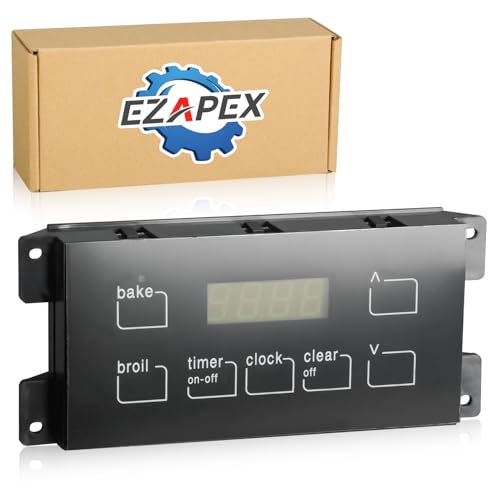
Compatible Models: Compatible with Electrolux, Frigidaire, Kenmore, Tappan Oven, black overlay included will be incluede as a gift.【𝐀𝐩𝐩𝐥𝐢𝐞𝐬 𝐭𝐨 𝐬𝐩𝐞𝐜𝐢𝐟𝐢𝐜 𝐦𝐨𝐝𝐞𝐥𝐬 𝐨𝐧𝐥𝐲. 𝐈𝐟 𝐭𝐡𝐞 𝐩𝐚𝐫𝐭 𝐧𝐮𝐦𝐛𝐞𝐫 𝟑𝟏𝟔𝟒𝟓𝟓𝟓𝟎𝟎 𝐦𝐚𝐭𝐜𝐡𝐞𝐬 𝐲𝐨𝐮𝐫 𝐦𝐨𝐝𝐞𝐥 𝐛𝐮𝐭 𝐲𝐨𝐮 𝐚𝐫𝐞 𝐧𝐨𝐭 𝐜𝐨𝐦𝐩𝐥𝐞𝐭𝐞𝐥𝐲 𝐬𝐮𝐫𝐞 𝐚𝐛𝐨𝐮𝐭 𝐜𝐨𝐦𝐩𝐚𝐭𝐢𝐛𝐢𝐥𝐢𝐭𝐲, 𝐩𝐥𝐞𝐚𝐬𝐞 𝐜𝐨𝐧𝐭𝐚𝐜𝐭 𝐮𝐬 𝐟𝐨𝐫 𝐜𝐨𝐧𝐟𝐢𝐫𝐦𝐚𝐭𝐢𝐨𝐧.】

Universal Compatibility - Professional stove control board designed to replace part numbers: 316455500, 316455420, 316222811, 1197180, AP3960228, PS1528269, EAP1528269, 5304518660, 316455420R, EA1528269, and AH1528269. This upgraded unit is a direct fit for specific Frigidaire, Electrolux, and Tappan oven models.

【Direct Replacement for Frigidaire Kenmore Ranges】Compatible with Crosley, Electrolux, Frigidaire, Gibson, Kelvinator, Kenmore, Tappan, and Westinghouse models including FFEF3050LSR WWEF3008TWC TEF351EWS FFEF3018LBJ FFEF3018LQJ FFEF3018LWJ CRE3860QBB CRE3860QBC CRE3860QWB CRE3860QWC CRE3875SSC FFEF3048LSN FFEF3018LMK FFEF3018LMM FFEF3018LSF FFEF3018LSG FFEF3048LSR FFEF3018LBK CFEF3048LSR CFEF3014LSB CFEF3014LSC CFEF3014TWB CFEF3014TWC CFEF3016LWJ CFEF3016LWK CFEF3018LBK CFEF3018LMM CFEF3018LWK CFEF3046LSM CFEF3046LSN CFEF3048LSP CRE3875SSD FFEF3018LQK TEF351EWR FFEF3018LBH FFEF3018LQH FFEF3018LWH LFEF3048QFB LFEF3048QFC and more
Essential Tools for Electrolux F20 Repair
When addressing the F20 error code in Electrolux ovens, having the right tools is crucial for an effective repair. This section outlines the essential equipment and instruments needed to diagnose and resolve communication loop faults, ensuring a smoother troubleshooting process and restoring your oven to optimal performance.
Before starting the repair, gather the necessary tools and supplies. This will streamline the process and ensure you have everything on hand.
| Tool/Supply | Purpose |
|---|---|
| Screwdriver set | Remove screws |
| Multimeter | Test electrical connections |
| Replacement control board | Replace faulty component |
| Wire connectors | Secure any loose wires |
Electrolux F20 Wiring Faults to Inspect
When dealing with an Electrolux oven displaying the F20 error code, it’s essential to inspect the wiring for potential faults. This section outlines the specific wiring issues that may lead to communication loop failures, helping you identify and resolve the problem effectively. Understanding these wiring components will facilitate a more efficient troubleshooting process.
Wiring issues are a frequent cause of the F20 error code. Inspect these components carefully.
Frayed wires can disrupt communication.
Corrosion at terminals can lead to poor connections.
Loose connections may cause intermittent faults.
Addressing these wiring issues can often resolve the error without needing to replace the control board.
Electrolux Oven Maintenance to Avoid F20 Errors
Regular maintenance of your Electrolux oven is essential to prevent F20 error codes, which indicate communication loop faults. By following specific upkeep practices, you can enhance the appliance’s performance and longevity, ensuring it operates smoothly without interruptions. Understanding these maintenance steps will help you avoid potential issues and keep your oven in optimal condition.
Regular maintenance can prevent the occurrence of error codes like F20. Consider the following practices:
Clean the oven regularly to prevent dust buildup.
Inspect wiring during routine checks to catch issues early.
Test functionality after repairs to ensure everything operates smoothly.
Proactive maintenance can extend the lifespan of your oven and reduce the likelihood of communication faults.
Electrolux F20 Communication Fault Repair Warnings
When addressing the F20 error code in Electrolux ovens, it’s crucial to understand the potential communication loop faults that can arise. This section outlines important repair warnings to ensure safe and effective troubleshooting, helping you navigate the complexities of the issue while minimizing the risk of further complications.
Always ensure the oven is unplugged before attempting any repairs. Working with electrical components poses risks if proper safety measures are not taken.
Electrolux F20 Error Resolution Steps
When your Electrolux oven displays the F20 error code, it indicates a communication loop fault that can disrupt its operation. Understanding how to effectively troubleshoot this issue is crucial for restoring functionality. The following resolution steps will guide you through diagnosing and fixing the F20 error, ensuring your oven operates smoothly once again.
To resolve the F20 error code, follow the outlined steps and utilize the provided tables for guidance. Regular maintenance and prompt attention to wiring issues can enhance the performance of your Electrolux oven.

Hey, I’m Jake. I focus on cooling systems at Appliance Mastery, like fridges, freezers, and air conditioners.
I’ve worked in appliance repair for more than ten years and I’m certified through NASTeC. I’ve seen just about every fridge issue you can imagine.
My goal is to help you fix problems without stress. Whether it’s a freezer that won’t cool or an AC that keeps beeping, I’m here to walk you through it.