
Is your Whirlpool stove touch screen acting up? You’re not alone. Many people face this frustrating issue, especially when they’re in the middle of cooking a meal. A non-responsive touch screen can throw a wrench in your dinner plans and leave you feeling helpless.
Key Takeaways
- Common Symptoms: Recognize signs of a malfunctioning touch screen, which may include non-responsiveness, random inputs, partial sensitivity, or delayed response.
- Troubleshooting Steps: Begin troubleshooting by checking the power supply, resetting the stove, and cleaning the touch screen to enhance responsiveness.
- Customer Support: If issues persist after troubleshooting, consider contacting Whirlpool customer support for professional assistance and specific instructions for your model.
- Warranty Awareness: Know your warranty terms to determine if your stove qualifies for free repairs or replacements, and keep documentation like purchase receipts readily available.
- Authorized Service Centers: Utilize Whirlpool’s service locator tool to find certified technicians for repairs, ensuring that your appliance warranty remains intact and quality service is received.
Common Issues With Whirlpool Stove Touch Screens
Touch screen issues on Whirlpool stoves can significantly disrupt your cooking experience. Identifying common problems can help you address the issue effectively.
Overview of Touch Screen Functionality
Touch screens work through a glass panel that detects finger pressure, translating it into commands. The functionality relies on sensors beneath the surface, connecting to the stove’s control board. This technology allows for quick access to settings and features. Proper functioning requires clean, intact surfaces without obstruction or damage.
Symptoms of a Malfunctioning Touch Screen
A touch screen that isn’t working may display several symptoms:
- Non-Responsiveness: The touch screen doesn’t respond to taps or swipes.
- Random Inputs: Inputs register that you didn’t initiate, causing unintended actions.
- Partial Sensitivity: Certain areas of the screen may not respond, while others work fine.
- Delayed Response: There’s a noticeable lag when you attempt to interact with the screen.
Recognizing these signs early can aid in troubleshooting the issues. If you encounter these symptoms, consider checking for updates, cleaning the surface, or reviewing your user manual for guidance.
Troubleshooting Steps
Follow these troubleshooting steps to get your Whirlpool stove’s touch screen up and running again.
Recommended Products

【WPW10409946 Gas/Electric Range Oven Door Outer Glass Panel Replacement Perfect Fit and Compatibility】 Ensure optimal performance with parts that are manufactured to meet or exceed OEM specifications. These parts are specifically designed to ensure seamless integration and easy installation. Affordable replacement parts that restore your parts to like-new condition without the high cost of a whole new unit. WPW10409946 Oven Stove outer door glass panel replacement is a cost-effective solution for your gas/electric freestanding range.
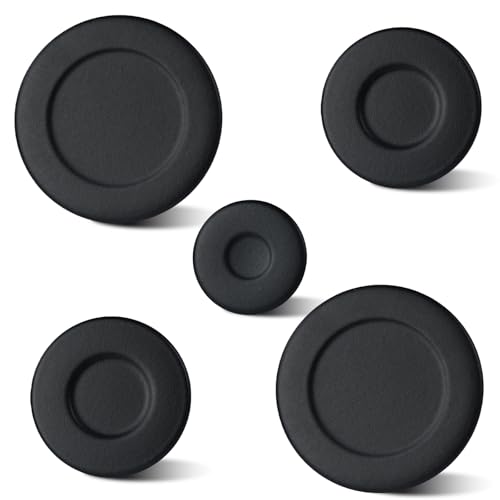
Specific Part Number Replacement: This burner cap set replaces part W10832694 and compatible numbers W10597133, AP5988633, PS11727796, 4363154. Verify compatibility with your stove model before ordering
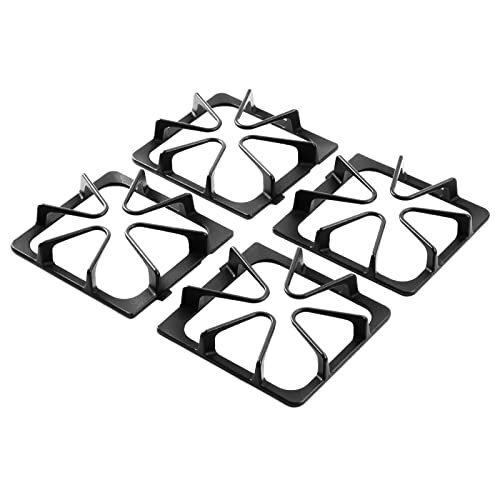
【UPGRADED HEAVIER AND THICKER GRATE BARS】 The whirlpool gas range burner grates are made of cast iron and it heavier than others, more durable and long-life lasting. The matte enamel cast iron gas burner rack are less likely to scratch up your cookware【EASY TO CLEAN】 Maytag grate can be cleaned in the dishwasher as long as they are cast iron
Check Power Supply and Connections
First, ensure the stove is plugged in securely. Check the outlet by plugging in another device. If that device doesn’t work, the outlet may have issues. Next, examine the power cord for any visible damage. Tighten any loose connections, both at the stove and the wall outlet. If you’re using a power strip, connect the stove directly to the outlet instead.
Resetting the Stove
Resetting your stove can resolve touch screen issues. To do this, unplug the stove from the power source for at least one minute. After waiting, plug it back in and turn it on. This process refreshes the control board and may restore touch screen functionality. If issues persist, consult your user manual for model-specific reset instructions.
Cleaning the Touch Screen
Cleaning the touch screen can improve responsiveness. Use a soft, damp cloth to gently wipe the screen. Avoid harsh chemicals or abrasive materials, which can cause permanent damage. After cleaning, allow the screen to fully dry and test its responsiveness. Sometimes, dirt and grease can interfere with the touch sensors.
When to Contact Customer Support
You might consider contacting customer support if troubleshooting steps don’t resolve the touch screen issue on your Whirlpool stove. For specific guidance and further assistance, reaching out directly to professionals can be essential.
Warranty Considerations
Understand your warranty terms before contacting customer support. If your stove is still under warranty, you may qualify for free repairs or replacements. Document the purchase date and keep your receipt handy. Knowing whether your stove is covered can save you time and money when seeking help.
Finding Authorized Service Centers
Finding an authorized service center ensures you receive the best support. You can locate service centers by visiting the Whirlpool website and using their service locator tool. Enter your zip code to find nearby authorized technicians. Using professional services helps maintain your stove’s warranty and assures quality repairs. Always verify if the technician is certified for Whirlpool appliances.
User Experiences and Reviews
Users often share their experiences with Whirlpool stoves, especially regarding touch screen functionality. Feedback reflects a mix of satisfaction and frustration.
Positive Feedback on Whirlpool Stoves
Many users appreciate the sleek design and modern features of Whirlpool stoves. They highlight the ease of use that touch screens provide when functioning correctly. You might find comments like, “The touch screen makes it easy to switch settings quickly,” or, “I love the responsive controls when they work.” Users also report satisfaction with cooking performance, often noting that their meals cook evenly and efficiently.
Common Complaints About Touch Screen Issues
Despite the positive feedback, numerous users encounter touch screen problems. Common complaints include the screen not responding when touched or sporadically registering inputs, leading to cooking mishaps. You may come across reviews stating, “My stove’s touch screen has stopped responding completely,” or “The delay makes it frustrating to adjust heat settings.” These issues disrupt meal preparation and can leave you feeling helpless. Users often recommend looking for updates, checking connections, or even replacing the control panel for resolution.
Conclusion
Dealing with a non-responsive touch screen on your Whirlpool stove can be really frustrating. You’ve got meals to prepare and the last thing you need is a malfunctioning appliance. By following the troubleshooting steps and keeping an eye on common issues, you can often get things back on track.
If you’ve tried everything and the problem persists, don’t hesitate to reach out to customer support. They’re there to help you navigate warranty options and find authorized service centers. Remember you’re not alone in this—many users have faced similar challenges. With a little patience and the right approach, you can get your stove working smoothly again. Happy cooking!
Frequently Asked Questions
What causes non-responsive touch screens on Whirlpool stoves?
Non-responsive touch screens on Whirlpool stoves can be caused by several factors, including dirt or grease buildup, software glitches, power supply issues, or faulty control boards. These elements can interfere with the sensors that detect finger pressure, leading to frustration while cooking.
How can I troubleshoot my Whirlpool stove’s touch screen?
To troubleshoot the touch screen, check if the stove is securely plugged in and inspect the power cord for damage. Cleaning the screen with a soft, damp cloth can help. You can also reset the stove by unplugging it for at least one minute to refresh the control board.
When should I contact Whirlpool customer support?
Contact Whirlpool customer support if the troubleshooting steps do not resolve the issue. It’s crucial to understand your warranty terms beforehand, as you may qualify for free repairs or replacements if your stove is still under warranty.
How do I find an authorized Whirlpool service center?
You can find authorized Whirlpool service centers by visiting the official Whirlpool website. There, you can search for certified technicians in your area to ensure quality repairs while maintaining your warranty coverage.
What user experiences do people have with Whirlpool stoves?
User experiences with Whirlpool stoves vary. Many appreciate their sleek design and modern features, especially when the touch screens work well. However, numerous reviews indicate frustrations due to touch screen issues like unresponsiveness and delayed inputs, impacting their cooking experience.

Hey, I’m Jake. I focus on cooling systems at Appliance Mastery, like fridges, freezers, and air conditioners.
I’ve worked in appliance repair for more than ten years and I’m certified through NASTeC. I’ve seen just about every fridge issue you can imagine.
My goal is to help you fix problems without stress. Whether it’s a freezer that won’t cool or an AC that keeps beeping, I’m here to walk you through it.