
Have you ever faced the frustration of a dehumidifier pump that just won’t work? You’re not alone. Many people rely on these handy devices to keep their homes comfortable, and when they stop functioning, it can lead to unwanted humidity and mold issues.
Key Takeaways
- Common Causes for Pump Failure: Power supply issues, clogged drain hoses, and float switch malfunctions are typical reasons behind a non-functioning Hisense dehumidifier pump.
- Effective Troubleshooting: Start by checking power connections, inspecting the drain hose for clogs, and resetting the unit to resolve issues effectively.
- Preventive Maintenance: Regularly clean the filter, inspect the drain hose, and maintain proper airflow around the unit to ensure optimal performance and longevity.
- Recognizing Serious Issues: Unusual noises, persistent error codes, water leaks, and overheating are signs that indicate the need for professional assistance.
- Professional Help: Seek out certified technicians with good reviews to ensure effective repairs when basic troubleshooting fails.
Common Reasons For Hisense Dehumidifier Pump Stopped Working
When your Hisense dehumidifier pump stops working, several issues could be at play. Understanding these common reasons can help you troubleshoot the problem effectively.
Power Supply Issues
Power supply issues often cause the pump to stop functioning. Check the following:
- Power Outlet: Ensure the outlet is operational. You can test it by plugging in another device.
- Power Cord: Inspect the power cord for any visible damage or fraying.
- Circuit Breaker: Look at your circuit breaker. If it’s tripped, reset it to restore power.
Clogged Drain Hose
A clogged drain hose can prevent proper drainage. Take these steps to resolve it:
- Inspect the Hose: Remove the hose and check for blockages. Clear any debris or kinks.
- Clean the Hose: Use warm, soapy water to clean it. Rinse thoroughly before reattaching.
- Check Connections: Make sure the hose is securely connected to the dehumidifier and the drain.
- Empty the Tank: Regularly check and empty the water tank when it reaches capacity.
- Float Switch: Make sure the float switch isn’t stuck. A stuck float can signal that the tank is full when it’s not.
- Tank Placement: Ensure the tank is placed correctly in the unit. An improper fit may prevent the pump from activating.
Troubleshooting Steps
When your Hisense dehumidifier pump stops working, follow these troubleshooting steps to identify and resolve the issue quickly.
Recommended Products

Multi-Purpose Hose, 6ft Cut-to-Fit:This 6-foot hose is designed for various applications, including dehumidifier drainage and gardening tasks. It can be easily cut to the desired length for flexible use. Please confirm the required length before purchase.

Length – 16.4ft (5 meters) for flexible and convenient pump drainage.

【The Undisputed Champion — Industry‑Leading Dehumidifier Brand】When you choose AEOCKY, you get double market validation. In 2025, AEOCKY was an industry‑leading dehumidifier brand on Amazon US. This means you’re not just choosing a flagship from a market leader, but the top choice proven by millions of real users—representing the ultimate combination of performance, quality, and trust.
Checking Power Connections
Ensure the power outlet provides electricity. Plug another device into the outlet to test it. If the outlet works, check the dehumidifier’s power cord for any visible damage. A damaged cord can disrupt power flow. Make sure the power switch is turned on. If everything looks good, unplug the unit for one minute, then plug it back in.
Inspecting the Drain Hose
Examine the drain hose for clogs or kinks. A blocked hose prevents proper drainage, causing the pump to malfunction. Remove the hose and flush it with water to clear any debris. Replace the hose securely to ensure a tight fit. Make sure the hose directs water to an appropriate drainage location.
Resetting the Unit
Resetting your dehumidifier can resolve minor issues. Locate the reset button, usually found on or near the control panel. Press it to reset the unit. For models without a reset button, unplug the unit for several minutes, then plug it back in. This action restores the system and may fix operational glitches.
By systematically going through these troubleshooting steps, you can often restore functionality to your Hisense dehumidifier pump without outside assistance.
Preventive Maintenance Tips
Maintaining your Hisense dehumidifier helps keep the pump operating efficiently and extends the device’s lifespan. Here are some essential tips for preventive maintenance.
Recommended Products
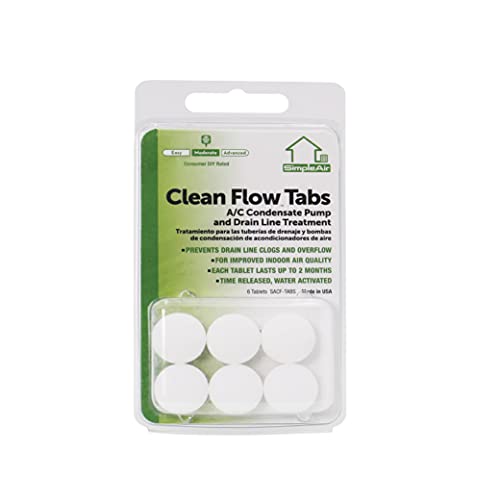
SimpleAir’s Clean Flow Tabs are a simple method to maintain free-flowing drain lines associated with all HVAC systems

Energy Star Efficiency: ENERGY STAR Most Efficient 2025 Certified and officially recognized by the U.S. EPA for excellent energy efficiency

4,500 SQ. FT. DEHUMIDIFIER – Removes up to 50 pints of moisture per day with an adjustable humidity setting from 35% to 85%. Perfect for use in basement, bathroom, bedroom, office, kitchen, cellar, or crawlspace. Maintain a healthy 45%-55% humidity range
Regular Cleaning
Clean the dehumidifier’s filter every month. A dirty filter restricts airflow, making the pump work harder. Use warm, soapy water to wash it, then rinse and let it dry completely before reinserting.
Inspect the drain hose regularly for clogs or debris. If you notice any buildup, flush it with water to ensure a smooth flow. Additionally, wipe down the exterior of the unit to remove dust and dirt that can accumulate.
Keeping The Area Dry
Ensure the area surrounding your dehumidifier stays dry. Excess moisture around the unit can lead to increased humidity levels, causing the pump to operate inefficiently.
Avoid placing the dehumidifier in direct contact with water sources, such as sinks or washing machines. Make sure to seal any gaps in windows and doors, reducing moisture intrusion from outside.
Maintain proper airflow around the unit. Keep it at least 6 inches away from walls or furniture to allow air to circulate freely.
When To Seek Professional Help
Recognizing when it’s time to call a professional is crucial for maintaining your Hisense dehumidifier. If basic troubleshooting doesn’t resolve the issue, consider reaching out for expert assistance.
Recommended Products

AUTOMATIC CONDENSATE PUMP: features a vertical-type switch to reduce footprint and is designed to automatically remove condensate produced by boilers, furnaces, air conditioners and de-humidifiers

PREMIUM QUALITY - Nickel-plated brass fittings, fits standard 3/4" hose thread outlets. Fully compatible with most brands of dehumidifiers, and can also be connected to a variety of valves and hose taps.

AUTOMATIC CONDENSATE PUMP: features a vertical-type switch to reduce footprint and is designed to automatically remove condensate produced by boilers, furnaces, air conditioners and de-humidifiers
Signs That Indicate A Major Problem
Look for these key signs that suggest a serious malfunction:
- Unusual Noises: Listen for grinding, rattling, or hissing sounds. These auditory signs often indicate internal mechanical issues.
- Persistent Error Codes: If your unit displays persistent error codes that troubleshooting hasn’t resolved, it signals deeper electrical problems.
- Water Leaks: Noticeable puddles around the base or leaks from the unit suggest a significant issue with seals or internal components.
- Failure to Turn On: If the dehumidifier doesn’t respond to power, despite checking connections, a deeper electrical fault may exist.
- Overheating: If the unit becomes excessively warm to the touch, it indicates potential motor or compressor problems.
Finding A Certified Technician
Finding a qualified technician is essential for effective repairs:
- Research Local Services: Look for specialists or HVAC companies in your area with experience in dehumidifiers.
- Check Reviews: Read customer reviews and ratings online to gauge the reliability and quality of service before selecting a technician.
- Verify Certifications: Ensure the technician is certified and has the necessary qualifications to service Hisense products specifically.
- Request Estimates: Get estimates from multiple technicians to compare costs upfront. Factors such as parts, labor, and warranty should influence your decision.
Seeking professional help promptly can save you money and extend the life of your dehumidifier.
Conclusion
Dealing with a Hisense dehumidifier pump that’s stopped working can be frustrating but don’t lose hope. By following the troubleshooting steps outlined in this post you can often get your unit back up and running. Remember to keep an eye on maintenance to prevent future issues.
If you find yourself facing persistent problems don’t hesitate to reach out for professional help. Taking these steps not only ensures a comfortable living environment but also helps extend the life of your dehumidifier. You deserve a home that feels fresh and dry so take action today!
Frequently Asked Questions
What should I do if my Hisense dehumidifier pump isn’t working?
If your Hisense dehumidifier pump isn’t working, first check the power supply by testing the outlet and inspecting the power cord for damage. Next, ensure that the water tank is correctly placed and not full. Lastly, inspect the drain hose for kinks or clogs and consider cleaning it to restore functionality.
How can I troubleshoot my Hisense dehumidifier pump?
To troubleshoot your Hisense dehumidifier pump, start by checking the power connections, inspecting the drain hose for clogs, and making sure the water tank is properly installed. You can also try resetting the unit by locating the reset button or unplugging it for a few minutes.
What causes a Hisense dehumidifier pump to stop working?
Common causes for a Hisense dehumidifier pump to stop working include power supply issues, clogged drain hoses, and problems with the water tank. Regular maintenance and inspections can help prevent these issues from arising.
How often should I clean my Hisense dehumidifier filter?
It’s recommended to clean the filter of your Hisense dehumidifier every month. This keeps the airflow clear and helps maintain the efficiency of the unit, prolonging its lifespan.
When should I seek professional help for my dehumidifier?
Seek professional help if you notice unusual noises, persistent error codes, water leaks, failure to turn on, or overheating. These could indicate a significant problem that requires certified technician intervention.
How far should my dehumidifier be from walls or furniture?
Your dehumidifier should be placed at least 6 inches away from walls or furniture. This ensures proper airflow and efficiency in moisture removal, enhancing its overall performance.

Hey, I’m Jake. I focus on cooling systems at Appliance Mastery, like fridges, freezers, and air conditioners.
I’ve worked in appliance repair for more than ten years and I’m certified through NASTeC. I’ve seen just about every fridge issue you can imagine.
My goal is to help you fix problems without stress. Whether it’s a freezer that won’t cool or an AC that keeps beeping, I’m here to walk you through it.