
Have you ever been in the middle of cooking a delicious meal only to be interrupted by an error code flashing on your LG gas stove? The F19 error code can be frustrating, but you’re not alone. Many people face this issue, and it can leave you wondering what went wrong and how to fix it.
Key Takeaways
- The F19 error code on LG gas stoves indicates a communication issue between the oven’s components, often arising from faulty wiring, control board malfunctions, or sensor problems.
- Common symptoms of the F19 error include improper oven heating, flickering burners, and inaccurate temperature readings.
- To troubleshoot, check wiring connections, reset the stove, and inspect temperature sensors for damage or misalignment.
- If troubleshooting fails, consider contacting a professional to address potential deeper electrical issues related to the control board or wiring.
- Regular maintenance and proper usage of the stove can help prevent the F19 error, including routine checks of wiring and sensors, and adhering to manufacturer guidelines.
Overview Of LG Gas Stove F19 Error Code
The F19 error code on LG gas stoves signifies an issue with the oven’s communication system. This code often occurs during cooking cycles, signaling a malfunction within the stovetop or connected components.
Common Causes
- Faulty Wiring: Loose or damaged wiring can disrupt the signals between components.
- Control Board Malfunction: A malfunction in the control board can lead to incorrect readings.
- Sensor Issues: Temperature or pressure sensors may fail, causing incorrect error reporting.
Symptoms
When you encounter the F19 error code, several symptoms may appear:
- The oven may not heat properly.
- Burners might flicker or sputter.
- Temperature readings could be inaccurate.
How To Troubleshoot
- Check Connections: Ensure all wires are securely connected to prevent communication failures.
- Reset the Stove: Unplug the stove for a few minutes then plug it back in to reset the control board.
- Inspect Sensors: Examine temperature sensors for damage or misalignment. Adjust or replace them as needed.
When To Seek Professional Help
If the troubleshooting steps don’t resolve the issue, contacting a professional is advisable. Persistent F19 error codes can indicate deeper electrical problems that require technical expertise.
Common Causes Of F19 Error Code
The F19 error code on your LG gas stove typically stems from a few specific issues. Understanding these common causes helps in troubleshooting effectively.
Recommended Products

PERFECT FIT: 2026 Upgraded DG32-00002B temperature sensor can exact for Sam.sung and L.G oven .Equal with oven parts: DG32-00002B 6322B62214A DG32-00002A EBG61305805 PS4240743 PS11732697 2087461 AP4343210 PS2567734 EAP2567734.Cable Length: 82mm Probe Length: 100mm Temperature Range:-50~+300C

【COMPATIBLE WITH LG OVEN & RANGE MODELS】Oven Range Temperature Sensor Probe compatible with LG LRG3061ST, LRG3081BD, LRG3081ST and LRG3083ST. Designed as a replacement temperature sensor for compatible LG gas oven and range models. Please verify your appliance model before ordering.

𝗣𝗘𝗥𝗙𝗘𝗖𝗧 𝗙𝗜𝗧 - Our upgraded dg32-00002b sam.sung temperature sensor is exact compatible with Samsung and LG range. DG32-00002B Equal with range oven parts # EBG61305805, 6322B62214A, DG32-00002A, PS4240743, PS11732697, 2087461, AP4343210, PS2567734, EAP2567734. (Cable Length: 82mm, Probe Length: 100mm, Temperature Range: -50~+300C)
Sensor Malfunction
A malfunctioning sensor often triggers the F19 error code. Sensors monitor temperature and communicate with the control board. If a sensor becomes faulty, it may send incorrect temperature readings. For instance, if the temperature sensor fails, your oven may wrongly indicate it’s heating, leading to uneven cooking. Check sensor connections, and if they appear damaged, replace them for proper function.
Wiring Issues
Wiring issues frequently cause communication problems between the stove components. Look for frayed, loose, or corroded wires that connect the control board to the oven. These wiring faults can interrupt signals, triggering error codes. For instance, a loose wire can prevent the control board from detecting when the oven reaches the desired temperature. Inspect wiring carefully for damages, and ensure all connections are secure to maintain proper communication.
Control Board Problems
Control board problems can be a significant source of the F19 error code. The control board manages various oven functions and regulates communication between components. A damaged or malfunctioning control board may fail to interpret signals from the sensors or wiring correctly. Symptoms include unresponsive controls or incorrect display readings. If you’ve checked the sensors and wiring without success, consider having the control board tested or replaced by a qualified technician.
Troubleshooting Steps
Follow these steps to address the F19 error code on your LG gas stove effectively.
Recommended Products

Package includes 1 x DG32-00002B OEM range oven temperature sensor

【Premium Quality for Accurate & Durable Service】Built to last and perform. Our DG32-00002B Temperature Sensor is constructed with a high-quality 304 stainless steel body and features an imported CLASS B PT1000 element component for exceptional accuracy and stability. Manufactured to meet OEM standards, suitable for Sam-sung and L-G range oven. Replacement number :EBG61305805 DG32-00002A, 2087461, AP4343210, PS2567734, EAP2567734 gas stove igniter. It reliably operates across a wide temperature range of -50°C to +300°C, ensuring consistent performance under the demanding conditions of your kitchen. (Cable Length: 82mm, Probe Length: 100mm)

IMPORTANT: Please check the model number carefully before ordering. If you're unsure about the compatibility, send us your Oven model number and we can help you confirm if it fits or not.
Checking Temperature Sensors
Inspect the temperature sensors for any visible damage or disconnection. These sensors monitor the oven’s internal temperature. If they’re faulty, they cause inaccurate temperature readings. To check:
- Locate the Sensors: Find the temperature sensors inside the oven.
- Examine for Damage: Look for frayed wires or signs of wear.
- Clean the Sensors: Clean any dirt or debris that may affect performance.
- Test with a Multimeter: Use a multimeter to check for continuity. If the sensor does not show continuity, replace it.
Inspecting Wiring Connections
Wiring issues often lead to the F19 error. Follow these steps to inspect connections:
- Turn Off the Power: Ensure safety first by turning off the gas and power supply.
- Access Wiring: Remove the panel to access the wiring.
- Check for Loose Connections: Ensure all wires are securely connected.
- Look for Damage: Inspect for frayed or broken wires that might disrupt communication.
- Reconnect if Necessary: Tighten any loose connections and replace damaged wires.
Resetting The Stove
Resetting the stove can sometimes clear the F19 error and restore functionality. To reset:
- Turn Off the Stove: Power down the stove completely by unplugging or switching off the circuit breaker.
- Wait: Leave it off for about five minutes. This allows any residual charge to dissipate.
- Power Up: Plug the stove back in or switch the circuit breaker back on.
- Test Functionality: Check if the error code persists after resetting.
These troubleshooting steps can help resolve the F19 error on your LG gas stove, restoring normal operation.
Prevention Tips
Taking proactive steps can help prevent the F19 error code on your LG gas stove. Implement regular maintenance and proper usage practices to keep your appliance running smoothly.
Recommended Products

POWERFUL GAS RANGE CLEANER: Dissolves cooked-on, stubborn soil and gives your gas range a sleek shine
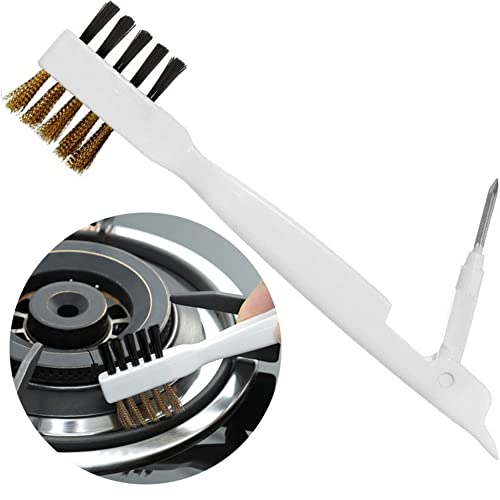
Versatile kitchen tool: Brass wire brush +nylon brush on one side and stainless steel nail + spatula on another side. This brush size is made for small jobs and tight spaces. Durable and strong. Combine brush, sparse, stainless steel needle pick and shovel into one, 4-in-1 function, easy to clean the counters,gas stoves, etc .

COMPLETE 3-PIECE OVEN CLEANING SYSTEM: Take the guesswork out of oven cleaning with the ultimate all-in-one solution. This heavy-duty kit includes one 24oz bottle of Weiman Foaming Stove & Oven Cleaner, a precision razor-edged scraper tool, and a specialized dual-action sponge—everything you need to restore your appliance to a "like-new" shine.
Regular Maintenance
Perform routine checks on your stove to identify potential issues early.
- Inspect Wiring: Look for frayed or loose connections. Ensure all cables are secure and intact.
- Clean Sensors: Regularly clean temperature sensors to prevent buildup that can interfere with readings.
- Check Burners: Inspect burners for blockages. Clean them after each use to maintain proper function.
- Update Components: If your stove has older parts, consider updating them to avoid compatibility issues.
Proper Usage Practices
Adopting safe usage habits can minimize the risk of errors.
- Follow Instructions: Always use the stove according to the manufacturer’s guidelines. Refer to your user manual for specific recommendations.
- Avoid Overloading: Don’t overload burners with heavy pots or pans, as this can strain components.
- Use Correct Settings: Adjust temperature settings as needed. Using extreme heat can cause stress on electronic controls.
- Turn Off When Not in Use: Ensure all burners and the oven are off after cooking to prevent accidental activation.
Implementing these tips can significantly reduce the risk of encountering the F19 error code, ensuring a better cooking experience.
Conclusion
Dealing with the F19 error code on your LG gas stove can be frustrating but you’re not alone in this. With a little troubleshooting and some preventive measures, you can get back to cooking without a hitch. Remember to keep an eye on those sensors and wiring connections to catch any potential issues early. If you find yourself stuck or the problem persists, don’t hesitate to reach out to a professional. Taking these steps will help ensure your stove runs smoothly and your cooking experience remains enjoyable. Happy cooking!
Frequently Asked Questions
What does the F19 error code on an LG gas stove mean?
The F19 error code indicates a problem with the oven’s communication system. It often happens during cooking cycles and suggests a malfunction in the stovetop or connected components. Common causes include faulty wiring, control board issues, and sensor malfunctions.
What are the symptoms of the F19 error code?
Symptoms of the F19 error may include improper heating of the oven, flickering or sputtering burners, and inaccurate temperature readings. These issues can disrupt your cooking and indicate communication problems within the appliance.
How can I troubleshoot the F19 error code?
To troubleshoot the F19 error, check temperature sensors for damage, inspect wiring connections for looseness, and reset the stove to clear the error. Ensure safety by turning off the power before inspecting wiring and consider using a multimeter to test sensor continuity.
When should I seek professional help for the F19 error?
If troubleshooting steps do not resolve the F19 error, it’s best to seek professional help. Persistent issues may indicate deeper electrical problems, such as control board malfunctions, requiring expert technical assistance for safe and effective repairs.
How can I prevent encountering the F19 error in the future?
To prevent the F19 error, perform regular maintenance by checking wiring for frayed connections, cleaning temperature sensors, and ensuring burners are not blocked. Follow manufacturer instructions and avoid overloading burners to ensure optimal performance and reduce the risk of errors.

Hey, I’m Jake. I focus on cooling systems at Appliance Mastery, like fridges, freezers, and air conditioners.
I’ve worked in appliance repair for more than ten years and I’m certified through NASTeC. I’ve seen just about every fridge issue you can imagine.
My goal is to help you fix problems without stress. Whether it’s a freezer that won’t cool or an AC that keeps beeping, I’m here to walk you through it.