
Ever had that moment when you’re all set to do laundry, but your Samsung washer decides to play hide and seek? You press the start button, but nothing happens. Frustrating, right? Don’t worry, you’re not alone in this laundry day dilemma.
Imagine the convenience of having your Samsung washer ready to go at the push of a button. No more waiting around or troubleshooting why it won’t start. In this article, we’ll unravel the mystery behind your washer’s reluctance to kick into action.
Check Power Supply
When your Samsung washer won’t start, the first step is to check the power supply. Make sure the washer is plugged in and the power outlet is functioning properly.
If the washer is plugged in but still not starting, try plugging in another device to the same outlet to test if there is power.
Sometimes, a simple reset of the circuit breaker or fuse replacement can solve the issue. Remember to verify the power cord for any damages that may be causing a poor connection.
In some cases, issues with the power supply can prevent your Samsung washer from starting, so it’s essential to ensure everything is properly connected and powered.
Recommended Products

CLEAR LCD READOUT: GFCI Receptacle Tester features a large backlit LCD readout for easy voltage reading and clear indication of wiring conditions

CLEAR LIGHT SEQUENCE: Outlet tester's light sequence indicates correct/incorrect wiring, ensuring easy identification of wiring issues
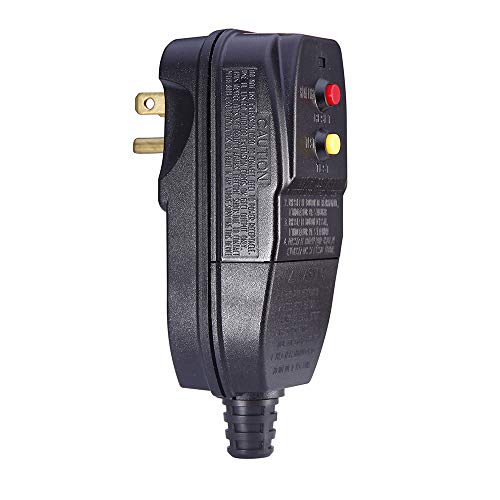
Protect you and your appliances from electric shock: When leakage of electricity takes place, the GFCI plug can break the circuit automatically within 0.03 second.
Inspect the Door Lock
If your Samsung washer won’t start, it’s crucial to Inspect the Door Lock. The door lock ensures that the washer door is securely closed before a cycle can begin.
Here’s what you can do:
- Check if the door is completely closed. A partially closed door may prevent the washer from starting.
- Inspect the door lock for any visible damage or obstructions. Clean the lock area if needed.
- Make sure the door lock mechanism is engaging properly. You should hear a clicking sound when the door is fully closed and locked.
If the door lock appears to be damaged or malfunctioning, it may be preventing your washer from starting. In this case, consider contacting a professional repair service to assess and resolve the issue promptly.
Recommended Products

【Replacement Part Number】DC34-00028A washer switch door lock Fit for Samsung Washing Machine Parts Replace: PS12740237, EAP12740237,T65888.1.D8, EG-380917.1,4975290

DC34-00028A Washer Switch Door Lock: The DC34-00028A Washer switch door lock assembly effectively closes the washing machine door, addressing issues such as leaks, cycle instability, failure to start, door not locking properly, and other related problems.

⭐【Funtion】:DC34-00028A Washer switch door lock assembly can effectively close the washing machine door, can fix issues like leaks, cycle instability/won't start/door won't lock, stops or takes longer than usual/ washer lid opens during wash cycle and spin cycle/door lock closes during operation/won't lock properly, etc.
Examine the Control Panel
When troubleshooting why your Samsung washer won’t start, begin by examining the control panel. This essential component plays a crucial role in initiating the wash cycle.
Actions to take:
- Check if the display is responsive when you press the buttons.
- Inspect for any error codes that may be displayed.
- Ensure the washer is properly plugged in to a power source.
Sometimes, a non-responsive control panel can indicate underlying issues that need to be addressed for your washer to function properly.
Verify Water Supply
When your Samsung washer won’t start, the water supply could be the culprit. Without proper water flow, the machine can’t initiate the wash cycle. Here’s what you should do:
- Check the water valves behind the washer to ensure they’re fully open.
- Examine the water inlet hoses for kinks, leaks, or blockages.
- Confirm that the water pressure meets the washer’s requirements.
Remember, a reliable water supply is essential for your washer to function correctly.
Conclusion
So, next time your Samsung washer refuses to start, remember to double-check the water supply. It’s essential for a smooth wash cycle. Make sure to inspect the water valves, inlet hoses, and water pressure to guarantee proper flow. Without enough water, your washer might not work as it should.
Frequently Asked Questions
Why is it important to check the water supply for Samsung washers that won’t start?
A reliable water supply is essential for starting the wash cycle. Checking the water valves, inlet hoses, and water pressure ensures proper flow, enabling the washer to function correctly. Without adequate water supply, the machine may fail to start.
What should Samsung washer owners verify if their machines fail to initiate the wash cycle?
Owners should confirm the water supply by checking the water valves, inlet hoses, and water pressure. Ensuring these components work properly is crucial for the washer to start and function effectively.
How can inadequate water supply impact the functionality of Samsung washers?
Insufficient water supply can prevent the washer from starting or running correctly. Without proper water flow through the valves and hoses, the machine may not initiate the wash cycle, leading to operational issues.
Hi, I’m Charlie, and I cover all things laundry here at Appliance Mastery.
I’ve spent over eight years working on washing machines, dryers, and dishwashers. I also have a degree in mechanical engineering, which helps me understand how these appliances really work.
I try to make every guide clear and practical. If you’re stuck with a noisy dryer or a leaking washer, I’ll help you figure out what’s wrong and how to fix it.